More Zumo woes: what about the new update?

Tahnks Mzokk, I will check.

Regarding the "fastest route" issue. I have had problems with Zumos (both 396 and XT) routing from my place (NW London) to Dover and asking me to go all around the M25. I should have screenshots.
 
Here it is:
odd-route01.jpg


odd-route02.jpg


To be fair, it hasn't done this in a while. It might have been fixed in a software update.
 
The issue illustrated on the zumo forum makes sense and it is also somewhat related to the issue I had of the shaping points semi-misteriously becoming waypoints.
 
"The XT takes traffic into account."

Yes it does but its a bit thick in that if the delay is on the faster road it will (in my experience) drive you into it rather than taking a minor road which will avoid the issue. I've run it side by side to test this and experienced it trying to direct me into a 20min delay in Enniskillen when buy Crossing lough Erne via a minor road I could avoid it and lop about 5-6miles off the journey.
 
"The XT takes traffic into account."

Yes it does but its a bit thick in that if the delay is on the faster road it will (in my experience) drive you into it rather than taking a minor road which will avoid the issue. I've run it side by side to test this and experienced it trying to direct me into a 20min delay in Enniskillen when buy Crossing lough Erne via a minor road I could avoid it and lop about 5-6miles off the journey.

I’ll take note and check next time I’m out with it - so far it seems to be working ok for me. I’ve been using it alongside the TomTom app on the phone, and while the routes aren’t the same it’s been 6 of one and half a dozen of the other.

One problem I’ve seen on some of the navigation apps is that they’ll send you off on a minor road in the middle of nowhere to avoid a 1 minute delay that’s gone by the time you get there.


Sent from my iPad using Tapatalk
 
I discovered yesterday that setting the Zumo to Fastest Route doesn't give you the fastest route. It gives you the route on the fastest roads - which can take longer.

That has always been the case. You can see it most clearly when you create a route in BaseCamp. Sometimes, it will cut a corner in a town, simply because by cutting the corner down a back street, it knocks say 10 yards off the distance. To its simple mind, the road that cuts the corner and the road it has directed you away from are both the same speed limit, therefore (being shorter) cutting the corner must be quicker. Of course that is far from being always the case.

No A to B routing tool, whether it comes from Garmin, TomTom, Waze, Google or any number of others is ever perfect. If 500 users of Google or Waze on the M1 turn off at a junction at the same time, as their GPS devices have told them all that it’s the best way to avoid the jam up ahead, it creates a sub-jam. Of course it’s a thing of genius if you are vehicle 1 or 10 in the 500. Less so if you are vehicle 490 or 499.

Without a doubt, the algorithms (linked to AI) will get better and better….. but will they beat an old style London black cab driver, fully trained in The Knowledge? We shall have to wait and see.
 
Last edited:
does it need to be connected to the Explore App for that?
It has to be connected with the Drive app to receive traffic info (and other stuff).

The way Garmin fragmented the mobile apps is astounding. But, maybe, for now it's better this way.

At least, once it has been setup, Drive connects everytime you switch on the Zumo. Have to be honest, works very well at least there. :)
 
That has always been the case. You can see it most clearly when you create a route in BaseCamp. Sometimes, it will cut a corner in a town, simply because by cutting the corner down a back street, it knocks say 10 yards off the distance. To its simple mind, the road that cuts the corner and the road it has directed you away from are both the same speed limit, therefore (being shorter) cutting the corner must be quicker. Of course that is far from being always the case.

No A to B routing tool, whether it comes from Garmin, TomTom, Waze, Google or any number of others is ever perfect. If 500 users of Google or Waze on the M1 turn off at a junction at the same time, as their GPS devices have told them all that it’s the best way to avoid the jam up ahead, it creates a sub-jam. Of course it’s a thing of genius if you are vehicle 1 or 10 in the 500. Less so if you are vehicle 490 or 499.

Without a doubt, the algorithms (linked to AI) will get better and better….. but will they beat an old style London black cab driver, fully trained in The Knowledge? We shall have to wait and see.
And they'll never beat local knowledge either. What you do get is a foolproof way of getting where you are going, when you don't know the area (or maybe even where you are). I remember pitching up to strange foreign towns armed with an unhelpful street address and trying to find my digs, with constant stops to look at maps (too big scale) or directions given in foreign. I prefer the GPS.
 
Ahead of my long weekend in Germany, I updated my XT this morning, which involved a full map update and a software update. I made both updates wirelessly, over my home wifi. It took a while, so I just left the device alone for three or so hours. Everything seems to have gone OK.

The detailed maps (north and south) are both present and viewable on the screen. The device is accepting bespoke routes, created in MyRoute and transferred via my phone, using the Garmin Drive app. The routes appear to be faithful copies of the original. I can only assume that they will run perfectly.

I have installed the same routes into the BMW Connect app, so I’ll be running these in parallel, just to see how each performs.
 
That has always been the case. You can see it most clearly when you create a route in BaseCamp. Sometimes, it will cut a corner in a town, simply because by cutting the corner down a back street, it knocks say 10 yards off the distance. To its simple mind, the road that cuts the corner and the road it has directed you away from are both the same speed limit, therefore (being shorter) cutting the corner must be quicker. Of course that is far from being always the case.

No A to B routing tool, whether it comes from Garmin, TomTom, Waze, Google or any number of others is ever perfect. If 500 users of Google or Waze on the M1 turn off at a junction at the same time, as their GPS devices have told them all that it’s the best way to avoid the jam up ahead, it creates a sub-jam. Of course it’s a thing of genius if you are vehicle 1 or 10 in the 500. Less so if you are vehicle 490 or 499.

Without a doubt, the algorithms (linked to AI) will get better and better….. but will they beat an old style London black cab driver, fully trained in The Knowledge? We shall have to wait and see.
The problem is that it won't use the route that takes the least time, but will use faster roads in preference. Near to my house there's roads that work like a triangle. The Opposite and adjacent are "faster" ones, the hypotenuse is "slower". The XT usually choses the opposite and adjacent, and will give an arrival time in of about 9 minutes minutes. Turn off onto the hypotenuse and very quickly the arrival time reduces by 3 minutes. Hope this makes sense.
 
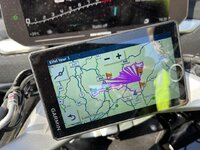
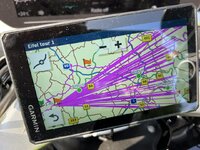
Looking bad, Houston:

IMG_2318.jpegIMG_2315.jpeg

But hey, for a while, the best it could offer up was an image of the entire western globe and a straight magenta line from what I assume was a point in the Eifel to a point in the ocean, just south of Nigeria. So an image of laser beams in the Eifel is quite acceptable.
 
Haven’t seen that one…..yet! Using the Zumo forums Java fix for Basecamp routes (makes them saved rather than imported.) and the unit now behaves as expected. Hopefully garmin will sort it soon as I like the functionality of the unit.
 
The very odd thing was that, if I clicked on GO and requested that the device joined me to the route at the closest entry point, it faithfully displayed and then ran the remaining portion of the route correctly, despite starting from a map view which was covered with laser beams.

You’ll also notice that:

a, The laser beams, all shoot out from a point that is behind me.

b. In post #53, they sometimes shoot out from a point west of my position and sometimes from a point north east.

c. The laser beams only extend to the edge of the route itself.

d. The laser beams are not uniform on the area they cover. It depends on the point they shoot out from.
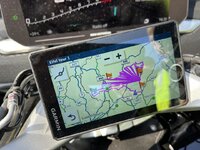
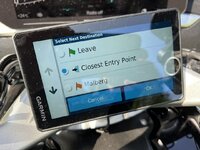
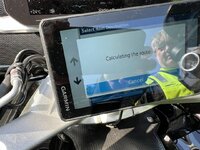
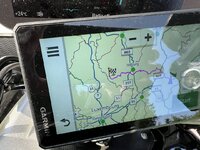
IMG_2318.jpegIMG_2319.jpegIMG_2320.jpegIMG_2321.jpeg


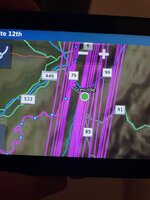
Unfortunately, I didn’t manage to take a picture of the western part of the globe of the Earth, with the straight magenta line going down to the ocean beneath Nigeria. Nor did I manage to snap a picture when the device displayed not laser beams, but a waterfall of magenta, descending from the outline of the route downwards.

The problem started suddenly, mid-afternoon. The device had been functioning normally all day, displaying and running the same route normally from 09:30. It has also performed normally for the past two days and for all the days prior to that.

It’ll be interesting to see if the same thing happens again today. I’d like to think that I am a pretty experienced user, when it comes to Garmin devices in general. I have never seen anything like this.

Device updated to CN Europe NTU 2024.10 ALL South / ALL North before leaving home last Thursday.
Hardware version: V8 Pv3 DT R512S

Software version: 6.5

GPS Firmware: 9.00.37

 
Last edited:
I think I mentioned it in the issues we had during the trip.

This was my mate’s zumo loading on of the gpx files I did while in France.

Restart and re-importing the file fixed the issue.

IMG_7979.jpeg

Seems similar to the lines you did not photograph.
 
I am wondering if the problem was caused by me skipping a via point, something I never usually do?
 
I think I mentioned it in the issues we had during the trip.

This was my mate’s zumo loading on of the gpx files I did while in France.

Restart and re-importing the file fixed the issue.

View attachment 264882

Seems similar to the lines you did not photograph.

That’s it, exactly. The ‘waterfall’. I only saw it once.

Something clearly corrupts the file or at least the display of the route on the screen. It is very odd. The route itself is not corrupted, despite the laser beams; I know this, as I discover that I can join it by going: GO > Closet entry point. It recalculates (which is normal behaviour) and the remainder of the route is fine.

Why did it only happened mid-afternnon, on day three? Was it because I skipped a via point, which was behind me, which forces a recalculation? If so, why did the recalculated route run perfectly for a long while, then go haywire?

Why were the same laser beams, sometimes displayed when I got back to my hotel and sometimes not?

Why, this morning, isn’t it happening now?

Something triggers it but I have no idea what it is.
 
Last edited:


Back
Top Bottom