Moving a route from PC to device

Santa-2512

Omnipotent one
UKGSer Subscriber
Joined
Aug 3, 2016
Messages
13,568
Reaction score
3,171
Location
North Pole
Just for a bit of fun and using near enough the same routing preferences for each, I asked three reasonably popular app’s to create me an A to B route from Chelmsford to Norwich. It’s a bit under 100 miles, so a decent enough morning’s ride.

The black line is MyRoute.

The red line is Beeline.

The magenta line is Kurviger.

View attachment 450218


With all the fuss over the XT, it would be interesting to see what it spat out.
Interesting,

That's normally what most of the off the shelf apps offer as a std route (ie all 3 and you pick which route your want)

And that's where they all go wrong ..

Example,

You select the black route, make a few tweaks , say you want to hit Braintree, and swing across to Colchester, then out to Halstead, and then continue via the black route - you call this The Trip , and save it as a gpx, FIT,KML or whatever your software uses as proprietary.

Now to me, ive have a route from Chelmsford to Norwich, via Braintree, Colchester, and Halsted and then continuing to Norwich , i know the route i planned it and saved it

Yet when you load it back in it will offer either

The direct route (your detours not there)

Your route with changes - ie from Colchester direct to Norwich

Your route amended , to another totally different routing

I've raised this with several mapping app company's with little success, they don't seem to this as an issue ??

The other , you haven't covered is running the route the other way ...

In theory, you've selected the fastest route from point A- B so the fastest route back should be B-A

Which funnily enough is very handy if you've never been somewhere before, passing familiar places , sights puts your mind at rest, that your going in the right direction / route

Very rarely will you get the same route back


if your not worried or have time to kill, its not an issue, but if your on a deadline or chasing a ferry / flight, your never sure ...

I decided to trust the Nav last time i went to Sids with a pre waypoint route ,

All good until 3/4 way there and it decided to take me off the direct route into a cross country meandering route which in 30c wasnt funny, considering it brought me out on the road I'd originally mapped in !!

I treat GPS units as a mobile top level map, - but for route mapping, i dont trust them one bit

=====

I have created a fresh thread for this topic.

Richard
 
Last edited by a moderator:
Interesting,

That's normally what most of the off the shelf apps offer as a std route (ie all 3 and you pick which route your want)

And that's where they all go wrong ..

Example,

You select the black route, make a few tweaks , say you want to hit Braintree, and swing across to Colchester, then out to Halstead, and then continue via the black route - you call this The Trip , and save it as a gpx, FIT,KML or whatever your software uses as proprietary.

Now to me, ive have a route from Chelmsford to Norwich, via Braintree, Colchester, and Halsted and then continuing to Norwich , i know the route i planned it and saved it

Yet when you load it back in it will offer either

The direct route (your detours not there)

Your route with changes - ie from Colchester direct to Norwich

Your route amended , to another totally different routing

I've raised this with several mapping app company's with little success, they don't seem to this as an issue ??

The other , you haven't covered is running the route the other way ...

In theory, you've selected the fastest route from point A- B so the fastest route back should be B-A

Which funnily enough is very handy if you've never been somewhere before, passing familiar places , sights puts your mind at rest, that your going in the right direction / route

Very rarely will you get the same route back


if your not worried or have time to kill, its not an issue, but if your on a deadline or chasing a ferry / flight, your never sure ...

I decided to trust the Nav last time i went to Sids with a pre waypoint route ,

All good until 3/4 way there and it decided to take me off the direct route into a cross country meandering route which in 30c wasnt funny, considering it brought me out on the road I'd originally mapped in !!

I treat GPS units as a mobile top level map, - but for route mapping, i dont trust them one bit
Now that sounds really complicated. Just plot the route in Basecamp and it doesn’t need changing to any of those GPX, kms, gt whatever. Just send to device. Job done. Why other routing apps feel the need to be so complicated is just ridiculous.
This afternoon I have just created two short trips using Basecamp. One to Germany and one to Ireland. None of this GPX type crap just plot the routes, send to one of the lads so he can have a look, print out a screen shot for the meeting on Thursday re the next trip, job done.
IMG_0203.jpg
Just how one is supposed to draw a route on this shite I have no idea.
 
And that's where they all go wrong ..

Example,

You select the black route, make a few tweaks , say you want to hit Braintree, and swing across to Colchester, then out to Halstead, and then continue via the black route - you call this The Trip , and save it as a gpx, FIT,KML or whatever your software uses as proprietary.

Now to me, ive have a route from Chelmsford to Norwich, via Braintree, Colchester, and Halsted and then continuing to Norwich , i know the route i planned it and saved it

Yet when you load it back in it will offer either

The direct route (your detours not there)

Your route with changes - ie from Colchester direct to Norwich

Your route amended , to another totally different routing

I've raised this with several mapping app company's with little success, they don't seem to this as an issue ??

There’s a lot going on in that lot.

There is no reason why a properly created route, should alter significantly between what has been created on a PC and what is finally displayed on a GPS device.

Where differences might arise are:

A. When the map on the PC and the map on the device differ significantly.

B. When there’s too few shaping points between points A and B. Some devices will do their best to fill in the gaps, often influenced by their owner’s preference settings. This can alter routes significantly.

MyRoute for example recommends:

A. Using Here maps, as these match with the standard maps on Garmin devices.

B. A shaping point every 5 km / 3 miles, in order to help to fix the bespoke route to roads.

:beerjug:
 
Last edited:
Now that sounds really complicated. Just plot the route in Basecamp and it doesn’t need changing to any of those GPX, kms, gt whatever. Just send to device. Job done. Why other routing apps feel the need to be so complicated is just ridiculous.

That sounds complicated only if someone wants it to sound complicated and ridiculous.

BaseCamp will of course export in assorted formats, if the owner wants or needs it to.

Likewise, MyRoute. I just choose GPX 1.1 to send the route from my iPad or phone to my Garmin XT1 via Bluetooth.

The only one that is ‘complicated’ is sending routes to Google maps or receiving them from Google maps. But, that is also a problem for BaseCamp too, I think.

:beerjug:
 
Last edited:
When i get some time I'll see if i still have the files , and upload them along with screenshots
 
When i get some time I'll see if i still have the files , and upload them along with screenshots

Do that, please.

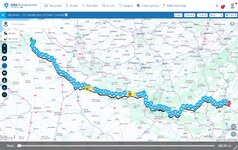
As an exchange, here’s a route I created in MyRoute. Please load it into your device and let’s see how accurately it does so:


IMG_0040.jpeg

It is 280 miles, between near enough the Ibis Budget in St Omer and the front door of the Belle Vue hotel in Vianden. I always start my bespoke routes a little away from my actual start point. This is for two reasons:

1. The device does not need to be told where it is standing at the start. It will know where it is standing (probably better than me) just as soon as it gets a fix on its satellites.

2. The artificial start point gives the device somewhere to aim for, after which the route will run normally, all on its own, with no intervention from me.

The route has 88 intermediate shaping points between the start point in St Omer and the end point in Vianden. This equates to a shaping point (near enough) every three miles, as recommended by MyRoute.

The route has ‘hands’ (ie. points that you must pass through) at:

The cafe Inchy.

To leave the cafe.

IMG_0041.jpeg

The Casino restaurant (up its car park entrance) at Chimay.

To leave the restaurant at Chimay.

IMG_0042.jpeg


It is not too complex in the sense that it is not circular. Nor does it cross over itself, as it would in say a figure-of-eight route. That said, it does include some motorway (which can lead to problems if a shaping point is on the wrong carriageway) and some twisty roads, too.

The route transferred easily from MyRote’s Cloud based app ie. their version of BaseCamp, as it were. It then ran perfectly and simultaneously on my XT1 and on my sacrificial phone, running MyRoute’s Navigation app.

Let us know how it transfers and displays for you, please.
 
Last edited:
Some bods might wonder why I placed ‘hands’ on the route, just after the cafe and lunch stop.

I didn’t need to. The reason why is that I loaned the route to a friend who uses a Garmin navigation device. He’s just not very good at using it. He got into a blind panic that he’d lose the route if his device closed down. Having the ‘hand’ meant that, on restart, it would appear as a point on his ‘Take me to’ list and (if he had even the slightest ability) be able to run the route from there.

As it was, he seemed to cope. As surprising as that was.
 
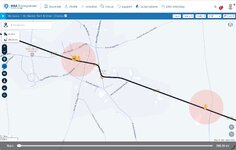
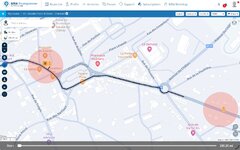
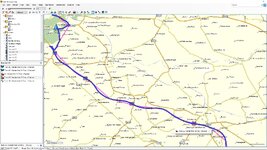
the track works fine for me when i convert it from track to route using basecamp,
but if you look at the pic below you will see that the route from mra just straight lines in many places , this i would expect due to differences in software and maps .
The magenta line is the orig route blue line converted track to route.

I know if i transfer the converted track to route to any of my devices it will do so correctly. in other words it will remain as is.


richard.jpg


Back
Top Bottom