MRA exporting to Nav 6

Steve in Kent

Member
UKGSer Subscriber
Joined
Jun 14, 2019
Messages
88
Reaction score
0
Location
Loose
Would anyone be able to send a link or something to explain how I should plan a route and get my BMW Nav 6 to actually follow the route properly?
I've used export BMW motorbike gpx 1.2 and then using the import from trip planner it just isn't following all of the waypoints I've put in MRA.
I start the nav, look at the map and it shows the correct route, then when I actually hit Go it doesn't follow the waypoints.
 
1. When you create a route in MyRoute, MyRoute recommends placing a shaping point every 5km / 3 miles. Do it and place each one accurately. See the sticky on how to ‘Expand’.

2. You do not need to place the ‘start’ at the place you’ll be standing, the device will know precisely where you are without being told. Place it instead say a mile or so (or just a couple of hundred yards) along the road you’ll want to take. Call it something like ‘START’. This will standout on the list when you come to run the route on your device. You’ll be able to select it as a destination, from which the route will run thereafter with no more input from you.

3. What you haven’t told us is the process / choices of destination you make before you hit ‘Go’. I suspect a little bit of user error, perhaps.

:beerjug:

PS I do both 1 and 2 and select ‘START’ for stage 3. It all works reliably.
 
1. When you create a route in MyRoute, MyRoute recommends placing a shaping point every 5km / 3 miles. Do it and place each one accurately. See the sticky on how to ‘Expand’.

2. You do not need to place the ‘start’ at the place you’ll be standing, the device will know precisely where you are without being told. Place it instead say a mile or so (or just a couple of hundred yards) along the road you’ll want to take. Call it something like ‘START’. This will standout on the list when you come to run the route on your device. You’ll be able to select it as a destination, from which the route will run thereafter with no more input from you.

3. What you haven’t told us is the process / choices of destination you make before you hit ‘Go’. I suspect a little bit of user error, perhaps.

:beerjug:

PS I do both 1 and 2 and select ‘START’ for stage 3. It all works reliably.
I've placed a waypoint after every junction and add some if it's a long stretch of road.
I've looked at how to add shaping points, but can't do it, if I drag the route it just creates waypoint.
 
I've looked at how to add shaping points, but can't do it

 
So a shaping point is actually just a waypoint.
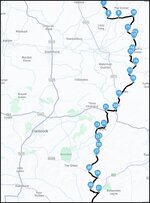
This is the route I've done, but after transferring it to NAV 6 it doesn't follow that exact route.
It will suddenly just take me towards and straight down the A274
1772899016343.jpg
 
When you ask the nav to navigate do you press final destination?
 
When you ask the nav to navigate do you press final destination?
1. Import trip using the apps icon
2. It states saving item 1 of 1 and calculates the route
3. Click on the route
4. Click on Go!
5. Click on final destination
6. Click on Start
7. Click on Go!
8. Map shows the correct route

Then when I actually start the journey it goes off route and takes me off on a different route to the final destination.
 
1. Import trip using the apps icon
2. It states saving item 1 of 1 and calculates the route
3. Click on the route
4. Click on Go!
5. Click on final destination
6. Click on Start
7. Click on Go!
8. Map shows the correct route

Then when I actually start the journey it goes off route and takes me off on a different route to the final destination.
Seems like to much clicking to me. Once I've sent to nav, I just click go and am away.
 
1. Import trip using the apps icon
2. It states saving item 1 of 1 and calculates the route
3. Click on the route
4. Click on Go!
5. Click on final destination
6. Click on Start
7. Click on Go!
8. Map shows the correct route

Then when I actually start the journey it goes off route and takes me off on a different route to the final destination.
Don't click final destination, your telling it to calculate it's own route to your chosen destination
 
3. What you haven’t told us is the process / choices of destination you make before you hit ‘Go’. I suspect a little bit of user error, perhaps.

In post #8 at point 6, it reads that you are standing at or close to the beginning of your route. You are then asking the device to take you to the final destination from where you are standing. This the device is doing but…. It will take you there by ignoring your preplanned route. This is simply the way the newer Garmin devices work.

You can negate this by simply following suggestion two in post #2.

Try it, sitting at home. You can’t break things.
 
In post #8 at point 6, it reads that you are standing at or close to the beginning of your route. You are then asking the device to take you to the final destination from where you are standing. This the device is doing but…. It will take you there by ignoring your preplanned route. This is simply the way the newer Garmin devices work.

You can negate this by simply following suggestion two in post #2.

Try it, sitting at home. You can’t break things.
My first point is about 100 yards away, I'll change it to the main road about 1/4 mile away
 
My first point is about 100 yards away, I'll change it to the main road about 1/4 mile away

Assuming it’s on the road and in the direction you want to go in, 100 yards should be far enough.

Call it something like, START.

When the device asks you to chose your destination, select START.

The bespoke route you created in MyRoute should then run properly.

====

I almost always create bespoke routes, using MyRoute.

As a rule, I always:

A. Name my first point START

B. Name my final destination END

C. Put a shaping point every 5km / 3 miles

D. Have recalculation set to OFF or PROMPTED

E. Have no (or very few) preferences turned on

F. Have no (or very few) intermediate waypoints (ie. points I have told the device I MUST go through)

G. Export the route from MyRoute to my Garmin device in version 1.1

H. Select START as my destination when first running the route

I. Preview the route(s) on my device, comparing them with the bespoke route(s) I created in MyRoute. Do they match (or near enough) the shape, the total distance, the estimated time? If ‘Yes’ then I’m good to go. If not, then what’s gone awry? I very rarely find that something significant has gone awry

It works for me.

:beerjug:

PS I do the same for bespoke routes I have created, when running them on the MyRoute Navigation app on my phone.
 
Last edited:
Save it as gpx1.1

Indeed, I had massive issues using GPX 1.2 from MRA on my Zumo XT, but it seemed OK if creating a 1.2 using Basecamp in limited testing....

....But I swapped back to 1.1 and have found everything works really well now.

I also always show the track as well, then I can see if the nav is trying to deviate from the route planned on the computer, and if you do this and look at the route on the nav device before you plan to use the route it will show a line for the route and the line for the track, allowing you to see where they disagree and add waypoints.

By leaving the tack shown as you are riding you can also see if anything else causes it to try and alter, such as live traffic, if you hit a diversion on the day you can also more easily see how far off your original route you are and try to get back on it, very handy if you had to skip multiple waypoints in the road closure.
 
Once I load on the XT, I convert the track to a route (or the other way round) and then follow the route.
No idea if I need to do this but my routes always come out as planned. I always ignore the reroute option, unless I want to cut the journey time.

It works for me and I'm happy with my limited understanding of all the options but am probably missing out on a lot of useful stuff.
 
Follow Wapping's instructions create a short route. Put your nav 6 in simulation mode and watch it unfold while having a cuppa and a chocolate biscuit. Gives confidence that the nav will work as expected out in the wild.
 
You don’t necessarily even have to put it into simulation mode. Though it is fun to see it work.

Use, for example, the bespoke route you created for post #6. Edit it slightly to make the start point at, say, point 2. Name this point START. Edit it once more to name the last point (your final destination) END.

Import the route into your Garmin device.

When prompted, select START as your destination.

Tap GO.

Your device should create and display a route that commences from wherever you are standing to the START point. It will do this according to your preference settings. The rest of the route from START to END should match your bespoke route exactly and run with no further input from you. In other words, the device will not scrap your bespoke route and direct you down the A274. You’ll now know that it works.
 
Last edited:
Assuming it’s on the road and in the direction you want to go in, 100 yards should be far enough.

Call it something like, START.

When the device asks you to chose your destination, select START.

The bespoke route you created in MyRoute should then run properly.

====

I almost always create bespoke routes, using MyRoute.

As a rule, I always:

A. Name my first point START

B. Name my final destination END

C. Put a shaping point every 5km / 3 miles

D. Have recalculation set to OFF or PROMPTED

E. Have no (or very few) preferences turned on

F. Have no (or very few) intermediate waypoints (ie. points I have told the device I MUST go through)

G. Export the route from MyRoute to my Garmin device in version 1.1

H. Select START as my destination when first running the route

I. Preview the route(s) on my device, comparing them with the bespoke route(s) I created in MyRoute. Do they match (or near enough) the shape, the total distance, the estimated time? If ‘Yes’ then I’m good to go. If not, then what’s gone awry? I very rarely find that something significant has gone awry

It works for me.

:beerjug:

PS I do the same for bespoke routes I have created, when running them on the MyRoute Navigation app on my phone.
I always use start and end as well.
I do not understand what shaping points are, all I get are waypoints (The upside down teardrop). I've looked at getting shaping points but can't seem to get them and don't know what they even look like. (I'm using a PC).
I'll check the recalculation mode now at Prompted, (I've changed so much I don't know what it was originally)
Turned off nearly all preferences, auto skip waypoints is on though.
I'll try 1.1

Thank you for the comprehensive response.
 
Well, gpx1.1 calculates the route waaay quicker than I'm used to with gpx1.2


Back
Top Bottom