
Report back please.….. I just submitted a ticket (and they emailed an acknowledgment) so I'll see what they say. Maybe...
Without delay. Do not pass go and do not collect £200.


Report back please.….. I just submitted a ticket (and they emailed an acknowledgment) so I'll see what they say. Maybe...
You sure the magnifying glass is not down the bottom.Thanks for the reply.
I'm still not getting the top-right-hand sidebar icons, as in your screencapture for some reason (PC W11 or iOS).
This is my 'view' ... and there's no magnifying/search icon
View attachment 495532
Happy to report...I now have access to the MyRoute forumsReport back please.
Without delay. Do not pass go and do not collect £200.

Ta. That’s the exact same issue affecting me.Happy to report...I now have access to the MyRoute forums
Someone from support got back within a couple hours to let me know there had been an issue somewhere - now when I click on Forum on the main page, it takes me to the Forum homepage and I'm already logged in so I have access to search etc.
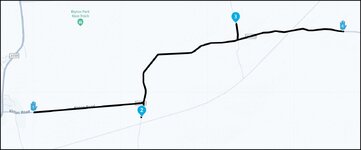
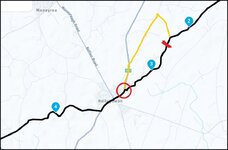
Thanks Mzokk!Depending on what type of waypoint you are using. If it is one of these which is sort of like a shaping point View attachment 495528 and you have automatic skipping enabled MyRoute will stop asking you to go back to it once you re join the route/or get closer to/ pass through the next waypoint in the direction of travel. If you keep waypoints close-ish together (MyRoute app recommends every 3 miles or so as a minimum auto skipping works well) . If the waypoints are further apart then it will nag to go back longer as you will be closer to the missed waypoint for longer before becoming closer to the next one (I hope that makes sense) If it is a via point like this View attachment 495529 then if you don't pass through it it will always have to be manually skipped even if you have automatically skip waypoints enabled. The logic is that you only use the Via waypoints for places you want to visit and the app will do its best to make sure you pass through them. This hand via point is a point for a photo rally so if you need to take a detour you would not want to miss it accidently.
Oh and as others have said no issue logging onto the forum or searching issues.
What nav device are you using?Thanks Mzokk!
I actually found the complete opposite to be honest. My route had a start point, an end point and a bunch of shaping/via points that I added as I moved the route that MrRoute created to create a better route.
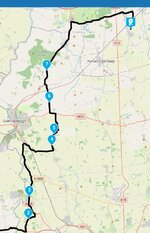
This is a portion of my route:
View attachment 495969
I got turned around due to a road closure near/close to number 6. I backtracked to the A631 and then rode into Gainsborough and turned north to try and re-join the route between 6 and 7. The MyRoute app literally spent the entire time tryin to make me go back to 6, even when 7 was much closer. I binned it in the end because I just couldn't trust the directions it was giving me - it just KEPT trying to get me to go back to 6.


I am using the MyRoute app on my iPhone. I didn't manually transfer/import the route to my phone, I created the route on the web site and it synced to my phone the next time I opened the app up. It sync'd automatically and didn't provide any options on how to handle shaping points when syncing OR when I started to navigate the route.What nav device are you using?
And, when you transferred/imported the route to the device, were you given options how you could ‘handle’ the shaping points?
Ah, sorry. I asked as Garmin & BMW CRN seem to handle ‘via’ points differently.I am using the MyRoute app on my iPhone.
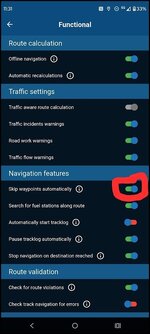
I did indeed re-join the route on the A159 in Blyton, heading north to point 7. I can't honestly remember when I binned it but I think it was actually at that junction because it, again, tried to get me to go right, south to point 6. At that point, it had tried to re-route me BACK to 6 many times - certainly more than 3 (which is what I read in the online forum a few times). So, I don't think I was using the MyRoute app when I passed through point 7 - I'd switched to Google at that point. I do have the Skip Waypoints option selected.Did it stop nagging you when you went through point 7? Are your settings for the app like this?
View attachment 495986
It looks like point 6 was on Pilham Lane and you probably re-joined the route via the A159 Blyton Road. So effectively you were moving towards point 6 until after Blyton (GPS has no concept of behind) It means you'd have been pretty close to point 7 before it was closer than point 6. Usually MRA warns about three times for a missed point (don't quote me on that) before giving up and routing to the next point automatically or it shuts up if you drive through the next point. I'm not saying you didn't have a glitch in this case but I've found the navigation app to be pretty reliable the last couple of years to the extent my Garmin is relegated to running a track of the route and proximity POI's.
If I don't like the route between a -b, I drag it where it's more interesting by click and holding down the mouse and release on the interesting road.I did indeed re-join the route on the A159 in Blyton, heading north to point 7. I can't honestly remember when I binned it but I think it was actually at that junction because it, again, tried to get me to go right, south to point 6. At that point, it had tried to re-route me BACK to 6 many times - certainly more than 3 (which is what I read in the online forum a few times). So, I don't think I was using the MyRoute app when I passed through point 7 - I'd switched to Google at that point. I do have the Skip Waypoints option selected.
I have read there is a manual option to skip a waypoint but that's just a total PIA as my gloves don't work with the iPhone screen so it would mean stopping, taking my gloves off etc.
I do understand now that via points are never skipped but I think I was using shaping points. I think (please confirm) that the shaping points icon is the teardrop icon (e.g. point 6 and point 7 on my route snippet) and via points are the hand icon - is this correct ?
My process for creating that route was put in the start and end points and then, since the resulting route was pretty boring, I added points along the way to force the route to take a different route - these points were added as, I believe, shaping points as denoted by the teardrop icon and so, should have been missed.
That's what I do - I either move an existing shaping point to move the route where I want it to go (in which case MyRoute sometimes adds a new waypoint) or I add a new waypoint to make the route go where I want it to. That bit works pretty well actually.If I don't like the route between a -b, I drag it where it's more interesting by click and holding down the mouse and release on the interesting road.



