nav 4 maps info

Status
Not open for further replies.
as i said earlier ifyou only have uk and ireland showing then that is all the mapping you have, you may have all of europe elsewhere on the pc but you only have what is listed on the unit, simple to check just look at how big the map is on the sd card look at the img file, right click on it and go to properties and post back the size. only do this with the map image and not the 3d image.
 
Why do people go through all this Garmin angst - the Opensteetmap (OSM) data is free, simple to load and to my mind much better
 
Why do people go through all this Garmin angst....

If you, as a keen OSM map user, would post a simple, step by step, guide as to how the OP can load Open Street Maps onto his computer and then onto his Nav IV GPS device, I'm sure it would be appreciated.
 
After formatting SD card reinstall maps. Sounds like the device needs a satellite fix if it's showing USA it needs to see sky for a short while to get a satellite fix

ok that makes sense,got a bit fed up with it last night will have another go this eve,thanks for all the replies.
 
If you, as a keen OSM map user, would post a simple, step by step, guide as to how the OP can load Open Street Maps onto his computer and then onto his Nav IV GPS device, I'm sure it would be appreciated.

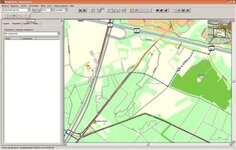
1. Download a copy of Mapsource to your PC (if you use a Mac or Basecamp dine with a long spoon)

2. Go to http://garmin.openstreetmap.nl/ and follow the very simple instructions to download the countries/tiles you require

3. It may be possible to download the data immediately but if not you will be sent an email with link to the appropriate .exe file

4. Activating the above will install the mapping automatically in Mapsource for your selection, edification and enjoyment

The example attached is a cycling (Openfiets Map) map but you will have selected the driving version
 

Attachments

  • image.jpg
    image.jpg
    62.6 KB · Views: 330
yes thanks,going to have another go tonight couldnt be arsed yesterday:D
 
You were troubled enough to ask others to get off their arses to help you.

Now return the compliment.
 
Try this <a href="http://www.poi-factory.com/node/39231" target="_blank">Linky</a> it worked really well on my 550s.

It took less than 15 minutes to load the whole of Europe using the card reader on my laptop.
 
well to update it was all rather simple really,gave it another go last night and after plugging in to garmin updater i must have pressed the right buttons this time as it came up on screen the regions i had on thr device and full europe wasnt one of them:blast.
selected full europe and told it i had indeed a sd card inserted and 3 hours later all done,dont know why it didnt work firsr time but pilot error seems most probable:D
 
so it would seem you only had the uk and ireland, and now after re downloading the full european map it is all working as it should, glad its all sorted.
 
so it would seem you only had the uk and ireland, and now after re downloading the full european map it is all working as it should, glad its all sorted.

yep it only showed eng and irl originaly,had to deselect them and select full europe,yes im glad its sorted too
 
Status
Not open for further replies.


Back
Top Bottom