… at the end of August.
I like CHIGEE device on my bike, as I am a big fan of Apple CarPlay and as many would know, MRA is fully integrated to work with this system.
However, my bugbear has always been with poor contrast of HERE maps that MRA use by default, and on CHIGEE device, these translate into even worse experience. Let’s face it CHIGEE screen does appear to be smaller than that on my iPhone 15 Pro Max.
Certain aspects of guidance details aren’t clearly displayed either. For example, in my wife’s car (VW Polo), I can see a number of the exit that I need to take way before I reach the roundabout. The placement of said number isn’t ideal though, as it is displayed within the roundabout shape. On small screen found on CHIGEE, said number and roundabout outline scaled down so small, that it simply does appear as a pixel, meaning even with a. Magnifying glass, you can not read it. So I vaguely read the outline of the roundabout outline and then focus more on the map and a blue line to follow instead of traffic approaching or going round the roundabout.
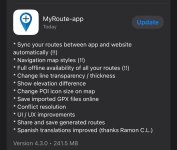
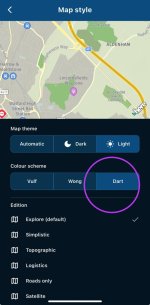
I just seen a post on MRA forum, that there will be an update coming out with the updated map colours. Let’s hope this will fix the contrast issues on CHIGEE as well as some guidance box text layout.
I like CHIGEE device on my bike, as I am a big fan of Apple CarPlay and as many would know, MRA is fully integrated to work with this system.
However, my bugbear has always been with poor contrast of HERE maps that MRA use by default, and on CHIGEE device, these translate into even worse experience. Let’s face it CHIGEE screen does appear to be smaller than that on my iPhone 15 Pro Max.
Certain aspects of guidance details aren’t clearly displayed either. For example, in my wife’s car (VW Polo), I can see a number of the exit that I need to take way before I reach the roundabout. The placement of said number isn’t ideal though, as it is displayed within the roundabout shape. On small screen found on CHIGEE, said number and roundabout outline scaled down so small, that it simply does appear as a pixel, meaning even with a. Magnifying glass, you can not read it. So I vaguely read the outline of the roundabout outline and then focus more on the map and a blue line to follow instead of traffic approaching or going round the roundabout.
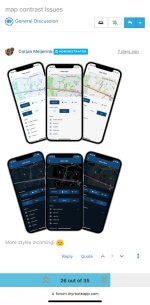
I just seen a post on MRA forum, that there will be an update coming out with the updated map colours. Let’s hope this will fix the contrast issues on CHIGEE as well as some guidance box text layout.