OSM Adventure Riding Maps for Garmin, Free

AdvOSM

AdvOSM Maps
UKGSer Subscriber
Joined
Aug 9, 2026
Messages
6
Reaction score
17
Location
Singapore
I would like to share with you the OSM maps I developed for back roads and off-road adventure riding. I created the first one because I couldn’t find a map that displayed on my Garmin screen the important road information I knew was available in OSM—whether a segment was unpaved, impassable, or even closed. Friends with Garmins asked for adventure maps for their countries, then their friends. The AdvOSM project slowly grew to cover 167 countries in 22 maps.

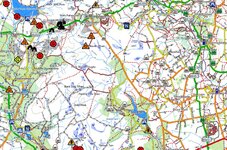
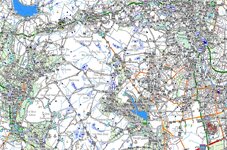
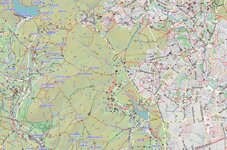
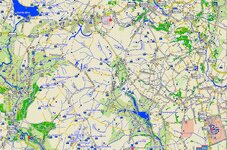
UK and Ireland now have their own map (previously, they were part of the Europe E map). Screenshots in Basecamp 54.02044,-1.83835 of the UK map and some other free general-purpose maps.

AdvOSM, annotated:
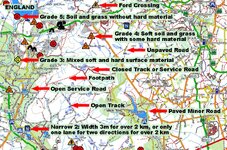
Example 54.02044,-1.83835 UK Adv Annotated.jpg

AdvOSM, without annotation:
Example 54.02044,-1.83835 UK Adv Normal.jpg

AlternativasLibres:
Example 54.02044,-1.83835 UK Alternativas Libres.jpg

Freizeitkarte:
Example 54.02044,-1.83835 UK FreiZeitKarte.jpg

BBBike:
Example 54.02044,-1.83835 UK BBike.jpg

I hope you enjoy using the maps as much as I enjoy making them—and using them.

For more information and the download links: https://rex8475.wixsite.com/advosm
 
@AdvOSM
Nice idea but what a shame you do not offer 10Mtrs or 20Mtrs contour lines scale as a separate map which I use.
You could then chose to enable one or the other or both at the same time as the DEM map
IMHO, a 100Mtrs scale is way to large to be of any practical use.
 
If you want to add 10m contour lines to any map in a Garmin, you can download an overlay here: https://garmin.opentopomap.org/ and turn it on and off in your Garmin.

Interesting timing! Within days after publishing these new maps of the world, I received requests to publish versions without any contour lines at all. It turned out that not all Garmins can turn contour lines layers on and off. Oregons can, but Montanas can’t--go figure. So starting 27 August, I have been publishing twice as many maps. The maps are in pairs, available with or without contour lines. Both can be put in any Garmin, which can switch from one to the other. The number of downloads of the maps with and without contour lines has been roughly 60:40, with and without contour lines.

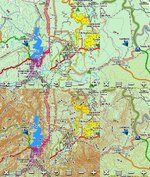
My first version of these maps had 10m contour lines. They are available ready-made. But IMHO, closely-spaced contour lines are ideal for hikers, mountain bikers, and equestrians, who use maps zoomed in, but not ideal for motorists (both 2 and 4 wheels) who follow roads and tracks in their vehicles and walk on designated footpaths. They use maps at various zoom levels and want to know where the cliffs, embankments, and steep sections are. Days of experimenting showed that 100m is enough to show the lay of the land, without covering other details in brown lines, and without grossly increasing the size of the mapfile. Adding 100m contours to the map of Australia + Oceania increased its size by 15% but adding 10m contours increased its size by more than 100%. But to have 100m contours in a Garmin map meant I had to download raw NASA height data for the whole world and generate new contour maps from scratch, which was weeks of work and data processing. But it only had to be done once.

The result looks like this—examples from Japan and Australia in a Montana 650 at 3km, 800m, and 500m zoom levels. Above, 100m contours, as my maps look today. Below, with 10m contours overlaid from OpenTopoMap, which is how my maps originally looked.

10m vs 100m Contours.jpg
 
You are correct re: clutter
This why I use separate contour maps at 10m or 20m.
And I do use a Montana710 so can switch on/off as needs be.
Top marks for your work(y)
 
Thanks! Since yesterday, there are now four versions of every map, (A) with or without contours, and (B) the traditional format for Basecamp and all outdoor/handheld models, like the Montana, plus a new "HD" format with better lines for automotive models, like the Zumo. Here's a comparison, at Kamloops, Canada, 50.70669,-120.43018, between a Montana and a Zumo, each using its own format:

Zumo vs Montana Example 50.70669,-120.43018.jpg

Riders with Zumos would prefer the HD version. You can download both versions here:

https://rex8475.wixsite.com/advosm
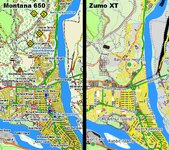
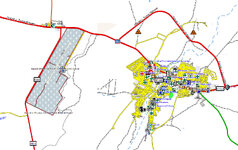
Because the automotive units like the Zumo suppress POIs, I've included a partial workaround in the latest maps: Viewpoints, Cattleguards, and Surface Warnings (like you see above on the left but not on the right) are discoverable as Up Ahead Places in Zumos by setting Custom Search categories.

Zumo UpAhead.jpg

There is more information and an example on the website.
 
Maps (whether paper or digital) and the way they are displayed are very personal things.

Whilst not in any sense belittling the work you’ve done, I find the maps in the examples all too ‘busy’. I much prefer a simpler map, such as that used by say, MyRoute.

Great that you are doing the work and sharing it though. Thank you.

:beerjug:
 
Last edited:
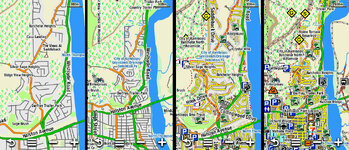
Thanks, Actually, you can turn the detail up and down in a Garmin (and in Basecamp). I made the examples above at maximum detail to pack as much detail as possible into the examples to show what the map can do, not what it must do all the time. Thanks pointing this out. I will mention this point on the website. A few screen shots from a Montana 650 at various zoom and detail settings:

Details Settings.jpg

When I'm in a city I turn the detail down. When I'm wandering in rural areas, I turn it up all the way.
 
Having had a few 'feathers' shot off by windows ... and with the amazing support of @AdvOSM , I have been able to download those maps. :type
With his blessing, here is a 'how-to' to save a few lost GB of failed downloads which I initially experienced.

Make a coffee, grab the cat and put the wife out- and not necessarily in that order :giggle: (humour!)

1-Download the free App for FDM
2- download the FDM (Free Download Manager extension in Firefox and/or Chrome)
3- Close each browser when you have installed it
4- Restart browser/s Firefox is recommended but Chrome works fine too. DuckDuckGo does not- no idea why but that' well above my pay grade.
5- Go to this page to go to the AdvOSM home page then click here to go to the Mediafire download page and to select your map
6-Chose the map by pressing download
7-You will be taken to the Mediafire web page; do NOT be tempted to simply click the blue download button as this begins the download but it will fail. It did for me anyway. Point to it and RIGHT CLICK the blue 'download' button to get the option to use the FDM and chose 'download with the Free Download Manager option.

in FDM go to settings to chose your preference such as which is your default folder (or any other folder of your choosing) amongst other settings.

A point worth mentioning for those with Garmin Zumos and other road type units is to chose the HD map option.
As a friend described the road type units : The automotive units are designed for everyone including housewives and the Zumo is just a motorcycle version of a Nuvi. They don't show any screen detail, so as not to distract a driver from following the turn-by-turn directions.

For others who use the Montana type units, choose the files annotated without the HD. You definitely need the original non-HD version; If you use HD map version in those types of units, the lines will be too thick and you won't see the surface warnings and track grades on the screen. These are the units for adventurers :augie, who want and need all the detail.
If map 'clutter' is a concern, you may want to download the maps WITHOUT contours. You can then obtain JUST contour mapping elsewhere and enable/disable them as you desire/need.

I hope this helps someone. No buns please :duck:
And finally, my thanks to @AdvOSM for all his work- and it takes a lot- and for giving us access this wonderful resource FOC.
 
Last edited:
A little bit of info if you use a 276cX, you will need to change the version in the header to Ms=0
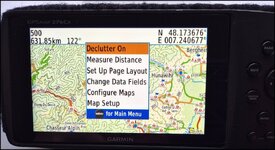
And should map clutter worry you, don't forget that there is an option of 'Declutter ON' or off.
Has anyone used AdvOSM mapping yet?
any feed back? :nenauScreenshot_20261012_112132_Gallery.jpg
 
And something new if you use a Montana 710. (alas that will not work on the 276cX)

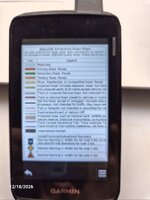
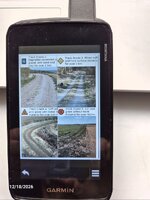
Using the picture Viewer, you can refresh your memory as to the meaning of various bits of map info- see a couple of screenshots-
All these are available on the AdvOSM website but it is in PDF format.
The Montana cannot read PDFs (AFAIK) so I took screenshots, edited them and placed them in the Montanas' internal memory- and jolly useful it is too and weighs nothing.
Someone throw me a bone.

Legend.jpg TrackGrades.jpg
 
The usual clamour for mapping, (especially when offered for free) for back roads and off-road adventure riding-including trails for those who venture out on those etc - especially for Morocco - is normally very loud.......:confused: yet the silence here is deafening :nenau
Any comments / thoughts / new ideas / observations / etc. dare I even mention maybe a 'thank you for the O.P ?
I'll even throw in a 'pretty please' ! Go on, you know you want to!
 
Last edited:
New map updates shortly
New maps updated- especially useful for those of you who enjoy trails in Morocco.
amongst others
Map legends images now also available for download to be placed in your unit as shown above on my 710
and ...
Any comments / thoughts / new ideas / observations / etc. dare I even mention maybe a 'thank you for the O.P ? :unsure:...:nenau
 
Yep thanks for doing this, any chance of rolling the imagery out for other devices or is it Garmin only. I make my own simple maps for OziExplorer, this must be ten times the effort and work.
 
It is indeed good that the op is making garminised OSM maps available. It's much easier to download maps that others have created than create your own using mkgmap and splitter. If you want to try it yourself and don't fancy using the command prompt to make the maps using Mkgmap and Splitter, then FrankB from the Garmin Zumo forums has created an application with a graphical interface to create your own OSM/Garmin maps. It is available here.


For those wanting to try the OP's maps on their Garmin. or several others that are available, I wrote a short guide to this a couple of years ago.

 
Built by the locals, to keep the odious creature out of their town, should he ever be passing.
 
Does anyone have any constructive comments / thoughts / new ideas / observations / suggestions / etc to help the O.P improve the maps for all to use? :nenau


Back
Top Bottom