Questions, questions

adamski49

Registered user
Joined
Feb 8, 2003
Messages
973
Reaction score
0
Location
Cambridge
Hello people

I've been reading the posts for a while now and have took the plunge and got a GPS V. Extrmely pleased with it so far :) (Ok, I've only had it a day) but there are a number of points I'd like answered - apologies if any of these have been covered earlier, I must have missed them.

1. Waypoints - useful little things. I've downloaded the speed camera, bmw dealers and cafe with the intention importing them into my Mapsource for later upload. This has not been possible as the *.mps files were produced on a different version of Mapsource - I have City v4.00 - second hand unit before you ask. How do I extract these or convert to a *.wpt file? :confused:

2. Following on from that how do I export my waypoints to a *.wpt file for use by others? :confused:

3. Do any of you use another antenna to boost signal and if so which one and where do you mount it?

4. I've used a RAM mount set up on my R1100S (sorry, it's not a GS) but the holder seems to be an impossibly tight fit for the GPS V unit. Is this right? Any advice on how to insert it without breaking anything (or double entendres) greatly appreciated. :confused:

5. Power lead. Where does this go if you decide to go for a spin without the GPS? Again this is morerelevant to RAM mounts. Is there a simple way of keeping things neat?

I'll probably think of plenty more questions later but answers to the above would be useful - thanks.

Adam
 
Adam,
I can't help you with the files, but regarding the power cable, I have a Street Pilot 111 & have run my lead up under the tank, from the battery.
I just leave it loosely connected to mt Touratech mount, when not in use.
Although the Touratech mount is a work of art in its self, it is a bit odd looking without the gps mounted.

Mike h

By the way, my 's' is at the doctors at the moment. It keeps cutting out & their diagnostic unit cant find the problem.
 
Mike

Thanks for the reply.

I was going to run the power lead along a similar route but from the back of the power socket instead of the battery.

My problem is that the RAM mounts are easily removed and this will leave me nowhere to secure the 6" or so of cable... batteries will have to suffice for now.

No antenna needed then I take it?

Out of interest, how much was the Touratech mount? Can you post a picture of it?

The RAM mounts are fairly cheap at £35.50 (inc P&P) and the fact that it can be removed quickly appealed to me.

Bad news about the cutting out. These sort of problems appear to be pretty elusive if they arise... never does it when the mechanic rides it :(

I take it you've found the S dedicated forum -http://autos.groups.yahoo.com/group/boxertrix/ - plenty of useful info in amongst the banter although nowhere near as simple to navigate as this site :D

I'll await further info on the files.

Cheers

Adam
 
adamski49 said:

1. Waypoints - useful little things. I've downloaded the speed camera, bmw dealers and cafe with the intention importing them into my Mapsource for later upload. This has not been possible as the *.mps files were produced on a different version of Mapsource - I have City v4.00 - second hand unit before you ask. How do I extract these or convert to a *.wpt file? :confused:

Adam, you need the latest version of MapSource on your PC. That is not directly related to your CitySelect maps. You can download the MapSource update for free at the Garmin site

Touratech mounts can be seen at www.touratech.de in the online shop.

Greetings,
Michel
 
adamski49 said:
Hello people

1. Waypoints - useful little things. I've downloaded the speed camera, bmw dealers and cafe with the intention importing them into my Mapsource for later upload. This has not been possible as the *.mps files were produced on a different version of Mapsource - I have City v4.00 - second hand unit before you ask. How do I extract these or convert to a *.wpt file? :confused:

As MiGSel says in his reply - go upload the latest version from Garmin it's free. You should upload one program to your PC and one to you GPS V.


2. Following on from that how do I export my waypoints to a *.wpt file for use by others? :confused:

Connect your GPS V to your PC - click on the button in the tool bar that transfers data from the GPS V to the PC, when you click this it will ask you what you want to download - just select the waypoints , make sure that maps and routes is deslected , file will transfer to your PC where you can 'save as'.

3. Do any of you use another antenna to boost signal and if so which one and where do you mount it?

NO , not on the bike but some cars have anti-sun-galre glass in the windscreen which can mean you won't get a good signal inside the car. Then you need an antenna.

4. I've used a RAM mount set up on my R1100S (sorry, it's not a GS) but the holder seems to be an impossibly tight fit for the GPS V unit. Is this right? Any advice on how to insert it without breaking anything (or double entendres) greatly appreciated. :confused:

I use the RAM mount too and it is tight but it is meant to be. When you snap it in , point the front of the base of the unit into the holder first and snap in the top - not the other way around - you can lift the top clip with your thumb to allow it to snap into place a little easier but mine just click in and even with the odd bit of off road bumpy stuff the GPS unit stays put.

5. Power lead. Where does this go if you decide to go for a spin without the GPS? Again this is morerelevant to RAM mounts. Is there a simple way of keeping things neat?

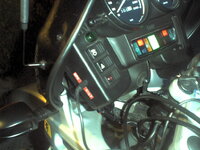
See pic. I have a power cable which I cut to length and fitted a special power socket in the cockpit. When I don't use it I just take it off and stick in my pocket - it's only about 8 inches long so no problem

One other tip - WATCH THE ROAD - not the GPS unit !!!
Ride safe
Gecko
 

Attachments

  • gspic0009.jpg
    gspic0009.jpg
    121.7 KB · Views: 214
Gecko and Michel, thanks for the replies.

I've already updated my GPS to v2.08 (and may upgrade to v2.12 beta having just read the other thread) but can't see anywhere to download the Mapsource update. Any clues?

As this is a second hand unit (bought from Navcity) I'm not sure if it has already been registered - possibly not seeing as the unlock code is included in the box.

If I register online will I automatically get sent v5.00 City Select CD or do I have to request it?

Thanks for all the other info, especially the tip :)

Cheers

Adam
 
Adam,

If you need to start cutting cables to make them fit your bike lynks cables sell the P Plugs and various fittings to save you chopping up the standard Garmin lead http://www.lynks.co.uk/
I bought 5 'P' plugs for a fiver when I made my GPS 5 lead. They are a bit fiddly to fit but saved my Garmin lead.

Gecko,

I'm trying to plot out a route to Spain on my GPS V. The problem I've got is that I do not have sufficient memory to download the full route on detail maps. I thought that I would be able to load as many detail maps as possible through France and Spain and that the GPS V would still plot through the non detail mapped areas, just using main routes on the basemap, but it doesn't...any ideas?

Rob
 
Ok, brain is now in gear - updated Mapsource to v4.13 and GPS V to v2.12 beta.

I was fortunate that the previous owner doesn't appear to have registered with Garmin - does this mean that I will be able to get the free upgrade to v5.00 City Select as I've only just registered?

If so, do you order direct from Garmin or one of the many GPS outlets?

Rob

Thanks for the info on cables - I'd already spotted this on another thread.

With regard to your Spain route problem I've uploaded detail maps for East Anglia and N London and then loaded some waypoints and about 4 different routes to Manchester. These obviously fall outside my detail maps but it hasn't flagged up a problem.

Maybe loading the maps for the areas you want first followed by your routes will overcome this problem? Just a thought from a complete novice.

Cheers

Adam
 
Adam,

Welcome to Mapsource and their own version of the world. Maps or waypoints or routes are not easily transferable between systems or versions.

There are a number of packages which do allow transfer through intermediate programs and a lot of these packages are share ware. Try a google search for Mapsource and Waypoints and conversion. You will come up with a number of sites including a "hack" site.

As a starter try:

http://www.easygps.com/default.asp
http://www.sheps.clara.net/SSVersions.html (this looks good as it allows conversion of Autoroute waypoints)
http://www.gartrip.de/
http://www.gpsu.co.uk/
http://gps.chrisb.org/gps_mapper.htm

Alternatively you could try seaching on "Geocaching" which seems to be the GPS version of trainspotting.....

Personally I cannot be arsed to play around with these format changes and after a couple of hours looking for some decent software to allow transfer from Autoroute to Garmin I gave up. If you try any let us know if they are worth it.

Adam


;) :beer: :beerjug: :p
 
adamski49 said:


As this is a second hand unit (bought from Navcity) I'm not sure if it has already been registered - possibly not seeing as the unlock code is included in the box.

If I register online will I automatically get sent v5.00 City Select CD or do I have to request it?


If you do get the free upgrade I will be very jealous :mad: - good luck.
 
Rob Farmer said:


Gecko,

I'm trying to plot out a route to Spain on my GPS V. The problem I've got is that I do not have sufficient memory to download the full route on detail maps. I thought that I would be able to load as many detail maps as possible through France and Spain and that the GPS V would still plot through the non detail mapped areas, just using main routes on the basemap, but it doesn't...any ideas?

Rob

Rob
You have just discovered the main limitation of the GPS V. It only takes about 10 maps and it's full. From what I have been reading here the Mapsource City Select 5.0 is much more efficient and a lot more maps can be put onto the unit. It sounds like they have found a way to compress the data packages that go between the PC and the GPS V. If this is the case then if I can't wangle a freebie from Garmin I guess I may fork out the $100 they are asking. :rolleyes:
The only thing I can suggest is pick the sections that are not difficult to navigate and don't upload those map sections. You can still upload some waypoints without the maps . If for example you have a big chunk of motorway just don't bother with the map for that section. You have to be creative and selective unless you have the 5.0 version.
I had the same problem last year but you'll figure it out. Of course you could alwasy stick a lap top in your top box and upload the maps as you go :D
Cheers
Gecko
 
Gecko said:
If you do get the free upgrade I will be very jealous :mad: - good luck.

By the way if you do decide to cut the power cable to shorten it there are only 2 wires in it so it really is very easy. I used a small audio jack plug and socket. Don't forget to put an in line fuse into the system (0.5amps) or you'll likely blow up your GPS unit. I have used my set up as seen in the photo for over a year in all weathers and it's been fine. If you want any info on wiring it in let me know.
Cheers
Gecko

PS Still jealous of anyone who gets a free 5.0 upgrade for nowt :mad:
 
Gecko

You can be jealous now... v5.00 free upgrade installed and in use.

And yes, you can get shed loads more maps into 19Mb :D

I think the free upgrade applies to anyone registering their Mapsource after 24 Jan 03 - hardly seems fair to older customers :mad:

Let us know how you get on with Garmin.

Cheers

Adam
 
....even more jealous now !!!!! Still no reply from my email to Garmin - I'll give them a while longer and see if they can be bothered to acknowledge me at all. Failing this guys, I might ask you for some help - if I can tell them about all these 'good mates ' who have recently bought GPS V and quote them some user numbers they may feel that they owe me something.....watch this space :D


Back
Top Bottom