Rt Speakers

busy builder

Well-known member
UKGSer Subscriber
Joined
May 6, 2013
Messages
4,146
Reaction score
1,327
Location
Cromarty
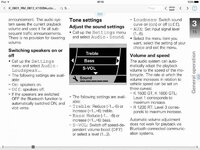
If I turn the 'wheel' it says speakers turned off, but I don't know how to turn them on how do I get the speakers to work ?
 
Sometimes the available options are off the screen and need to scroll up or down to see them.

Some of them are scroll right to bring up sub menu.
 

Attachments

  • ImageUploadedByTapatalkHD1466403234.003098.jpg
    ImageUploadedByTapatalkHD1466403234.003098.jpg
    87.4 KB · Views: 268
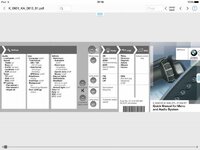
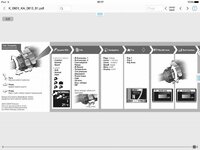
Does this schematic type explanation of the menus help at all?
 

Attachments

  • ImageUploadedByTapatalkHD1466403447.334977.jpg
    ImageUploadedByTapatalkHD1466403447.334977.jpg
    49.7 KB · Views: 259
  • ImageUploadedByTapatalkHD1466403456.490169.jpg
    ImageUploadedByTapatalkHD1466403456.490169.jpg
    47.7 KB · Views: 271
When I select AUDIO I don't get loudspeaker or Bass Treble option, from memory I only get BT PAIR ?
 
Press the Menu button 6 times.
scroll all the way up to Audio
Select it
scroll all the way up to Loudspeaker.
Select it
Scroll up or down to select speaker on or off..

If the current menu has a little arrow at the top or bottom, then there are more options to be found.

 
I'm a plonker !

I scrolled UP and lo and behold there it is. Thanks all.


Back
Top Bottom