Should I ditch my Nav V?

Becksy

Active member
UKGSer Subscriber
Joined
Jun 14, 2016
Messages
358
Reaction score
10
Location
UK
Maybe it’s time to ditch the nav v and get a new device! It is about 10 years old. Any suggestions, does a Zumo XT2 work with Basecamp? I maybe quite weird as I like basecamp.

=======

I have started you a fresh thread.

Richard
 
Last edited by a moderator:
I have an XT and old 340 and 390. The 390 and 340 are pretty much WYSIWYG with Basecamp when you have the settings match. The XT is definitely not, as Garmin have changed the routing logic and it no longer matches the logic in basecamp. So when plotting a route in Basecamp you have to use more shaping points than you might with your Nav 5 to make sure it goes in the direction you intend (Fastest time now means main roads not fastest time!!). Using mine I also make a track of the route and enable it so that I can see if the route deviates from the track on the Zumo XT unit. Garmins recommended route planning software for the XT is explore. Its utter crap you are better not connecting an XT device to it if you get one. Apart from that the XT has a great screen and after a period adjusting to its foibles I can use it effectively. The XT2 can use routes designed in basecamp but basecamp is not designed to utilise all of the features that the XT2 has. The prefered software that Garmin has produced for this unit is Tread. I have no experience of this unit or tread but it does seem to have a number of issues. Lots of info on this site about the XT and XT2 and even more here.


Would be worth doing a bit of research on the XT and XT2 before jumping in.
 
The Nav V is a very good device.

The third generation Nav VI is now very good device, which will also work with BaseCamp and your Mac. See posts on the ghosting problem that blighted the first and second generation Nav VI devices.

The XT is a good device, too. It though will not work too easily with your Mac (see threads on the subject). Many XT owners with a Mac have switched to MyRoute, for route creation. I did and haven’t looked back, even though I was a big BaseCamp / Mac fan.
 
Last edited:
Nav 5 still does it for me, basecamp is pretty accurate. I will have to figure out what to change too when this fails, but so far its just a battery replacement now and again. Does all I need. Saying that though, the A to B app by TomTom on my phone is the bees knees for quick a to be on the move in London. Much faster and accurate than others I have tried. Have tom tom been overshadowed in marketing maybe, as their routing was always fast
 
I have both an updated (CAP screen) Nav6 and an older Nav5.

I use the Nav5 on all my big/long trips because I trust it. Haven’t quite reached that stage with the Nav6 yet, though the latest one (my third) has been faultless over the last year or so. Just not sure how it might take to being jiggled about on the dirt roads!

Back to the Nav5 question. If it works for you, why change it?
 
Maybe it’s time to ditch the nav v and get a new device! It is about 10 years old. Any suggestions, does a Zumo XT2 work with Basecamp? I maybe quite weird as I like basecamp.

=======

I have started you a fresh thread.

Richard
I must also be weird then as. I also like Basecamp. I find it very easy and intuitive to use.
 
The Nav V is a very good device.

The third generation Nav VI is now very good device, which will also work with BaseCamp and your Mac. See posts on tge ghosting problem that blighted the first and second generation Nav VI devices.

The XT is a good device, too. It though will not work too easily with your Mac (see threads on the subject). Many XT owners with a Mac have switched to MyRoute, for route creation. I did and haven’t looked back, even though I was a big BaseCamp / Mac fan.

Do you use My Route on your Mac? And sync the routes to your XT from the Mac?
Thanks.
 
The Nav V is a very good device.

The third generation Nav VI is now very good device, which will also work with BaseCamp and your Mac. See posts on tge ghosting problem that blighted the first and second generation Nav VI devices.

The XT is a good device, too. It though will not work too easily with your Mac (see threads on the subject). Many XT owners with a Mac have switched to MyRoute, for route creation. I did and haven’t looked back, even though I was a big BaseCamp / Mac fan.
Richard,

How do I tell what generation my Nav 6 is?

Device says hardware V8 SA3, software v5.90

Seems to work pretty well… but is occasionally irritating, probably because I haven’t learned its foibles, and how to deal with them.

Tia
 
Do you use My Route on your Mac? And sync the routes to your XT from the Mac?
Thanks.

Yes.

BaseCamp became increasingly flakey on my Mac during lockdown, so I switched to MyRoute. It’s a move I’ve not regretted at all.

The XT is an Android device, which doesn’t play too nicely with a Mac.


Edited: Changed the word ‘No’ to ‘Yes’.
 
Last edited:
Richard,

How do I tell what generation my Nav 6 is?

Device says hardware V8 SA3, software v5.90

Seems to work pretty well… but is occasionally irritating, probably because I haven’t learned its foibles, and how to deal with them.

Tia

Garmin Support 0800 238 0000 They’ll tell you.

If yours is a generation 1 or 2 device, it will almost certainly start to ghost. Garmin will exchange it for free.
 
  • Like
Reactions: SBD
Yes.

BaseCamp became increasingly flakey on my Mac during lockdown, so I switched to MyRoute. It’s a move I’ve not regretted at all.

The XT is an Android device, which doesn’t play too nicely with a Mac.


Edited: Changed the word ‘No’ to ‘Yes’.

The great thing about MyRoute is that it is cloud based, meaning that I can use it on any device that has an internet connection. I now do everything on either my iPad Pro or phone, making my Mac all but redundant. Similarly, I can send routes I’ve created in MyRoute from my phone to the XT. This means that I no longer need to take a laptop away with me, as I had to do when I was firmly in the BaseCamp world.
 
Garmin Support 0800 238 0000 They’ll tell you.

If yours is a generation 1 or 2 device, it will almost certainly start to ghost. Garmin will exchange it for free.
"you've dialled an incorrect number, please check the number and try again"

unfortunately, the website doesn't seem to provide a number of any sort

 
"you've dialled an incorrect number, please check the number and try again"

unfortunately, the website doesn't seem to provide a number of any sort

Try this one: 0808 238 0000
 
Thanks,

0808 238 0000 works, spoke to a nice lady who said that there had been a significant update in 2023, and that mine (late 2020) predated that, but had been "patched".

She also said that if mine were to display any issues, they would look at replacing it, but if it is working properly (as it is at present) they were not prepared to exchange it now.

"Do call back if you have problems." Which I guess is fair enough.

Is the ghosting an issue that appears after so many hours' use, or is it age related? Mine doesn't get used every day, most of the time it is in its pouch on the shelf in the hall. Obviously if I go on a trip, it goes too. But so far only two holidays and a few days out. Maybe it has had maybe 250 hours' use over 4 and a bit years.
 
I am tempted by the Apple Play screens as opposed to a Sat Nav.
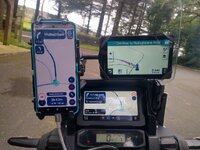
I have Apple Carplay/Android Auto (wired) built into my Honda Africa Twin Screen and can use the Left hand buttons on the Honda to control the screen....zoom in out etc skip music tracks answer the phone etc. But you have an added interface and all apps are limited in their functionality by what Android Auto or Apple Carplay allows. I use Myroute app a lot on the bike and to get the best experience using apps on the phone I think a sacrificial rugged phone or small tablet is the way to go, particularly if you don't have remote buttons to control an AA/Apple carplay screen..... just my tuppence worth. I have tried both at the same time with a Zumo XT all running the same route. This was last summer. The Myroute navigation app has improved considerably since then. I also use OSMand+ but it has a hell of a learning curve and is kept for experimentation purposes. For a-b routing Google maps is king. All can be used on devices without a sim card as long as the appropriate maps are downloaded. Myroute app and OSMand+ are easy in this regard as they give specific countries and regions for download.

IMG_20240814_123614993_HDR (1).jpg

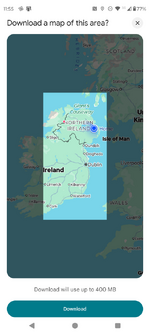
Google maps is a bit more awkward for travelling any distance. It seems to limit map downloads to 400mb at the moment (up from 250m the last time I looked) and this does not quite cover the whole of Ireland. I have Belfast and Co.Down downloaded and it take up 139mb. Obviously if you have a phone/device with a sim or hotspot a sacrificial phone this is not an issue. Also you can download a number of overlapping maps and give them a name. I'm not sure how this works in practice as I've never done it.

1742817639746.png
 
Still using my old Nav V, still doing the job I bought it for, never updated the maps .... :thumby:

:beerjug:


Back
Top Bottom