Street pilot 111. Updates.

gpsonaPan

Registered user
Joined
Jul 9, 2006
Messages
666
Reaction score
0
Location
Birmingham
Hey good people.

My Second question so please be gentle.

I bought my SP111 from gpswarehouse. I am having a lot more fun with it than I expected to.For me it is excellent as a "first". The system was a "Deluxe" version. a lot will be wasted on me as I only have my bike.(Pan European).

Okay, nitty gritty time. The system came with Mapsourse v.7. I believe version 8 is due or is out already. So, question,,, what do I need to do to get this update,?D Do I click on "help,, update software or what ??

Any help is appreciated.

Pat
 
Drop an email to:

[email protected]

Request that they send you the City Navigator 8 update DVD suitable for use with the StreetPilot III.

The disk is free. The software will check to see if you need to pay for the upgrade - which is unlikely.

That's the simple answer.

-Rob
 
RobD.

Thanks for that I have sent a request to them.

Will look forward to receiving a reply.

Is this the normal way as I have noticed on "help, check for software updates".?

Pat
 
robD.

Many thanks for your help on this. I have done as you suggested and sent a E-Mail. I got an automatic response askin me for information I may not have supplied to them previously.
I wrote all what the asked for and sent it and had ANOTHER auto response E-Mail in return.

Guess I will have wait and see.

Thanks again

Pat
 
gpsonaPan said:
Thanks for that I have sent a request to them. ....
Is this the normal way as I have noticed on "help, check for software updates".?
I think you will find that the "check for software updates" you mention is for Maspsource updates (and possibly the GPS unit itself) rather than for the maps.
 
Pat,

Firstly have you created a 'MyGarmin' account? If not you will need to do this.

The phone this guy, Tom Bird on 0808 2380000 and ask for the City Navigator Europe V8 disc.

I tried to get it my emailing 3 times with no success but Tom put it in the post within a couple of days. :thumb

If you want a copy of the disc PM me and I'll send you one. I've used mine to unlock several friends SP111's so I don't see why a copy shouldn't work. All you need is your own personal unlock code which you can get from the 'myGarmin' account once you've registered.

Andy
 
TAFF.

Thanks for explaining that one.Silly me used to check for software updates by doing as explained on other programmes.I thought the same was with Garmin.


HUMBUG.
Thanks also for your offer.Will let you know.

When I was putting my "unlock code" in I was having no luck.I got in touch with GPSWarehouse and they showed me a link to a patch. I downloaded that and all was well.
I have seen the page you refer to but not knowing what to do(as I had already unlocked it) I left well alone.Should I now go back to said page and enter my details? I am waiting a reply from Garmin.

As Taff mentioned a 'phone number and you also, both different tho, I will wait 'til monday and 'phone both.I am worried tho, as there is a mention on here, somewhere about waiting a hour on 'phone for response!!

Thanks again

Pat
 
Pat,

You can go back to said page anytime - it will not harm anything. Once you have unlocked your maps they will stay that way unless you have to re-install your software.

With regards to the phone number, yes it can take a while to get an answer but it's a freephone number so Garmin are paying for it! :D I put my phone on loudspeaker when I called them.

Andy
 
Andy

Thanks again for help on this.

I have gone back to Garmin Page.

I put in a Name and Password but not recognised.

Will have to dig out what I put in when regestering MapSourse.
I honestly don't remember being asked to create a "my Garmin account" tho.

Thanks again

Pat
 
ANDY,,, TAFF.

Have been in touch with the supplier and he has said Grmin are responsible for the upgrades.He also gave me a different number to 'phone. Guess I will be busy on 'phone Monday at work,,!!

Thanks again guys.

Pat
 
The updated maps (Version 8 of City Navigator now from memory) is available from Garmin. The maps are free, provided you registered the unit after a set time - again AFAIC that was 1st Jan 2006. Personally, I wouldn't waste time ringing Garmin, as I've always had a response to the e-mails I've sent them. In fact I don't think I've ever managed to get through on the phone.

The updates for Mapsource ie the computer program is available free just by clicking on "check for software updates" on Mapsource.
 
TAFF.

Many thanks for help on this again.

I have checked on "Check for software updates" and am up to date.
I do KNOW I regestered with Garmin on net but when I got to the unlock page it was error ridden. I got in touch with seller (www.gpsw.co.uk) who had a link to a patch which I downloaded.No trouble in unlocking then.

All was well until I saw updates on Maps were free on this site. Now I will wait and see what happens.

Thanks again.
 
FWIW, Have had the CN V8 update and the detail it contains is massive....which is good as long as you recognise that SP3 standard memory card is not able to carry as many map tiles as with previuos CN version...so buy another card ! :thumb
 
I have recieved my V 8 disk and cannot get the unlock codes from garmin. Follow the instructions and it askes me for my coupon code I would like to redeem which I cannot find.
Any sugestions or advice
 
worthy said:
I have recieved my V 8 disk and cannot get the unlock codes from garmin. Follow the instructions and it askes me for my coupon code I would like to redeem which I cannot find.
Any sugestions or advice
Search :o
 
IIRC your coupon code is printed on the bottom of the yellow slip of paper, along with the Unit ID etc.
 
worthy said:
I have recieved my V 8 disk and cannot get the unlock codes from garmin. Follow the instructions and it askes me for my coupon code I would like to redeem which I cannot find.
Any sugestions or advice

Worthy,

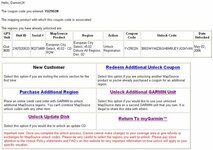
Log in to your myGarmin account.


Click MapSource® Unlock. This is the section in which the units you own are listed.

In some cases your units name may simply be Unknown.

This is nothing to worry about.

I have used an iQue 3600 for this example.


Click on your unit and you will be taken to the additional options screen:


From this page you can:


- Unlock Update Disc

This is where you can obtain the unlocking code for new mapping.

From here it should show that you are entitled to the City Navigator Europe V8 and ask you if you have the dic or not. As you have the disc, chose the relevant link and you will be given the unlock code. Take a print of the page and keep a copy of this code.

Andy
 

Attachments

  • clip_image006.jpg
    clip_image006.jpg
    40.9 KB · Views: 111
Taff said:
The updated maps (Version 8 of City Navigator now from memory) is available from Garmin. The maps are free, provided you registered the unit after a set time - again AFAIC that was 1st Jan 2006. Personally, I wouldn't waste time ringing Garmin, as I've always had a response to the e-mails I've sent them. In fact I don't think I've ever managed to get through on the phone.

The updates for Mapsource ie the computer program is available free just by clicking on "check for software updates" on Mapsource.

You may also want to check the firmware, what Garmin calls "unit software", version on the unit itself and make sure it is current, if not download that update as well.

To update your unit's software:

1. Please go to the WebUpdater webpage by clicking on the following link: http://www.garmin.com/support/download_details.jsp?product=999-99999-27.

2. You will see a link labeled Download, please click on it.

3. You will be asked if you want to Run or Save the file, please click Run.

4. After the file downloads, you may receive a security warning; if you do, please click Run.

5. Please select your setup language and click Next (the following instructions are based on the English selection).

6. You will see a new window; please click Next.

7. A license agreement will appear; please agree to the terms and then click Next.

8. You will see the destination folder, please click Next.

9. Click Install; the WebUpdater installation will begin.

10. After the installation, please ensure that there is a checkmark next to Yes, I want to launch WebUpdater now and then click Finish.

11. The WebUpdater program will launch - again, please ensure that your unit is connected to the computer and turned on.

12. Click Next; you will then be prompted to select your GPS. Please select USB Device and then click Next.

13. A new window will appear with information about the update for your unit, please click Next.

14. A new license agreement will appear, please click that you agree and then click Next.

15. The unit's internal operating system/software (sometimes called "firmware") will then be updated.

16. Once the download is complete, please click Finish.

17. Please feel free to disconnect the unit; it is ready to use.

 
Hey Guys.

I followed a few instructions on here. I managed to get so far but when I put in my codeings "the unit number is already in use." Probably me in a previous attempt to register.!!

Anyway I could not get any further than the update page where I saw ALL the pages with contact details to get an update.At 4.15 on Friday (I know,I know) I rang the local number (A 01790 number can't exactly remember). I went thru the options and managed to get thru to the update department.I was put on hold. At precicely 5.00 I was cut off.!!

I thought to myself "Oh dear, that's not very nice.People must be going home now.."

I give up and ,,,

Pat


Back
Top Bottom