


Using MRA routeplanner without Garmin Drive
Older Garmin GPS devices can’t use Garmin Drive to transfer routes to the unit. For those with Old units and an Android phone the GPX files can be transferred as follows. (Tested on a Zumo 340 390 and BMW Nav 4). So that you can have a compact on the Fly routing solution for trips.
1. Download the route you want to put on the device from MRA routeplanner to your phone.
2. Connect the phone to the Garmin GPS device with the Garmin unit lead and a USB (A) female to USB (C) adaptor or a USB (C) to mini USB(B) lead. I’m not sure that this will work with a phone that has a micro USB connector (with the appropriate adaptor or with an apple phone)
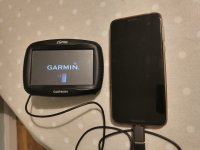
3. Open the phone and navigate to its file manager. This varies depending on the make of mobile phone/personal choice but you should see the Garmin as an attached device. The Garmin USB device is just the SD card if you have one in your unit.
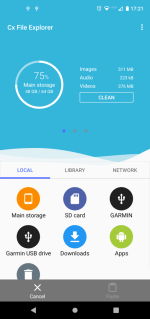
4. I had downloaded a route from MRA routeplanner onto the phone so I hit the downloads button and selected the file I wanted to transfer.
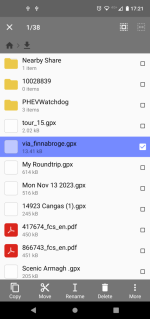
5. And copied it into the Garmin>GPX folder
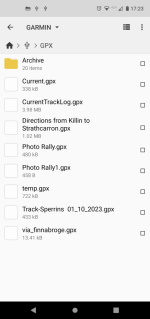
6. The file will appear on your imports on the device.
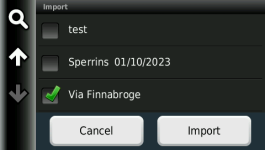
7. Import it and start it up in trip planner.
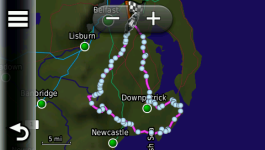
Similar transfer capabilities could be achieved with a USB(C) micro SD card reader and transfer the micro SD card with the GPX file on it from unit to unit.
Older Garmin GPS devices can’t use Garmin Drive to transfer routes to the unit. For those with Old units and an Android phone the GPX files can be transferred as follows. (Tested on a Zumo 340 390 and BMW Nav 4). So that you can have a compact on the Fly routing solution for trips.
1. Download the route you want to put on the device from MRA routeplanner to your phone.
2. Connect the phone to the Garmin GPS device with the Garmin unit lead and a USB (A) female to USB (C) adaptor or a USB (C) to mini USB(B) lead. I’m not sure that this will work with a phone that has a micro USB connector (with the appropriate adaptor or with an apple phone)
3. Open the phone and navigate to its file manager. This varies depending on the make of mobile phone/personal choice but you should see the Garmin as an attached device. The Garmin USB device is just the SD card if you have one in your unit.
4. I had downloaded a route from MRA routeplanner onto the phone so I hit the downloads button and selected the file I wanted to transfer.
5. And copied it into the Garmin>GPX folder
6. The file will appear on your imports on the device.
7. Import it and start it up in trip planner.
Similar transfer capabilities could be achieved with a USB(C) micro SD card reader and transfer the micro SD card with the GPX file on it from unit to unit.




