Disclaimer. If you lose your maps or “brick” your device as a result of the information contained below, on your own head be it. The use or reliance of any information contained on this post is solely at your own risk. You have no concept of the mental capacity, or for that matter the mental stability of the poster 
If you don’t know what you are doing and are going to be unhappy with adverse consequences…...don’t do it.
If you spot any inaccuracies or have something to add I’m more than happy with that, add your comments to the thread.
I was asked via PM if “ Hi, read your post re a 2610 and being able to load up to date OSM, can you share the source. Presume it's quite easy to do I'm not an expert on this stuff.”
Not sure what constitutes “Easy” but I will explain how it can be done. The explanation is divided into two and a bit sections. Very old Garmin devices that used City Navigator (CN) mapping, such as Garmin Streetpilot 2610, Quest, 2620, BMW NAV II, and III. The latest Garmin supplied mapping for these devices is CN 2008 which is dated by Naveteq as 2007 and in all probability relies on map data from 2005/6 so is about 20 years out of date.
The second is Garmin devices that use NT mapping these include the Zumo 2XX, 400,450, 550 and 660 Series and the BMW NAV IV. These devices had their last mapping release in July 2024 after16 years of supply and I would expect that these maps will be available to download for some time. However to be safe if you have any of these devices download the latest mapping asap. And make sure that you have the full mapping saved to your computer as most of the devices will only have space for subsets of the mapping, just in case Garmin decide to remove the facility. For these devices there isn’t much need to update the mapping for a while, unless you want to explore the OSM map sets that are available, or you are going to a Country not covered by your mapping.
Finally I’ll say a bit about using OSM maps for areas outside your for Zumo devices map set that use current NTU Garmin mapping...so anything introduced after about 2014 including the 3XX series, 590, 595 XT and XT2
Old city Navigator Garmin Devices.
I’ve had an old Streetpilot 2610 since 2004. Up to date mapping for this device was only supplied by Garmin for 4/5 years up to CN2008. When Garmin stopped supporting the device with mapping I started to use Garminised open street maps produced for many years by a Dutch chap. I first used his maps on a couple of trips to America and later to keep the 2610 relatively up to date. I can’t remember the URL of his site but he provided this service up until a few years ago when his health deteriorated and he stopped producing the maps. Since then I have been producing my own maps using two command line utilities Mkgmap and Splitter. They allow you to obtain Open Street Maps and tailor them to your own needs, but this is not “Easy”. I have the island of Ireland on my 2610 using maps I converted for Garmin use myself.
In order to test an easier way to put fresh mapping on a CN Garmin device I had a look at some of the “Ready Made” mapping sites. There is a Wiki on what is available here:-
https://wiki.openstreetmap.org/wiki/OSM_Map_On_Garmin/Download
I downloaded the Ireland/GB maps for testing purposes from here, just because I’d had a look at these sources of mapping before.
https://www.freizeitkarte-osm.de/garmin/en/westeuropa.html
And here.
https://alternativaslibres.org/en/downloads.php
But as you can see from the wiki above there are loads of sources. As with all sites be careful what you are downloading and if possible scan the files for nasties before you use them.
Firstly a word of warning, if you are going to try new maps on your (very) old Garmin and you haven't got the CN maps on a computer, make sure that you use a different CF card to load the new maps as loading maps on these devices overwrites whatever maps are on the CF card. I hadn't used CN2008 since my last computer replacement in 2020. I had CN2008 installed on that, but when it was scrapped I didn’t keep CN2008 as I still had (have) the installation discs and was using OSM mapping in any case. For the purposes of this exercise I was going to illustrate the many mapping changes from those old maps until now. However, you cannot unlock CN2008 anymore once it is loaded from the DVD as the servers that carried out that function for Garmin no longer exist.
Freizeitkarte mapping. Use the link above
Downloading.
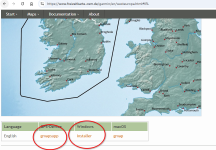
If you want to put the map directly on a CF card use the gmapsupp download and make sure its in a folder called “Garmin” in the root directory of the card. If you want to install the map for use in Mapsource or Basecamp use the windows installer.
To get the map onto the device
Mapsource
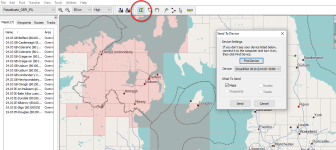
In Basecamp Maps> Mapinstall
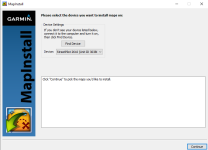
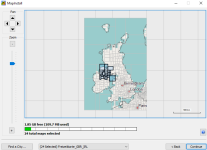
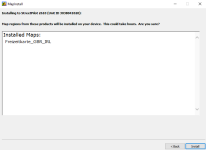
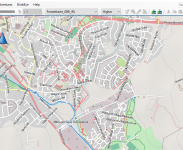
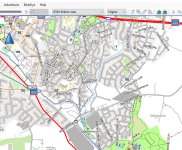
While Freizeitkarte mapping looks lovely in Mapsource and Basecamp it is obviously designed for more modern hardware than the 2610.
How it looks on Basecamp
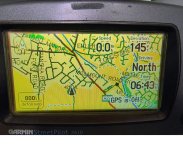
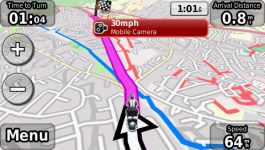
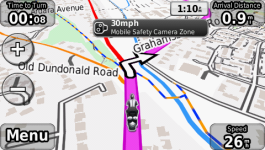
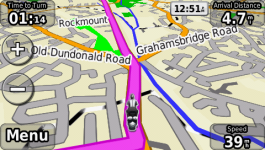
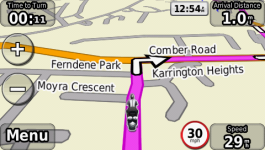
What it looks like on the 2610.
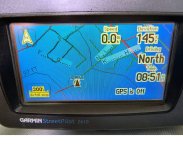
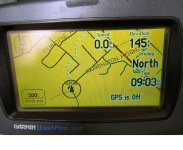
While it routes fine, its very blue and difficult to see and only displays the first letters of the street names. It works much better on NT and above devices.
Alternativaslibres
Follow the link above and download the file for mapsource basecamp.

The installation process is exactly the same as for the other maps above load them into basecamp or mapsource (or both) and send the maps to the CF card on the unit.
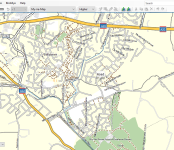
The Alternative libres maps look good on Basecamp.
To be continued. :-
If you don’t know what you are doing and are going to be unhappy with adverse consequences…...don’t do it.
If you spot any inaccuracies or have something to add I’m more than happy with that, add your comments to the thread.
I was asked via PM if “ Hi, read your post re a 2610 and being able to load up to date OSM, can you share the source. Presume it's quite easy to do I'm not an expert on this stuff.”
Not sure what constitutes “Easy” but I will explain how it can be done. The explanation is divided into two and a bit sections. Very old Garmin devices that used City Navigator (CN) mapping, such as Garmin Streetpilot 2610, Quest, 2620, BMW NAV II, and III. The latest Garmin supplied mapping for these devices is CN 2008 which is dated by Naveteq as 2007 and in all probability relies on map data from 2005/6 so is about 20 years out of date.
The second is Garmin devices that use NT mapping these include the Zumo 2XX, 400,450, 550 and 660 Series and the BMW NAV IV. These devices had their last mapping release in July 2024 after16 years of supply and I would expect that these maps will be available to download for some time. However to be safe if you have any of these devices download the latest mapping asap. And make sure that you have the full mapping saved to your computer as most of the devices will only have space for subsets of the mapping, just in case Garmin decide to remove the facility. For these devices there isn’t much need to update the mapping for a while, unless you want to explore the OSM map sets that are available, or you are going to a Country not covered by your mapping.
Finally I’ll say a bit about using OSM maps for areas outside your for Zumo devices map set that use current NTU Garmin mapping...so anything introduced after about 2014 including the 3XX series, 590, 595 XT and XT2
Old city Navigator Garmin Devices.
I’ve had an old Streetpilot 2610 since 2004. Up to date mapping for this device was only supplied by Garmin for 4/5 years up to CN2008. When Garmin stopped supporting the device with mapping I started to use Garminised open street maps produced for many years by a Dutch chap. I first used his maps on a couple of trips to America and later to keep the 2610 relatively up to date. I can’t remember the URL of his site but he provided this service up until a few years ago when his health deteriorated and he stopped producing the maps. Since then I have been producing my own maps using two command line utilities Mkgmap and Splitter. They allow you to obtain Open Street Maps and tailor them to your own needs, but this is not “Easy”. I have the island of Ireland on my 2610 using maps I converted for Garmin use myself.
In order to test an easier way to put fresh mapping on a CN Garmin device I had a look at some of the “Ready Made” mapping sites. There is a Wiki on what is available here:-
https://wiki.openstreetmap.org/wiki/OSM_Map_On_Garmin/Download
I downloaded the Ireland/GB maps for testing purposes from here, just because I’d had a look at these sources of mapping before.
https://www.freizeitkarte-osm.de/garmin/en/westeuropa.html
And here.
https://alternativaslibres.org/en/downloads.php
But as you can see from the wiki above there are loads of sources. As with all sites be careful what you are downloading and if possible scan the files for nasties before you use them.
Firstly a word of warning, if you are going to try new maps on your (very) old Garmin and you haven't got the CN maps on a computer, make sure that you use a different CF card to load the new maps as loading maps on these devices overwrites whatever maps are on the CF card. I hadn't used CN2008 since my last computer replacement in 2020. I had CN2008 installed on that, but when it was scrapped I didn’t keep CN2008 as I still had (have) the installation discs and was using OSM mapping in any case. For the purposes of this exercise I was going to illustrate the many mapping changes from those old maps until now. However, you cannot unlock CN2008 anymore once it is loaded from the DVD as the servers that carried out that function for Garmin no longer exist.
Freizeitkarte mapping. Use the link above
Downloading.
If you want to put the map directly on a CF card use the gmapsupp download and make sure its in a folder called “Garmin” in the root directory of the card. If you want to install the map for use in Mapsource or Basecamp use the windows installer.
To get the map onto the device
Mapsource
In Basecamp Maps> Mapinstall
While Freizeitkarte mapping looks lovely in Mapsource and Basecamp it is obviously designed for more modern hardware than the 2610.
How it looks on Basecamp
What it looks like on the 2610.
While it routes fine, its very blue and difficult to see and only displays the first letters of the street names. It works much better on NT and above devices.
Alternativaslibres
Follow the link above and download the file for mapsource basecamp.
The installation process is exactly the same as for the other maps above load them into basecamp or mapsource (or both) and send the maps to the CF card on the unit.
The Alternative libres maps look good on Basecamp.
To be continued. :-


 Fekk
Fekk