Waypoint "Categories" ?

Taff

Well-known member
UKGSer Subscriber
Joined
Feb 21, 2004
Messages
7,351
Reaction score
6
Location
South West Wales
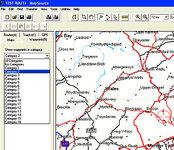
I updated to Mapsource Version 6.5 some time ago, and noticed that Waypoints can now be subdivided into 16 different categories, as per the attached image. As I dont know what to do with these categories, so far I have just been saving waypoints without allocating them, but feel that there's probably a good feature here that I'm not using to its full potential.

I assume that you can change the Category names eg from "Category 1" to say "Hotels" but I don't know how. What do the rest of you do with yours ? :rolleyes: These categories only seem to exist on the computer ie if I search for a Wapoint in the unit, it doesn't ask me which category I want to search for. Does the unit just lump them all together? Someone here is bound to have all the answers. :)
 

Attachments

  • untitled-2 copy.jpg
    untitled-2 copy.jpg
    101.8 KB · Views: 214
I suspect it depends on which GPS you have, or on updating the GPS to a version of its software that can use these categories.

I use a Quest, and have changed the categories to three types of work ones (according to contract) , personal waypoints and fords waypoints.

(they can be changed under Mapsource 6.5, go to Edit, preferences, waypoint categories and you'll find it.)

Then when I look up a w/p on the quest, I can search under the different categories to make it easier.......plus (though I haven'#t confirmed this yet) i think it's possible to cut and paste the w/p#s so for example I can send other people my directory a certain type of them.

HTH

PS you don't mention what type of GPS you use, but if it's an SPIII, you won't be able to use them because unless things have been updated since I stoed using mine, it doesn't support categories from its internal software.
 
Fanum said:
I suspect it depends on which GPS you have, or on updating the GPS to a version of its software that can use these categories.... (they can be changed under Mapsource 6.5, go to Edit, preferences, waypoint categories and you'll find it.) PS you don't mention what type of GPS you use, but if it's an SPIII, you won't be able to use them because unless things have been updated since I stoed using mine, it doesn't support categories from its internal software.
Thanks Fanum, I had a nagging feeling it would be something pretty obvious/ simple. :banghead: You guessed right, I do use a SP3 and I have upgraded to the latest software, but it doesn't ask which category I want to look in when looking for a waypoint, unless I'm missing something there as well. :rolleyes:
 
Well when you find the answer EJ let me know I've been pissing about with it for a month & cant save into the categorries.
I did ask on here but I'm not sure I managed to explain the categories as I couldnt load a picture like you did .:confused: :beerjug: ian
 
just to ask, is city navigator v6, the same as v6.5???
got my gps. in jan. of this year,do I need to update? sorry to pinch thread???
 
Mapsource 6.5 is the pc application.

The GPS will have come with City Select v6 (Quest) or City Navigator v6 (2610) which are the maps.

If you bought either GPS in Jan you will be able to ugrade the maps to v7 for free.
 
metro said:
Mapsource 6.5 is the pc application.

The GPS will have come with City Select v6 (Quest) or City Navigator v6 (2610) which are the maps.

If you bought either GPS in Jan you will be able to ugrade the maps to v7 for free.

thanks metro, just gone over and done it,do they now send me a disk?? or how dose it go from here on??
 
Spock

You will get a cd, install it and follow the upgrade instructions - if eligible you will get the new unlock for free when you go through the unlock wizard.

Andy.
 
red rocket said:
... when you find the answer EJ let me know I've been pissing about with it for a month & cant save into the categories.
confused:
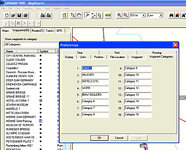
Aha! Getting the hang of these now - could play with these for hours. To save a waypoint into a Category, firstly, you have to rename the given categories, to the categories you want eg "FRENCH HOTELS". Just open a file, go to Edit - Preferences - click on Waypoint Categories - double click on a category (it will turn blue) and rename it. With mine, I have changed Category 2 to "MILITARY", Category 5 to "BMW DEALERS" etc (as in the picture below). Press APPLY then OK
 

Attachments

  • untitled-2 copy.jpg
    untitled-2 copy.jpg
    98 KB · Views: 102
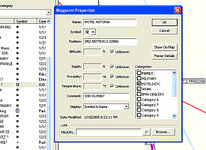
To allocate any given waypoint to a renamed category, right click on the waypoint needed and press Waypoint Properties. On the right, you will see the renamed categories, and just click on the square next to the category you need. In this case "Hotel Astoria" has been put in the "Hotels Etc" category. Press OK and the waypoint is put in the selected category.

By the way, you can allocate waypoints in batches, (rather than doing possibly hundreds individually) by pressing and holding Ctrl (bottom left key) and clicking on the waypoints you want, then OK. I have just saved about 35 waypoints into the "MILITARY" category in one go. If you cock one up, just click on it again and you will remove it from the batch. Hope that helps.
 

Attachments

  • untitled-3 copy.jpg
    untitled-3 copy.jpg
    64.3 KB · Views: 92


Back
Top Bottom