Where’s the best download for Open Street Maps?

G&T

Well-known member
UKGSer Subscriber
Joined
Jan 18, 2016
Messages
4,408
Reaction score
2,307
Location
Shropshire
Looking for a genuine website and anything I should know about before loading to PC, Basecamp and onto Nav VI?

It’s the North Africa map I’m after for now.

Thanks
G&T
 
Thank you, Berin.

I have rather fallen behind on the various alternative maps out there, not least as I haven’t needed to use them.

Would it be helpful if a separate sub-section were to be created, to deal with the majority of non-standard Garmin / TomTom maps?

Richard
 
Last edited:
I only ever use Gaia Maps when travelling in Morocco in the Land Cruiser, I pay for the premium version and have it on an iPad.
You can download many different layers and save whole areas for offline use.

I don't think it's possible to use it on a Nav VI (could be wrong) but you could always mount an iPhone in a Quad Lock case on the bars and use that?
 
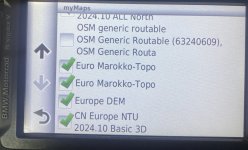
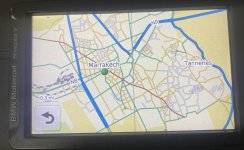
I seem to have these on my Nav V, but it's been 5 years since I installed them so have no idea where I installed them from
C5E38645-D51B-4114-92A8-B7D198E44A49.jpeg
85B859FC-5C08-4E6C-B69C-976ACA1E045E.jpeg
 
That's not ringing any bells.... I'm sure they were free open source maps.
Any clues from where you have them stored on your PC? I’ll look around more at Open Street Maps to try and find a safe link.
 
I don’t think (the otherwise pretty good) official Garmin maps would run on the iPad, Paul mentioned.
I just want to run mine on the Nav VI so I should be ok. I had a quick look at their compatible list and there were lots of zumo’s.
 
Unless you are going deep into Morocco, I would guess the official Garmin SD card would be fine. Take care if buying a used or copy version on eBay, as they are often coded to a specific Garmin device, to prevent / hinder re-sellers.
 
  • Like
Reactions: G&T
Or you can make your own for use on Garmin Devices.


I used this first it was a couple of Quid from Amazon so that I could create my first map and understand the Wiki!! Two bits of Software MKGMAP and Splitter and the command line and your away!

Creating your own OpenStreetMap image for Garmin DriveSmart and nuvi models Kindle Edition​

 
On a side note. I was doing a few routes for an upcomming trip in Northern Spain and I noticed a few anomalies with the Garmin Here maps in Basecamp. One were a (paved) road was missing and another where the road was "broken" i.e. ends of the road at either side of a national park boundry has a little gap making routing past this a two route issue. This road was fine in Google street view and Open street Maps. Reported the issue to Here maps. In terms of completeness in this neck of the woods I would rate Google maps as most accurate followed by OSM followed by HERE.
 
Sparky, thanks, I was able to download file for Morocco from BBBike, install on NavVI and when connected to PC shows on Basecamp. :thumby:

2 questions:
How do you get to show map in Basecamp without Nav connected?
Which map type in your experience works well?
I downloaded: Openfietslite/latin1

Thanks G&T
 
How do you get to show map in Basecamp without Nav connected?
Was there not the option to install it to BaseCamp as well as the Nav VI?

I know when doing a Garmin map update it asks you something like "Do you want to install to the Nav device, desktop or both"
 
Was there not the option to install it to BaseCamp as well as the Nav VI?

I know when doing a Garmin map update it asks you something like "Do you want to install to the Nav device, desktop or both"

That’s only if you are downloading from Garmin Express. If you’ve downloaded a .img file for installing on your device you can only view it in Basecamp with the device installed, provided it’s got the “view in basecamp” flag set.

To install on a Mac or PC you need to download a gmap file - some sites have both img and gmap files.

An excellent tool, even though it’s no longer supported, is Javawa Device Manager and Javawa GMTK. Free, too.

Windows only these days but it’s so handy I run a windows VM on my Mac just for this.


Sent from my iPhone using Tapatalk


Back
Top Bottom