Wifi switch via a laptop key pad

Ianak

Active member
UKGSer Subscriber
Joined
Feb 24, 2008
Messages
206
Reaction score
82
Location
Dorset
I have an H/P laptop and some how managed to disable turn off the Wifi when cleaning the key pad I tried everything in settings to turn it back on and nothing I could find would turn it back on . so I put a wifi dongle in a usb port which gave me a wifi 2 option which I used for 3 months then when cleaning my key board I have managed to enable the original wifi 1 again and now don't need the dongle I have no idea which keys disable and enable the wifi can anyone help please win 10

 
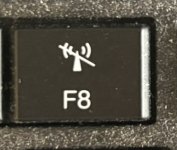
Normally the key in question should have a little picture on it depending on what it’s going to do.
Look for one that looks like a transmitter or an antenna of sorts.


Or, just clean your keyboard again whenever you next want to turn the laptop Wi-Fi on or off :D :D :D
 
Sounds like you've toggled 'airplane mode' on.

That's what the F8 key on my laptop does. Your key might be different, but it will likely have a similar logo on it.

IMG_3326.jpg

If not, then you should be able to turn this on/off using the instructions found here

Hope that helps :thumb2
 
You may even have a WiFi switch on the side of the laptop, check there too.

Good luck
 
Just checked and F12 is an Aeroplane key and yes that could be the issue there is no Wifi switch on the side thank you very helpful


Back
Top Bottom