wireless problem

  • Thread starter Thread starter fleetwood
  • Start date Start date

fleetwood

Guest
Hi all wondered if some one could assist me with a problem I'm having wiv me laptop wireless set up. My original system which worked fine was my home PC connected to a modem wireless router thingy by a cable and the laptop has a wireless connection to the router (the laptop has a built in wireless card ) My problem started when I had to replace the router after it developed a fault,as it was still under warranty the same unit was replaced. When installed and after telling it what country it was in etc. the P.C. connected to the Internet no problem however the laptop wouldn't although I suspect it is connecting to the router as it tells me that signal strength is excellent but when I try to get on the net I get the server not found page I have checked that my ISP user name and password are OK. I have shut down zone alarm etc. but still no joy

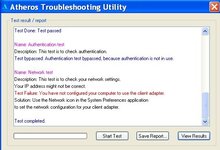
The new router came bundled with a usb wireless dongle thing and it works fine on the laptop, I have uninstalled and reinstalled the laptop wireless software still nowt. When I run the diagnostics it tells me this :nenau
 

Attachments

  • diagnostics.JPG
    diagnostics.JPG
    109.7 KB · Views: 93
If, as suggested, your IP address is incorrect you need to open Network Connections and right click on the Wireless Network Adaptor.

Scroll down in the box to select Internet Protocol (TCP/IP) and click Properties

Make sure that the option Obtain an IP address Automatically is selected, then try again.

Iain
 
I don't understand why you're using the wireless 'dongle' on the laptop as it has it's own built-in wireless capability, so it's probably causing confusion when plugged in. The 'dongle' would be better off in your PC so you could run it wirelessly if you wanted, instead of via the Router's LAN cable.

You could also configure your system with the Windows WZC utility instead of the Atheros one (is it a Toshiba laptop perchance ? ).
 
Iain Hogg said:
If, as suggested, your IP address is incorrect you need to open Network Connections and right click on the Wireless Network Adaptor.

Scroll down in the box to select Internet Protocol (TCP/IP) and click Properties

Make sure that the option Obtain an IP address Automatically is selected, then try again.

Iain

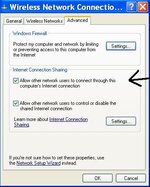
Hi Iain thanks for the advice and pointing me in that direction couldn't find the (TCP/IP) but did find this, after ticking the box things now back to normal cheers
:clap
 

Attachments

  • control panel 2.JPG
    control panel 2.JPG
    36.3 KB · Views: 47


Back
Top Bottom