2017.10 Map Update - not finding SD card ?

Have you tried a hard reset on the device after saving your routes & favourites? Then reformat the card again & empty the trash. Reinstall maps to device & computer? Using a data USB lead?
 
Have you tried a hard reset on the device after saving your routes & favourites? Then reformat the card again & empty the trash. Reinstall maps to device & computer? Using a data USB lead?

Hard reset in terms of keeping power button pressed until it finally restarts and puts up the warning message ? Done that.
GE is up to date.
Not sure how you could install maps without the USB lead ?
 
I think hard reset is power the device off first (not sleep) then power button & lower right of screen together. Save anything bar the maps you want to keep first. I believe power button only is soft reset.
 
Seem to recall having problems with this update with symptoms that others have described.
I have a 390, a car Garmin and a Virb camera. Detection of each is randomly problematic.
I suspect that choice of cable is critical to allow the shitty software to be happy enough to play ball.
 
Me? I'd just put a fresh news SD card into the device and see if that worked. If it did, I'd be happy. Then, when the map update was complete, I'd transfer all the music over to the new card. Actually, I wouldn't as I don't do noise / sound / voice when riding but each to their own.

I'd then take the old card, clean / wipe it properly and keep it safe for next time.
 
Me? I'd just put a fresh news SD card into the device and see if that worked. If it did, I'd be happy. Then, when the map update was complete, I'd transfer all the music over to the new card. Actually, I wouldn't as I don't do noise / sound / voice when riding but each to their own.

I'd then take the old card, clean / wipe it properly and keep it safe for next time.

Done that, didn't recognise it.
 
I'll have a go with hard reset tonight. Straight forward to copy off favourites I assume ? I think base camp does that from memory
 
A couple of questions and maybe suggestions. have you updated the maps on the mac and are they installed on it,check this, can you use them do they work in base camp. have you transfered them to the card and are they there, check this. if you can see the maps on the mac and can actually use them on the mac i would presume the download to the mac was ok, check that the maps are actually on the card you should have a large image file of around 4gb or bigger, if the update is on the card you may have a problem with the card or the unit. if not try to install it using a card reader and have the software set the card in the reader as destination for the update. also ensure you have the correct usb lead there are different types, you can have a lead that just charges or a lead that does not charge but will send and recieve data, and a lead that will do both.
 
I'll have a go with hard reset tonight. Straight forward to copy off favourites I assume ? I think base camp does that from memory

Right click on the favourite from the connected device, think you will get the option to copy. You could also just drag & drop them into a new smart folder. This folder option is on the toolbar
 
A couple of questions and maybe suggestions. have you updated the maps on the mac and are they installed on it,check this, can you use them do they work in base camp. have you transfered them to the card and are they there, check this. if you can see the maps on the mac and can actually use them on the mac i would presume the download to the mac was ok, check that the maps are actually on the card you should have a large image file of around 4gb or bigger, if the update is on the card you may have a problem with the card or the unit. if not try to install it using a card reader and have the software set the card in the reader as destination for the update. also ensure you have the correct usb lead there are different types, you can have a lead that just charges or a lead that does not charge but will send and recieve data, and a lead that will do both.

Mac is fine, GE is happy to place them on the computer. I've checked and they work fine.

The issue is GE not recognising the SD card installed in the Nav V. It knows that it doesn't have enough space on the Nav and suggests using an SD card.....but when it looks for a card, it can't find it.

The card is fine - I can install the maps on there via MapInstaller (from Garmin)....then see the files on the SD card ok......but the Nav V does not recognise them - it continues to refer to the 2016.3 files on the Nav V itself.

So it looks like the Nav V can't see the SD card at all......but is happy to play MP3 files from it.....and worked fine this morning. It appears it's just map files on the card it's struggling with.

This is the first time I've had to try and put a map on an SD..
 
The fact that you can actually play your music files off the card, would seem to prove your unit is indeed seeing the card, but not seeing the map, now i am not familiar with mac stuff so some one may have to confirm this, on your sd card there should be a folder called garmin and in this should be a file called gmapsup1.image and another called gmapsup1.unl they are the two you need for the map to work, there may also be in that folder another folder called gpx and maybe one called jvc. can you confirm this.

 
The fact that you can actually play your music files off the card, would seem to prove your unit is indeed seeing the card, but not seeing the map, now i am not familiar with mac stuff so some one may have to confirm this, on your sd card there should be a folder called garmin and in this should be a file called gmapsup1.image and another called gmapsup1.unl they are the two you need for the map to work, there may also be in that folder another folder called gpx and maybe one called jvc. can you confirm this.

I think GPX files are GPS Exchange format files - just GPS information to swap between devices.

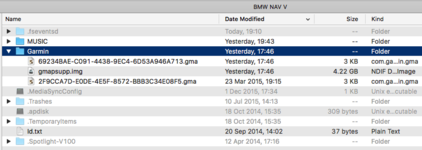
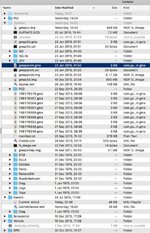
I've attached images of what I've got in the GARMIN (NAV V) and BMW NAV V (the SD card).

Their are map files in both, on the Nav V (GARMIN screenshot), they're in the .SYSTEM folder. on the SD card (BMW NAV V) they are in a folder called Garmin.

I think I'm going to try and complete restore - I think the NAV V has got its knickers in a twist and just wont, for whatever reason, find the SD card in connection with Maps. However - I need it to work at the weekend so will wait till after that..

Thanks for all the tips and advice. I've also raised a ticket with Garmin.

I'll be back with the outcome....
 

Attachments

  • Snip20160803_6.jpg
    Snip20160803_6.jpg
    109.7 KB · Views: 356
  • Snip20160803_5.png
    Snip20160803_5.png
    85.7 KB · Views: 365
like i say i dont know much about the mac format, but having a quick look, the top section is your card with your music folder and your garmin folder and with what appears to be the map img file and 1 old unlock file and a later one. and the bottom section is your nav drive with your old map set and all the rest of the files that should be there. I would say to me that looks about right. the only thing i am unsure of is the size of the file on the card and in the unit, i was sure the maximum file size for fat32 was 4gb and as you can see both are bigger, it may be worth asking garmin the question over this, and send them the screen grab.


Back
Top Bottom