Basecamp / Nav V Map Update/Route Issue

Becksy

Active member
UKGSer Subscriber
Joined
Jun 14, 2016
Messages
355
Reaction score
8
Location
UK
Have used Basecamp and my Nav V for years, mostly fine. Updated my maps recently and been planning a route for tomorrow on Basecamp, all good. First time planning a route this year and since updating the maps.

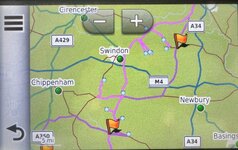
Transferred it to the Nav Unit and it routes completely differently, adds about 80 miles and all straight lines, not following roads. It is like the map or the route is in the wrong place on the Nav. If I zoom in all the route lines are straight. Yet the map is there on the SD card and the route is also on the Nav.

I used Garmin Express to update the maps, which doesn't ask you where you want to save the maps. It appears there are 2 versions of the map on my device, both on the SD card, one in SD Card/Map and one in SD Card/Garmin. But if I look at installed maps on my device, it has Europe North and South, but doesn't state the location where the maps are.

I could try copying the maps from the SD card to the device memory, but not sure that would help or worried about making a mess of it. But also there is not enough space.

Any advice greatly appreciated.
 
Last edited:
PS. I have reinstalled maps, reset the device, deleted all user data etc, started again and still not luck.
 
Are you on a Windows machine?? First check if the maps are installed correctly on your unit go to Settings> map & Vehicle > myMaps (I haven't got a NAV5 it might be Settings>Map>Mapinfo on it) and check what maps are installed. It should be CN Europe NTU 2026.10 All North and CN Europe NTU AllSouth if its the latest maps. If there is anything else ticked on Mapinfo or mymaps untick it and try again.

If it's something else like 2025.20 or a mixture......something is corrupted. If so get a clean SD card <32GB formatted to Fat 32 don't use an SD card >32GB as it will format to exFat by default and the Nav 5 won't be able to see it in any case. Attach the NAV 5 to the PC and run Garmin express (do not run basecamp at the same time as it and express don't get on) Run map update on Express and if it says that an SD card is required to load the maps insert your new SD cardd. If there is not enough space on the unit it should install the maps on your new SD card. To verify what maps you have installed go to map info/ mymaps again and check. Good luck!
 
Are you on a Windows machine?? First check if the maps are installed correctly on your unit go to Settings> map & Vehicle > myMaps (I haven't got a NAV5 it might be Settings>Map>Mapinfo on it) and check what maps are installed. It should be CN Europe NTU 2026.10 All North and CN Europe NTU AllSouth if its the latest maps. If there is anything else ticked on Mapinfo or mymaps untick it and try again.

If it's something else like 2025.20 or a mixture......something is corrupted. If so get a clean SD card <32GB formatted to Fat 32 don't use an SD card >32GB as it will format to exFat by default and the Nav 5 won't be able to see it in any case. Attach the NAV 5 to the PC and run Garmin express (do not run basecamp at the same time as it and express don't get on) Run map update on Express and if it says that an SD card is required to load the maps insert your new SD cardd. If there is not enough space on the unit it should install the maps on your new SD card. To verify what maps you have installed go to map info/ mymaps again and check. Good luck!
Hi, thanks for the reply.

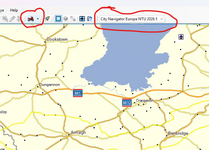
I am using a Mac, with City Navigator Europe NTU 2026.1 installed on the Mac. (along with Global Map 2.0)

The Nav has installed:
CN Europe NTU 2016.10 All South
CN Europe NTU 2026.10 All North
Europe DEM
CN Europe NTI 2026.10 Basic 3D

The route preferences between the two are the same.

I have unticked the last two. Same problem.

What I have noticed when importing the route into the Nav, is that it doesn't seem to calculate the route at that point. What would normally happen after you state import is that you would get a % number to indicate import completion, that must be the Nav calculating the route as it imports. That is not happening.

So if I force a recalculation of the route, then the route snaps to the roads and its approx distance is the same, though the time is way off, 2 hrs out.

I think it is a route calculation problem, but no idea why that is happening.
 
Ok, are your Basecamp and nav route preferences the same. Are any of the roads on the route motorways or dual carriageways, are the waypoints or via points exactly on the roads and the right carriageway. In Basecamp do you have the current maps in your unit ticked for route planning?

Was the route completely planned by you on Basecamp or imported from other route planning software? These are some of the issues that can trigger odd behaviour.
 
I had, shall we say a near meltdown, the evening before a massive trip when downloading the routes from Basecamp to Nav. The Nav routes looked different. My Basecamp and Nav settings were the same but because I’d updated maps that same evening prompted by Express I had to select make Nav match computer route when importing. Something like that.
 
It’s a long time since I have used BaseCamp (I was a big user and fan) and indeed since I have fired up my Mac.

Straight lines and odd routing (going back up and down roads) was most usually caused by:

A. A misfit between the maps on the device and the maps used to create the route. In short, the device didn’t have enough ‘knowledge’ to be able to snap the magenta line onto known roads. The straight lines are simply its attempts to join points A to B to C as best it can.

B. Badly placed points. This can be down to user error or where a route comes from a third party or was itself created from a track or in software outside of Garmin. In short, a host of possibilities.

Me? I’d go back to the route on BaseCamp on the Mac and recalculate it. You can do this several ways, including the mode of travel.. Basically, you asking the powerful Mac to redraw it and insert lots of invisible shaping points. Then get the route so you are happy with what you see looking at the Mac’s screen. Then ensure the maps on the Mac match those on the device and that the device’s maps are fully installed and active. Then see what happens when you send the route to your device, activate it and view it.

PS If you can share the route here on the forum, I’m sure someone will have a look at it, too. More often than not, it’s the easiest course of action.
 
Last edited:
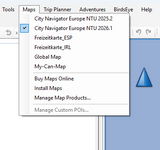
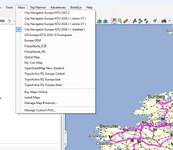
This needs to match the maps on the unit or you use the maps on the unit.

1742550471149.png

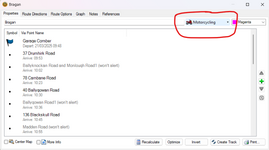
Also the route must match the universal setting in route properties.

1742550652372.png

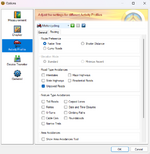
These settings should match the settings on your unit.

1742550801286.png

Like Wapping I suspect badly placed shaping points/waypoints. Not all maps have roads in the same place :D
 
You must understand that when you send a gpx file to your nav device , it only contains a list of waypoints .
It does not really contain a route as you would like .
The route is a calculation that is ONLY then done by your nav device
Trouble starts when the initial waypoints have coordinates that do not match the maps on your device
Your device calculates its own interpretation of the route from that list of waypoints .
 
Force the route to recalculate on your Nav V this usually resolves the issue.

Go into the Route on your Nav V by selecting it in Apps - trip planner - select route - in the top LHS select 3 bars -scroll down to route preference - change to shorter distance - once recalculated - back arrow check the Map in RH pane, this should remove any straight lines and your route should look exactly as you intended.

Then do the same again in the top LHS select 3 bars -scroll down to route preference - change back to Faster time.

When you switch it back to faster time the route stays corrected. Yes its a faff but it does fix it and only takes a minute.
 
Last edited:
I created the route myself in Basecamp. all my settings match, all the waypoints and shaping points are correctly placed, I always check these. As said above the maps match, but also as said above I think the issue is, for some reason, the nav when importing doesn’t calculate the route, it just joins up all the waypoint and shaping points with straight lines.

Also, as above, I forced the route to recalculate on the device changing to curvy route, this created the route that looked roght, I then changed it back to fastest route (as calculated on Basecamp with the same avoidances) and it looked right. I used the route today and it ran as it should.

Just really weird that this import problem has started. As I had reset the device and deleted all routes, I also imported some old routes that had previously imported fine, and they were off as well.

Something must have changed on the nav but don’t know what. Anyway, there is that recalculate workaround, a mild inconvenience.

========

I have edited this post, creating a fresh thread to address the “Should I ditch the Nav V?” question.

Richard

 
Last edited by a moderator:
Further to Post 11.

I tried to recreate the problem today so I could share screenshots of the route in Basecamp and the route in the Nav to show the difference. But lo and behold it imported correctly. No idea why or what has changed.

I then checked the transfer settings and changed a few of those to see if I could still recreate the issue (what a fool), it said SD card, changed it back to Navigator and the problem reoccured. So attached here is the route as displayed in Basecamp.

I have found another thread on here from 2022 which describes the exact same problem as I had:-


I have been experimenting with the settings (as described in the above thread) and have not been able to recreate the correct transfer, it is now always transferring incorrectly. I am totally mystified as to what is going on after 10 years of not having this problem.

One thing I noticed, in the transfer settings you can select SD Card or the Nav (mine is set as SD card, cannot remember when I set that), and tick 'always match the route'. I have that ticked and always have had. However, when you click "send to the device", these is also an option to "select your Garmin device", and the choice is the Nav or the SD card. This is set to Nav, even though in options I have selected SD card, if I change this to SD Card, it doesn't make any difference.

I am going to re-read the above thread. I know the device and Basecamp are probably doing what they are technically asked, but as someone said there, why do Garmin make this overly complicated. I think I will also delete all routes and all waypoints etc from device and reinstall the maps yet again.

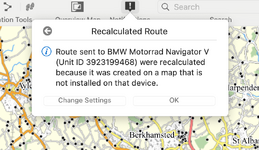
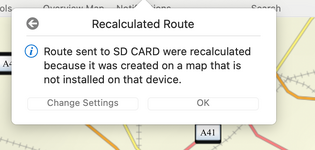
Also, this morning I noticed this alert in Basecamp, which seems to be the same issue as the other thread. I get that alert whether I transfer the route to the Nav or the SD Card. So it looks like Basecamp is not recognising what is on the Nav. Not sure from that though how to solve this at the moment.
 

Attachments

  • route transferred to Basecamp.jpeg
    route transferred to Basecamp.jpeg
    331.3 KB · Views: 8
  • Basecamp Alert.png
    Basecamp Alert.png
    394.2 KB · Views: 7
  • Basecamp Alert 2.png
    Basecamp Alert 2.png
    163.4 KB · Views: 8
Last edited:
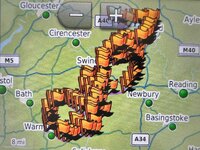
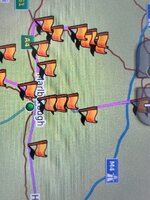
Reinstalled maps on my Nav and now get this with load of waypoints! The zoomed in version shows that the route underneath which is still straight lines with lots of spurs. The distance and time are different to the previous version, fewer miles, but longer time.

Have also tried to reinstall the maps to my Mac, and am getting an error message from Garmin Connect but it doesn't give an explanation as to what the error is. Maybe I have to uninstall and reinstall Basecamp, but don't want to lose all my previous routes.

Have also tried an old Mac that I have knocking around with an older set of maps (2022.2) and the problem is the same. Totally befuddled.
 

Attachments

  • IMG_6028.jpeg
    IMG_6028.jpeg
    557.3 KB · Views: 7
  • IMG_6029.jpeg
    IMG_6029.jpeg
    406.4 KB · Views: 5
Last edited:
The recalculated route message above is because the map in Basecamp is different than the on the device. So if you have 2025.2 on your mac and 2026.1 on the device it will want to recalculate the route on the device to match the map that is installed on the device. It looks like you may not have loaded 2026.1 to your MAC? On windows machines you have to manually clear out the old Garmin mapping and/or select the map that you want to use (not sure if this is the same for Macs?) Last summer my cousin used my XT in Canada and for plotting his routes we ticked the My-Can-Map which was installed on an SD card in my XT for route planning on Basecamp. I always keep the last map version from Garmin on my computer. I'm not sure why :D

1742650702022.png
 
If you have your device connected you also get the choice of using the maps on the device. Which is one way of ensuring that you are using the same maps but its much slower than running the maps from the PC.

1742651625954.png
 
The recalculated route message above is because the map in Basecamp is different than the on the device. So if you have 2025.2 on your mac and 2026.1 on the device it will want to recalculate the route on the device to match the map that is installed on the device. It looks like you may not have loaded 2026.1 to your MAC? On windows machines you have to manually clear out the old Garmin mapping and/or select the map that you want to use (not sure if this is the same for Macs?) Last summer my cousin used my XT in Canada and for plotting his routes we ticked the My-Can-Map which was installed on an SD card in my XT for route planning on Basecamp. I always keep the last map version from Garmin on my computer. I'm not sure why :D

View attachment 394526

Yes, I have the same maps on the nav and on my Mac. All 2026.1 on both devices. I can see all the maps and know I can switch between them from Basecamp. It’s only on my old Mac that I have old maps, I don’t use this anymore, only used it as a test case. Must be that Basecamp is not recognising that I have the correct maps installed on the device.
 
Last edited:
Yes, I have the same maps on the nav and on my Mac. All 2026.1, and yes I can see all the maps and know I can switch between them from Basecamp. It’s only on my old Mac that I have old maps, I don’t use this anymore, only used it as a test case.
I think I'd maybe try a freshly formatted (New) SD card as Garmin devices can be a bit funny with cards that are even mildly corrupted or have residual info from old installations. Does seem a bit odd! Good luck.
 
I think I'd maybe try a freshly formatted (New) SD card as Garmin devices can be a bit funny with cards that are even mildly corrupted or have residual info from old installations. Does seem a bit odd! Good luck.

Yes, I’ll definitely give that a crack, thanks for your help.
 
The recalculated route message above is because the map in Basecamp is different than the on the device. So if you have 2025.2 on your mac and 2026.1 on the device it will want to recalculate the route on the device to match the map that is installed on the device. It looks like you may not have loaded 2026.1 to your MAC? On windows machines you have to manually clear out the old Garmin mapping and/or select the map that you want to use (not sure if this is the same for Macs?) Last summer my cousin used my XT in Canada and for plotting his routes we ticked the My-Can-Map which was installed on an SD card in my XT for route planning on Basecamp. I always keep the last map version from Garmin on my computer. I'm not sure why :D
My experience, too.
I use BC a lot, quite like it, but it seems to be a continual work-in-progress with Mac devices.
 
I had, shall we say a near meltdown, the evening before a massive trip when downloading the routes from Basecamp to Nav. The Nav routes looked different. My Basecamp and Nav settings were the same but because I’d updated maps that same evening prompted by Express I had to select make Nav match computer route when importing. Something like that.
:ROFLMAO: I was on the ferry to Spain about to spend relaxing hour or two plotting some routes when I discovered that I no longer had South Europe on my NAV V after a pre trip update so Spain wasn't a country option. Had Slovenia. :ROFLMAO::ROFLMAO:



Back
Top Bottom