2 and a bit years - so out of warranty. However, I might try the old faithful "Consumer Rights 2015" - not fit for purpose, blah blah. I'll give a windows machine a go as well.


You are using an out of date browser. It may not display this or other websites correctly.
You should upgrade or use an alternative browser.
You should upgrade or use an alternative browser.
2017.10 Map Update - not finding SD card ?
- Thread starter Flipper_Man
- Start date

iand46
Registered user
I think it's a Mac / Garmin problem.
As I say I switched to a Windows PC and it all worked immediately.
So I suspect that Garmin express is broken with a recent Mac OSX update or something like that.
Especially as the SD card can be seen in OSX and written to.
If you have a Windows PC lying around try that.
Don't forget the device won't accept a hard reset. Unrelated to computer type.
So....plugged it into Windows machine, updated Garmin Express.....it recognises the SD card just fine and is now downloading the maps onto that !
I'll go back to Garmin and suggest their testing of their Mac software is pathetic.....
Looks like its Windows machine for updates for the moment.....which doesnt bode well as the only windows machine I have looks after the security cameras.
I'll go back to Garmin and suggest their testing of their Mac software is pathetic.....
Looks like its Windows machine for updates for the moment.....which doesnt bode well as the only windows machine I have looks after the security cameras.
iand46
Registered user
It's puzzling as there's quite a few bods on here using Mac's without issues with their Nav V's. At least you've hopefully got the maps sorted.
Stranger still that the hard reset didn't seem to work. I always do a reset after installing updates following advice from the Zumoforum
Check out this vid for this similar device to see it in action
https://m.youtube.com/watch?v=W9sF-BR9XAY
Stranger still that the hard reset didn't seem to work. I always do a reset after installing updates following advice from the Zumoforum
Check out this vid for this similar device to see it in action
https://m.youtube.com/watch?v=W9sF-BR9XAY
Ok, that's interesting, I was letting go of the power button before it the screen flickered etc. Once its downloaded on the Windows machine (awful internet connection from home) - I'll give that ago. Might end up being user error...on the restart.
iand46
Registered user
I don't think you have to keep pressing the power button, just the lower right screen till it flickers
New maps all installed fine....via Windows machine....
Will have a play with resetting tomorrow..
Will have a play with resetting tomorrow..
Complete user error.....I wasn't holding the bottom corner of the screen long enough, about 25seconds in my case.
Even resetting didn't help it find the SD card. Had to use a Windows machine in the end. Borrowed a spare unit from dealer and that all fit on the main unit so unsure as to whether it recognised SD card. Following a reset - it now complains that it won't fit on main unit....but doesn't offer he option of even looking for an SD card. I give up. Garmin have asked me to call their support line and talk it through with their guys.....but that's going to be another hour which I don't have at the moment so it'll have to wait.
Anyone else experience this pain or is it just me !
Anyone else experience this pain or is it just me !

What nav are we now talking about, the loan unit or your one, your posts are a little confusing. i will presume you have the complete maps installed on your Mac, if so have you tried using map install to see if you can see your card using that. and if so install the maps via that method. link to map install below, try this and report back.
https://www8.garmin.com/support/download_details.jsp?id=3825
https://www8.garmin.com/support/download_details.jsp?id=3825
Nav V SD card not recognised on Map install
Ok, let me recap and be clearer.
Unit 1 = my Nav V
Unit 2 = BMW North Oxford's Nav V
Unit 1
At the beginning of this post (beginning of August), I was attempting to upgrade map using Garmin Express on a Mac (version 4.1.27.0). It was coming back saying not enough space on main unit, would I like to use an SD card or smaller maps. When I chose SD card....it wasnt recognising the SD card in the Nav. Number of posts about the SD card, size, formatting etc etc - all concluded that it wasn't the actual SD card as same happened with replacement cards etc. Then had a go with a Windows machine and it worked fine, ie it found the SD card and installed the maps onto that. SO - we're all good with Windows but wanted it working on Mac. Back to the Mac machine - now tried on a different mac to see if that made a difference (MacMini rather than my MacBook Pro). Same Garmin express software etc and now I've reset the Nav V (few posts about me not doing that right and finally resetting properly). The issue I am NOW getting with Unit 1 is that its telling me there's not enough space on the computer.....but not offering me the option to put smaller maps or put on an SD Card ?! I've had a look at Garmin MapInstall, it recognises both the unit memory AND the SD card....but doesn't think there's an unlocked map in either. Garmin MapManager is similar - doesnt recognise any maps. I DON'T have the map on this latest Mac (for BaseCamp to use) and that's what I'm ideally also trying to achieve.
Unit 2
Borrowed this from BMW North Oxford for a little troubleshooting. Reset it. Plugged into same computer and updated maps.....but it was able to 'fit' the new maps on the internal memory of the unit - so I couldnt tell if it was suffering from same as my unit ie not identifying the SD card. Went back yesterday to try and install maps again - to see if it would give me the option to install the map onto my computer as well....and its now behaving like Unit1, ie NOT offering the ability to install smaller maps or use SD card.
Frustrating thing...I've been in IT all my career and consider myself quite technically minded when coming to stuff like this ! Can't see why the software is behaving differently - seemingly each time I use it !
Next steps - I'm going to try again with my MacBook and see how it behaves then.
What nav are we now talking about, the loan unit or your one, your posts are a little confusing. i will presume you have the complete maps installed on your Mac, if so have you tried using map install to see if you can see your card using that. and if so install the maps via that method. link to map install below, try this and report back.
https://www8.garmin.com/support/download_details.jsp?id=3825
Ok, let me recap and be clearer.
Unit 1 = my Nav V
Unit 2 = BMW North Oxford's Nav V
Unit 1
At the beginning of this post (beginning of August), I was attempting to upgrade map using Garmin Express on a Mac (version 4.1.27.0). It was coming back saying not enough space on main unit, would I like to use an SD card or smaller maps. When I chose SD card....it wasnt recognising the SD card in the Nav. Number of posts about the SD card, size, formatting etc etc - all concluded that it wasn't the actual SD card as same happened with replacement cards etc. Then had a go with a Windows machine and it worked fine, ie it found the SD card and installed the maps onto that. SO - we're all good with Windows but wanted it working on Mac. Back to the Mac machine - now tried on a different mac to see if that made a difference (MacMini rather than my MacBook Pro). Same Garmin express software etc and now I've reset the Nav V (few posts about me not doing that right and finally resetting properly). The issue I am NOW getting with Unit 1 is that its telling me there's not enough space on the computer.....but not offering me the option to put smaller maps or put on an SD Card ?! I've had a look at Garmin MapInstall, it recognises both the unit memory AND the SD card....but doesn't think there's an unlocked map in either. Garmin MapManager is similar - doesnt recognise any maps. I DON'T have the map on this latest Mac (for BaseCamp to use) and that's what I'm ideally also trying to achieve.
Unit 2
Borrowed this from BMW North Oxford for a little troubleshooting. Reset it. Plugged into same computer and updated maps.....but it was able to 'fit' the new maps on the internal memory of the unit - so I couldnt tell if it was suffering from same as my unit ie not identifying the SD card. Went back yesterday to try and install maps again - to see if it would give me the option to install the map onto my computer as well....and its now behaving like Unit1, ie NOT offering the ability to install smaller maps or use SD card.
Frustrating thing...I've been in IT all my career and consider myself quite technically minded when coming to stuff like this ! Can't see why the software is behaving differently - seemingly each time I use it !
Next steps - I'm going to try again with my MacBook and see how it behaves then.
Attachments
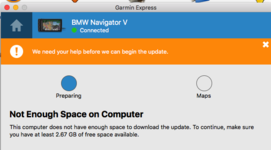
ok - first thing I've noticed going back to my MacBook is that the version of Garmin Express on there is 4.1.26 ! Looks like there's been a new version of Garmin Express ! This version IS offering me the option to install smaller maps or SD card....but, again, not finding the SD card when I take that option.
Also had a quick look at my Windows machine, and the version of Garmin Express on there is different again (not surprising as its a different operating system) at 4.1.25 - looks like the latest version for windows is 4.1.27 so they look to be keeping their version numbers in synch (4.1.27 is the latest version for Mac OS as well). So I wont be updating the Windows Garmin Express just yet....as that's the only bloody one that works ! (for me)
Also had a quick look at my Windows machine, and the version of Garmin Express on there is different again (not surprising as its a different operating system) at 4.1.25 - looks like the latest version for windows is 4.1.27 so they look to be keeping their version numbers in synch (4.1.27 is the latest version for Mac OS as well). So I wont be updating the Windows Garmin Express just yet....as that's the only bloody one that works ! (for me)
i dont understand how you are able to use the maps downloaded for your unit on the loan unit, i thought they were device locked. or are you using different maps. Sorry but this is all a little confusing you say Quote (The issue I am NOW getting with Unit 1 is that its telling me there's not enough space on the computer) was this the first mac or the second mac or the windows machine.
Quote (I've had a look at Garmin MapInstall, it recognises both the unit memory AND the SD card....but doesn't think there's an unlocked map in either) is this because you have a locked map selected in basecamp, or have not selected an unlocked map, you are trying to explain so many scenario's that i am struggling to follow this.
on the mac thats telling you there is not enough space to install maps onto the mac, why is this have you no room on the hdd, can you not remove some stuff. if map install can see the unit and sd card and the map you are trying to install is unlocked it will install it, but you say its locked, iff this is so you would not be able to install it on any device.
Post a screen shot of basecamp showing your maps and there locked and unlocked status, without the codes listed of course.
Quote (I've had a look at Garmin MapInstall, it recognises both the unit memory AND the SD card....but doesn't think there's an unlocked map in either) is this because you have a locked map selected in basecamp, or have not selected an unlocked map, you are trying to explain so many scenario's that i am struggling to follow this.
on the mac thats telling you there is not enough space to install maps onto the mac, why is this have you no room on the hdd, can you not remove some stuff. if map install can see the unit and sd card and the map you are trying to install is unlocked it will install it, but you say its locked, iff this is so you would not be able to install it on any device.
Post a screen shot of basecamp showing your maps and there locked and unlocked status, without the codes listed of course.
i dont understand how you are able to use the maps downloaded for your unit on the loan unit, i thought they were device locked. or are you using different maps. Sorry but this is all a little confusing you say Quote (The issue I am NOW getting with Unit 1 is that its telling me there's not enough space on the computer) was this the first mac or the second mac or the windows machine.
Quote (I've had a look at Garmin MapInstall, it recognises both the unit memory AND the SD card....but doesn't think there's an unlocked map in either) is this because you have a locked map selected in basecamp, or have not selected an unlocked map, you are trying to explain so many scenario's that i am struggling to follow this.
on the mac thats telling you there is not enough space to install maps onto the mac, why is this have you no room on the hdd, can you not remove some stuff. if map install can see the unit and sd card and the map you are trying to install is unlocked it will install it, but you say its locked, iff this is so you would not be able to install it on any device.
Post a screen shot of basecamp showing your maps and there locked and unlocked status, without the codes listed of course.
1. Havent used my maps on Unit2. In Unit2 explanation I say "Reset it. Plugged into same computer and updated maps" ie it worked fine and fitted the new map update on internal memory of Unit2
2. "The issue I am NOW getting with Unit 1 is that its telling me there's not enough space on the computer" - should have read 'no enough space on the NavV internal memory' NOT computer (my typo)
3. Garmin MapInstall - Its not showing ANY maps found. There are NO maps installed on the MacMini HDD for basecamp to use (as I say - that's what I'm also trying to achieve).
To summarise - I mean the Nav V memory - there's nothing wrong with available space on MacMini HDD.
No point in showing screenprint of Basecamp.....because there's nothing to show - no maps !
The whole issue revolves around Garmin Express not recognising the SD card and that the latest version of Garmin Express doesnt appear to offer me alternatives either - ie is not offering to install smaller maps or put on SD Card..
So if i read this right you have no maps on any of your pc or macs, if this is correct, and you dont mind me asking, why would you not have them installed on your pc/macs, you could then transfer them to your device using map install, and eleviate the issue with express, i know this does not fix the problem but would at least give you an option to install to the sd card, that you do not have wth express.
I DO have the map on my MacBook and yes, could transfer it from there to the Nav. However, I want it on my MacMini (to use with Basecamp on there) and also want it to work from Garmin Express. My fallback options are using the MacBook (but dont know how I would get an updated version when the next one comes out....as it has to come from Express ?) or use the Windows machine.
Do you know whether you can transfer the map, held on the MacBook, onto the MacMini ? Or does Garmin insist that you can only download new maps from Express and install on Basecamp that way ?
Do you know whether you can transfer the map, held on the MacBook, onto the MacMini ? Or does Garmin insist that you can only download new maps from Express and install on Basecamp that way ?
Not sure with a Mac but you can with a Windows PC to a Windows PC. I ca not see a reason why it should not work, try googling it.
I've screwed up...
I've been burying my head in this trying to resolve why Express is no longer giving me the choice....and I havent been actually reading the message it puts on the bloody screen. The screendump above DOES say that I dont have enough space on my computer NOT the SatNav. I just wasnt reading it and comprehending ! So...I'm clearing some space from my MacMini HDD to see if this new version of software does give me choice to put smaller maps or onto SD again. I think it'll put me right back to the position I was earlier though - it not recognising there's an SD card in the NAV.
I'll google swapping maps over from one machine to another. I did take a little look earlier but didnt see anything particularly promising - hence my query here.
I've been burying my head in this trying to resolve why Express is no longer giving me the choice....and I havent been actually reading the message it puts on the bloody screen. The screendump above DOES say that I dont have enough space on my computer NOT the SatNav. I just wasnt reading it and comprehending ! So...I'm clearing some space from my MacMini HDD to see if this new version of software does give me choice to put smaller maps or onto SD again. I think it'll put me right back to the position I was earlier though - it not recognising there's an SD card in the NAV.
I'll google swapping maps over from one machine to another. I did take a little look earlier but didnt see anything particularly promising - hence my query here.
Ok, so I cleared the space and I'm back to square 1 - its offering me the choice of sticking them on an SD card or smaller maps but not recognising the SD card in the Nav V. Neither option offers (at this stage) to just download to the computer.
On the other issue - trying to copy across the map I DO have on my MacBook (for use with Basecamp) to my MacMini - GOOD news - I found a little program that copies them over for you:
http://www.javawa.nl/download.script/software=JaVaWa GMTK&lang=en
On the other issue - trying to copy across the map I DO have on my MacBook (for use with Basecamp) to my MacMini - GOOD news - I found a little program that copies them over for you:
http://www.javawa.nl/download.script/software=JaVaWa GMTK&lang=en
Flipper Man if i was you, i would be walking away from it for a while, its looking like you cant see the wood for the trees if you get my meaning.
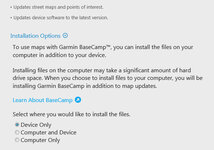
why cant you just install the maps to the mac's do you not have an options menue to select install to device only or computer only or both. it should look something like this for pc uncertain about mac.
once that is done you are half way there.
why cant you just install the maps to the mac's do you not have an options menue to select install to device only or computer only or both. it should look something like this for pc uncertain about mac.
once that is done you are half way there.
Attachments

Similar threads


