Beeline Moto App

casbar

Well-known member
UKGSer Subscriber
Joined
Feb 29, 2016
Messages
4,555
Reaction score
1,092
Location
Out and about!
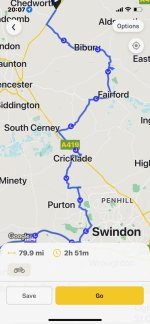
Thinking of purchasing a Beeline Moto 2 to use on my Airhead. Have downloaded the app for a play. Managed to export a gpx file from My Route App and load to the Beeline App. The route is all there, but the only waypoints shown are the start and finish so the others haven't come across. You also can't seem to add waypoints to an imported route. Does anyone know if this is correct, have googled but can't seem to find the info :)
 
Thinking of purchasing a Beeline Moto 2 to use on my Airhead. Have downloaded the app for a play. Managed to export a gpx file from My Route App and load to the Beeline App. The route is all there, but the only waypoints shown are the start and finish so the others haven't come across. You also can't seem to add waypoints to an imported route. Does anyone know if this is correct, have googled but can't seem to find the info :)
have you enabled the way point part in MRA ?

My experience of Beeline was that whilst it worked and certainly allowed the import of GPX all it is ia a slave to your phone so being honest you might as well get a quad lock and use google maps or MRA or any of the other hundreds of Nav apps - many of which are free in some form
 
It seems that the Beeline app is capable of taking in waypoints:


Which leads to:


Note though:

  • This feature is only available in Route Mode on rides that have been planned Route Mode routes that have been set in the Beeline app. Waypoint skipping is not possible on any imported GPX routes/Strava routes in Route Mode. In Compass Mode, this feature will work on all ride types!

How or if the waypoints appear on the handlebar mounted screen is not clear.
 
Last edited:
It seems that the Beeline app is capable of taking in waypoints:


How or if the waypoints appear on the handlebar mounted screen is not clear.
they dont but should show on the phone screen
 
It seems that the Beeline app is capable of taking in waypoints:


Which leads to:


Note though:


How or if the waypoints then appear on the handlebar mounted screen is not clear.
So you can setup waypoints if you sort a route out from scratch in the app. But if I import a route from MRA (tried 1.0, 1.1 and 1.2) it imports the route, but doesn't show any waypoints, other than the start and finish and you can't seem to manually adjust the route once it is imported and add waypoints (talking waypoints not shaping points)


I know I could just mount my phone, but there is nowhere to mount anything, I have a R100CS with the cockpit fairing. I just want to stick the Beeline either on the damper adjuster or possibly on the mirror stem. Currently I just use Waze on the phone in my pocket, but would like to have the confidence I was following the route, rather than going through the silent bits and the uncertainty that Waze was still working.
 
It does look as if the ability to add or amend waypoints, is only available within the phone app itself. It also looks as if the ability to do so, only exists for routes that are created within the phone app ie. not created in say, MyRoute and imported. I have never so much as held a Beeline, so I am only reading between the lines of the blurb.

Just as an aside, does it really matter? Surely, if you want to go to cafe XYZ or location ABC you’ll know when you get there, as youl’ll be able to see it.

I guess one work around would be to break up the route into separate segments. For example:

Route 1, home to cafe

Route 2, cafe to awesome view point

Route 3, awsome view point to tea stop

Route 4, tea stop to hotel
 
Last edited:
So you can setup waypoints if you sort a route out from scratch in the app. But if I import a route from MRA (tried 1.0, 1.1 and 1.2) it imports the route, but doesn't show any waypoints, other than the start and finish and you can't seem to manually adjust the route once it is imported and add waypoints (talking waypoints not shaping points)


I know I could just mount my phone, but there is nowhere to mount anything, I have a R100CS with the cockpit fairing. I just want to stick the Beeline either on the damper adjuster or possibly on the mirror stem. Currently I just use Waze on the phone in my pocket, but would like to have the confidence I was following the route, rather than going through the silent bits and the uncertainty that Waze was still working.
when you import the route from GPX does it give you the exact route you want - I.E including the way points you built into the route on MRA but just not showing them on the beeline app on the phone route ?

I gave up on B line TBH for the reasons I gave earlier and I now use the KTM Ride connect thing - the principle is the same as B line in as much as I get turn by turn only on my dash rather than a separate unit - when I import routes from MRA I do get the way points so have you got the settings in MRA to incorporate the way points segments
 
when I import routes from MRA I do get the way points so have you got the settings in MRA to incorporate the way points segments

It might help the OP if you gave him the specific settings in MyRoute to use or maybe some screenshots.
 
iMDbb4flyVtiuH5szq73P2OiEgFyuNNOtQ.png
Just dodging around on the internet, it does seem that waypoints within imported routes (but they might just be shaping points) should appear on the app, as shown in this link:


I take it that the orange points (shown in the screenshot) are waypoints or shaping points. But….. in the screenshot, the points seem to be connected by straight lines. This might though just be a bad picture or maybe the app is about to recalculate the straight lines into a line that follows the roads?

Is there a Beeline forum or help desk you can approach for help?
 
Last edited:
If Beeline becomes more popular as a navigation device, I’ll have a specific sub-section created for it.
 
when you import the route from GPX does it give you the exact route you want - I.E including the way points you built into the route on MRA but just not showing them on the beeline app on the phone route ?

I gave up on B line TBH for the reasons I gave earlier and I now use the KTM Ride connect thing - the principle is the same as B line in as much as I get turn by turn only on my dash rather than a separate unit - when I import routes from MRA I do get the way points so have you got the settings in MRA to incorporate the way points segments
I've been using MRA for about 10 years, but have only imported routes into my Garmin devices and have never had any issues with Waypoints or shaping points going across. Surely if I export from MRA using either Gpx 1.0, 1.1 or 1.2 then not sure how waypoints coming across is any different to if I save to Garmin Drive. Or is there a different format I should pick to load to Beeline App. I'm not sure what I can do differently :)
 
This video does seem to show way or shaping points coming across from an imported route and being displayed on the Beeline app on a phone:


Compass mode in the Beeline app, seems to be important.
 
iMDbb4flyVtiuH5szq73P2OiEgFyuNNOtQ.png
Just dodging around on the internet, it does seem that waypoints within imported routes (but they might just be shaping points) should appear on the app, as shown in this link:


I take it that the orange points (shown in the screenshot) are waypoints or shaping points. But….. in the screenshot, the points seem to be connected by straight lines. This might though just be a bad picture or maybe the app is about to recalculate the straight lines into a line that follows the roads?

Is there a Beeline forum or help desk you can approach for help?
Mine do not look like that. I have emailed support as well.

This route has round 10 waypoints that went over correctly to my Garmin, but this is how it shows in the Beeline appIMG_4894.jpegIMG_4894.jpeg
 
Indeed, the waypoints seem to be missing in your screenshots.

Have you tried using the ‘Compass mode’ setting?

It’ll be interesting to see how Beeline reply.
 
I have got it to work. Or at least sort of on my iPad, using the free version of the Beeline app.

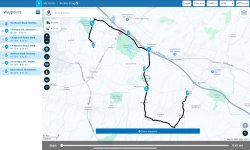
A. I first created a route in MyRoute, To make them standout, I made every other point either a viapoint (hand) or a shaping point (inverted teardrop thing).


IMG_5763.jpeg


B. I then saved the route to my iPad in version 1.1

C. I then imported the route into the Beeline app.

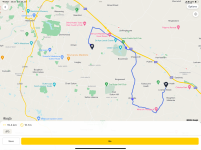
In the first import, I used Beeline’s ‘Route mode’. This brought the route across perfectly, but without the intermediate points:

IMG_5764.png
This would seem to match with the OP’s experience.

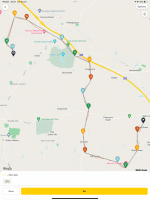
I then changed the Beeline mode to ‘Compass mode’ and imported the route again,

This brought the intermediate points across, but connected by straight lines:

IMG_5765.png

The straight line route would be near enough navigable, I guess.

I also guess it might be because we are using the free version of the Beeline app? Or maybe there is some other setting or mode to use? There again, I have tried fiddling around in the Beeline app and in MyRoute, without any success.

 
Last edited:
I have just noticed that the screenshot in ‘Compass mode’ has many more intermediate points, being 16 versus MyRoute’s five. I am though not convinced that they are in the same place, though I didn’t look that hard.

I assume that the additional 11 must be created by Beeline to fix the Compass (ie. off-road) version of the route into place.
 
Last edited:
I have got it to work. Or at least sort of on my iPad, using the free version of the Beeline app.

A. I first created a route in MyRoute, To make them standout, I made every other point either a viapoint (hand) or a shaping point (inverted teardrop thing).


View attachment 330255


B. I then saved the route to my iPad in version 1.1

C. I then imported the route into the Beeline app.

In the first import, I used Beeline’s ‘Route mode’. This brought the route across perfectly, but without the intermediate points:

View attachment 330256
This would seem to match with the OP’s experience.

I then changed the Beeline mode to ‘Compass mode’ and imported the route again,

This brought the intermediate points across, but connected by straight lines:

View attachment 330257

The straight line route would be near enough navigable, I guess.

I also guess it might be because we are using the free version of the Beeline app? Or maybe there is some other setting or mode to use? There again, I have tried fiddling around in the Beeline app and in MyRoute, without any success.
I’ve had exactly the same results. I have an account, but not a paid subscription. My understanding is a paid subscription is only if you want spoken directions and doesn’t add anymore functionality. I have raised a beeline ticket and will update if I find a solution. Thanks for having a go
 
At least we have the same results, which is something, I guess.

It’ll be interesting to hear what Beeline say.

One thing I am not sure about is that you want to use the Beeline display unit on your bike. Whilst the waypoints may (or may not) display on the Beeline app on your phone, are you sure they will display on the unit itself? If the unit does not display the waypoints or give some sort of alert that you’ve reached the points, how will you know?
 
I thought I would try and create a route in Beeline, save to my desktop and try and load into MRA to see if it works the other way around. I created an 8 mile route, put 3 waypoints on and tried to load. The load failed, got the error message the gpx had over 200 points. I think the conclusion is, the two apps are not compatible. It will be interesting to see what Beeline say. This is not a massive issue, the tracks from MRA are exporting ok, it is just there are no intermediary waypoints visible. I'll try creating a route in a different app and see if that will load


Back
Top Bottom