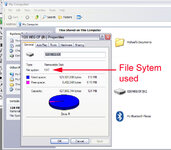
Just a post-script here: CF cards used in the SP 26xx GPSRs need to be formatted with the FAT (File Allocation Table) format, not with the NTFS (NT File System) format, or with any other proprietary file system, such as that used for Apple Macintosh computers, or some digital cameras.
For those of you unfamiliar with computer media file systems, think of it as pre-printed lines on a piece of paper, to guide you when writing on the paper. If your paper has horizontal rules pre-printed on it (like foolscap), or has blank musical scales pre-printed on it, but you want to create engineering sketches and really need a graph paper overlay, then you will have a problem, because your blank piece of paper is not 'formatted' correctly.
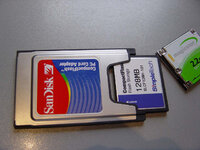
If you have a portable computer that has a PCMCIA slot, the easiest fix is to go buy a PCMCIA adapter that accepts a CF card. These are available for less than ₤10 at any large computer supply store. (See this
link for a photograph of a CF card PCMCIA adapter. Similar devices are available for desktop computers, but installation is a bit more complicated, more than just stuffing it in the empty slot in the side of a laptop).
Put the CF card into the adapter, and stuff the adapter into the side of your laptop. Now, click on "my computer", right-click on the icon for the CF card, and choose "properties" from the drop-down menu. The property sheet that appears will indicate if the card is formatted with FAT or NTFS. If it is not correctly formatted, just right-click again, choose "format", and be sure to select "FAT" as the file system to use.
The PCMCIA adapter for the CF card is worth purchasing even if you don't have formatting problems, because your computer can write the mapsets to the CF card much, much faster (less than half the time) if you have the CF card installed in the the computer, rather than the GPSR connected to the computer with the USB cable. This isn't a big issue with the 128 and 256 meg CF cards, but when you get into 512 meg CF cards, it can take hours to write the mapset to the CF card via the USB cable, as opposed to 20 minutes or so (depending on the speed of your computer's processor) with the CF card adapter.
PanEuropean