CF / 2610 Problem

GSAde

Registered user
Joined
Aug 18, 2002
Messages
373
Reaction score
1
Location
Sheffield,England
I've bought a 512cf card for my 2610 (supplied with 256) when I put the new card in the first screen opens up then immediately goes blank except for a fine line right across the screen. Do I have to do something on the PC to get the PC to "recognise" the new card or something? I'm afraid I'm a bit of an I.T. numpty & hence am stumped.
Oh & the card is a replacement for the first one I bought which I had assumed was faulty, but this one's just the same (brand - Viking Interworks bought from 7dayshop.com)

Any help greatly appreciated (tried Garmin site but no info on there)

Thanks

Ade
 
Adrian:

Tell us if the GPSR works OK when you install the original (smaller) CF card that came with the GPSR when you bought it. Also, tell us if the GPSR boots up OK when you turn it on without a CF card installed in it.

This is the first step in "principles of troubleshooting" - identifying the variable.

If it works OK with a different CF card, or boots up to a normal screen display without a CF card installed, then the problem is likely with your new CF card. If you have the same problem when you start the GPSR up with the original CF card, then the problem is either with the GPSR, or with the formatting or data content of the CF cards.

If it boots up OK without a CF card installed, but gives you a funny display with either of the two CF cards installed, the problem is specific to your CF cards - either formatting, some dirt in the CF card slot that is interfering with the connection, or (least probable) a hardware problem with the GPSR relating to reading the CF cards.

PanEuropean
 
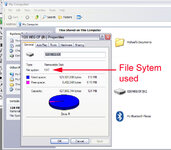
Just a post-script here: CF cards used in the SP 26xx GPSRs need to be formatted with the FAT (File Allocation Table) format, not with the NTFS (NT File System) format, or with any other proprietary file system, such as that used for Apple Macintosh computers, or some digital cameras.

For those of you unfamiliar with computer media file systems, think of it as pre-printed lines on a piece of paper, to guide you when writing on the paper. If your paper has horizontal rules pre-printed on it (like foolscap), or has blank musical scales pre-printed on it, but you want to create engineering sketches and really need a graph paper overlay, then you will have a problem, because your blank piece of paper is not 'formatted' correctly.

If you have a portable computer that has a PCMCIA slot, the easiest fix is to go buy a PCMCIA adapter that accepts a CF card. These are available for less than ₤10 at any large computer supply store. (See this link for a photograph of a CF card PCMCIA adapter. Similar devices are available for desktop computers, but installation is a bit more complicated, more than just stuffing it in the empty slot in the side of a laptop).

Put the CF card into the adapter, and stuff the adapter into the side of your laptop. Now, click on "my computer", right-click on the icon for the CF card, and choose "properties" from the drop-down menu. The property sheet that appears will indicate if the card is formatted with FAT or NTFS. If it is not correctly formatted, just right-click again, choose "format", and be sure to select "FAT" as the file system to use.

The PCMCIA adapter for the CF card is worth purchasing even if you don't have formatting problems, because your computer can write the mapsets to the CF card much, much faster (less than half the time) if you have the CF card installed in the the computer, rather than the GPSR connected to the computer with the USB cable. This isn't a big issue with the 128 and 256 meg CF cards, but when you get into 512 meg CF cards, it can take hours to write the mapset to the CF card via the USB cable, as opposed to 20 minutes or so (depending on the speed of your computer's processor) with the CF card adapter.

PanEuropean

 

Attachments

  • cf card file system.jpg
    cf card file system.jpg
    106.3 KB · Views: 225
CF Problem - more detail

PanEuropean

unit fires up fine with original CF card & without card in at all. I dont have a laptop, but could probably get access to one as I've no idea if the unit is formatted correctly - I assume there's no other way of checking?

Just in case it "kicked it off" I tried to download a map from mapsource & the unit said "no usb" - everything is fine with the original 256 cf card supplied with the unit.

Any more ideas?

Thanks

Ade
 
Adrian:

I'm pretty sure that all you need to do is re-format the CF card. The only other possible cause of the problem would be a 'dud' CF card, but that is unusual, because that type of media is pretty reliable.

Perhaps take your card to a camera shop - likely they have a computer on site with a CF card adapter, and you could probably persuade them to format it (FAT mode) for you if you offer to buy the clerk a good cup of coffee.

PanEuropean
 
Re: CF Problem - more detail

Adrian Waller said:
I dont have a laptop, but could probably get access to one as I've no idea if the unit is formatted correctly - I assume there's no other way of checking?

You can do it using a USB adapter on a PC instead of a Laptop/PCMCIA card, I assume you have a PC as your accessing the internet. The people you purchased your CF card from do a USB reader/writer for under a £10.00.

I have a SPIII, which comes with a card reader/writer, dosn't the 2610 come with a PC card reader?
 
Mick wrote:
I have a SPIII, which comes with a card reader/writer, dosn't the 2610 come with a PC card reader?
Hi Mick:

Good thought, but the SP III and SP 26xx use different removable media. The SP III uses the little Garmin proprietary chip, and Garmin provides a USB adapter for programming it, to avoid 4 hour downloads via the serial cable.

The SP 26xx comes with a generic CF card, and the SP 26xx itself has a USB connection on the GPSR, so it can be connected to any computer via a standard USB cable. But, writing half a gig of maps to the CF card via the USB 1.1 (not 2.0 high-speed) connection can take just as long as writing 128 megs to a SP III chip via the serial cable... so, the answer is to somehow install the CF card into the computer, and write the maps directly to the CF card, with the GPSR still outside mounted on the bike. Depending on the processor speed of your computer, this can cut the time to write to the card by over 90%. By example, my laptop has a 2.0 gHz Centrino processor, to write half a gig of maps to the CF card when it is inserted into the computer (via the PCMCIA slot) takes about 20 minutes.

Getting back to Adrian's original problem - and the reason for the suggestion to get a CF card adapter for the computer - the only way you can format a CF card is if it is attached directly to the computer. If the CF card is attached to the computer, the computer recognizes it as removable media, just the same as if it was a floppy disk. If the CF card is installed in the SP 26xx, and the GPSR is attached to the computer, the computer recognizes the GPSR, and the GPSR handles all transactions with the CF card. Your computer (at the OS level) won't even know that there is a CF card in the GPSR - it only sees the GPSR.

PanEuropean
 
Thanks..

PanEuropean said:
Mick wrote: Hi Mick:

Good thought, but the SP III and SP 26xx use different removable media. The SP III uses the little Garmin proprietary chip, and Garmin provides a USB adapter for programming it, to avoid 4 hour downloads via the serial cable.

The SP 26xx comes with a generic CF card, and the SP 26xx itself has a USB connection on the GPSR, so it can be connected to any computer via a standard USB cable. But, writing half a gig of maps to the CF card via the USB 1.1 (not 2.0 high-speed) connection can take just as long as writing 128 megs to a SP III chip via the serial cable... so, the answer is to somehow install the CF card into the computer, and write the maps directly to the CF card, with the GPSR still outside mounted on the bike. Depending on the processor speed of your computer, this can cut the time to write to the card by over 90%. By example, my laptop has a 2.0 gHz Centrino processor, to write half a gig of maps to the CF card when it is inserted into the computer (via the PCMCIA slot) takes about 20 minutes.

Getting back to Adrian's original problem - and the reason for the suggestion to get a CF card adapter for the computer - the only way you can format a CF card is if it is attached directly to the computer. If the CF card is attached to the computer, the computer recognizes it as removable media, just the same as if it was a floppy disk. If the CF card is installed in the SP 26xx, and the GPSR is attached to the computer, the computer recognizes the GPSR, and the GPSR handles all transactions with the CF card. Your computer (at the OS level) won't even know that there is a CF card in the GPSR - it only sees the GPSR.

PanEuropean

Pan, for that info, having never used or seen the 2610, other than pictures, was not sure how it all worked compared to the SPIII.
 
Thanks Pan et al

Looks like time to try the formatting ideas, I also think it unlikely to be a dud cf card as this is the second one with the same problem.

Many thanks

Ade
 
Mick:

Below are some photos that might help explain it.

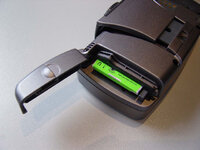
The first photo is of an early production SP 2620, showing the door at the back, and the little 2 gig CF format hard drive in the CF card slot (current production 2620's have an internal hard drive, therefore no door to open).

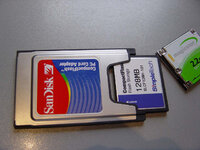
The second photo shows the PCMCIA CF adapter that I spoke about in the posts above, with a standard CF card partially inserted, and the 2 gig CF size hard drive beside it. For the record - neither I nor the Garmin hardware dudes recommend the CF format hard drives for motorcycle applications.

PanEuropean
 

Attachments

  • 2620 hard drive.jpg
    2620 hard drive.jpg
    65.7 KB · Views: 139
This photo shows the CF card holder that fits into the PCMCIA slot on any laptop computer. This is what I recommend anyone who has a SP 26xx and a laptop computer purchase. It is really cheap, and will greatly speed up the CF card programming process.
 

Attachments

  • cf card reader.jpg
    cf card reader.jpg
    82.1 KB · Views: 131
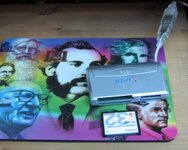
An alternative to the PCMCIA adaptor is a little box like this. I bought it from a photographic shop for about £17. It takes 7 different types of memory card, including compact flash and plugs into the USB port.
 

Attachments

  • cardreader.jpg
    cardreader.jpg
    51.1 KB · Views: 124
That's....

AndyB said:
An alternative to the PCMCIA adaptor is a little box like this. I bought it from a photographic shop for about £17. It takes 7 different types of memory card, including compact flash and plugs into the USB port.

what I suggested but was told to slow, if you have a PC and would prefer to use a PCMCIA card there are PCI adapters for the PCMCIA card.
 
Andy:

The only problem with the product that you suggested above is that it connects to the computer using a USB cable, which is the same as how the GPSR connects to the computer. The slowdown in data transfer speed is caused by the USB connection, not because of any inability of the GPSR to write quickly to the CF card.

The PCMCIA adapters connect directly to the computer processor bus (via the PCMCIA connection), therefore they completly bypass any 'ports' on the computer (serial, universal serial, etc.) - this is why data can be transferred so much faster.

In other words, the trick is to get a direct connection to the processer via the PCMCIA slot, not just an external card reader/writer.

PanEuropean


Back
Top Bottom