
Expand feature, take care….

Wapping

Well-known member
Moderator
Joined
Oct 21, 2005
Messages
90,836
Reaction score
15,607
Location
Wapping, London
The expand feature is useful, adding more waypoints to routes. But take a bit of care.

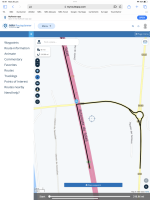
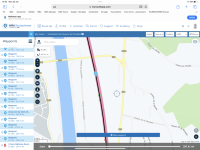
The feature can sometimes place a waypoint on a bridge over a motorway, or on a motorway which (at that point) is going over an underpass. This can confuse the route creation software, as these screen shots show.

In the first picture, the expand feature put the waypoint (25) directly on top of the bridge. This the software interpreted as being placed on the minor road beneath, resulting in a crazy route.
IMG_4082.png


In the second picture, I had dragged waypoint 25 into a better position, the route now displaying the correct direction, north to south, along the motorway.



IMG_4083.png
 
i usually add a way point which adds it like the last/next one. Then simply change the order of it in the waypoints menu to where i want it to be, to avoid situations like this.
 
i usually add a way point which adds it like the last/next one. Then simply change the order of it in the waypoints menu to where i want it to be, to avoid situations like this.

It only occurs when you add points through the ‘expand‘ method, unless of course someone places a waypoint on the crossing point.

There is a better way to add individual points into a route, which avoids changing the order completely. This is how the excellent MyRoute forum explained it to me:

….you can move the waypoint. Long press on the waypoint and then move it. It may take a little practice but it does work. If you want add a waypoint on the route, long press on the route, a + sign will appear and you can tap it to insert a waypoint with the correct number in sequence.
 
It only occurs when you add points through the ‘expand‘ method, unless of course someone places a waypoint on the crossing point.

There is a better way to add individual points into a route, which avoids changing the order completely. This is how the excellent MyRoute forum explained it to me:

i see. ITs good to know there's another way to add waypoints back into a route a slightly easier way.

Thanks for sharing
 
Welcome.

Rather like BaseCamp and Garmin devices, the app (and MyRoute in general) is pretty powerful and pretty dumb, simultaneously. The new Next app is still being developed; development will bring more tools with it.

I do recommend the MyRoute forum. I have used it several times to find out how to do things. Similarly, I have learned several.new tricks, just reading other people’s hints and tips.
 
I got caught out by this as well last year in my haste trying to get the MRA route to look the same on my Zumo XT once transferred and for some reason the XT was altering it slightly. No problem I thought, I'll use the expand feature and it'll make sure it doesn't devate, how wrong I was!

I didn't have your specific issue but I found it would place some of the waypoints right on a roundabout which when converted to the Zumo got interpreted as needing to either do a full lap of the roundabout, needing to turn around briefly. Also had it where it placed some on the slip road but in such a spot that the Zump thought I needed to exit then re-enter somewhere else and in some cases doing a bit of a loop for it to satisfy me having gone through those waypoints.

I'm off on a Euro trip in the next 2 weeks so I'll remember not to be so smug this time round and check!
 
The expand feature can indeed place waypoints on junctions or up side streets, like some cackhanded BaseCamp user.

As I do in BaseCamp, I always try to zoom in on the route to check where it is taking me. Similarly, in MyRoute, I click on each of the waypoints in turn, look at them on the zoomed in map and adjust them if needed. I think it is better to spend five minutes doing this at home, than an hour shouting at the dumb device on the roadside…. Not least as the dumb device is also deaf.

The reduce function also takes a bit of care. Take away too many and the carefully prepared route alters.
 
Re the reduce function altering the route,this happened to me and is mildly annoying, is there a specific formula to the number of points to reduce so as not to alter the route?

Sent from my SM-A226B using Tapatalk
 
The expand feature can indeed place waypoints on junctions or up side streets, like some cackhanded BaseCamp user.

As I do in BaseCamp, I always try to zoom in on the route to check where it is taking me. Similarly, in MyRoute, I click on each of the waypoints in turn, look at them on the zoomed in map and adjust them if needed. I think it is better to spend five minutes doing this at home, than an hour shouting at the dumb device on the roadside…. Not least as the dumb device is also deaf.

The reduce function also takes a bit of care. Take away too many and the carefully prepared route alters.
Definitely, I have been that person shouting at the roadside...... :oops:
 
Re the reduce function altering the route,this happened to me and is mildly annoying, is there a specific formula to the number of points to reduce so as not to alter the route?

I don’t think so.

For routes you have created yourself, it’s pretty unlikely that you’d need to reduce the number of waypoints. For routes you have imported from a third party (or particularly, those that have been converted from tracks) it might be a different story. Then reduction might be a good idea. The solution to the problem, I find, is to work from a copy of the route, with the original route or track displayed at the same time. Then start reducing. The changes, if any, are then easy to see.
 
Last edited:


Back
Top Bottom