


The expand feature is useful, adding more waypoints to routes. But take a bit of care.
The feature can sometimes place a waypoint on a bridge over a motorway, or on a motorway which (at that point) is going over an underpass. This can confuse the route creation software, as these screen shots show.
In the first picture, the expand feature put the waypoint (25) directly on top of the bridge. This the software interpreted as being placed on the minor road beneath, resulting in a crazy route.
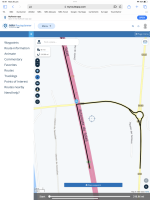
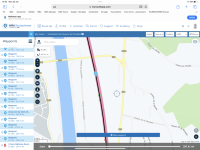
In the second picture, I had dragged waypoint 25 into a better position, the route now displaying the correct direction, north to south, along the motorway.
The feature can sometimes place a waypoint on a bridge over a motorway, or on a motorway which (at that point) is going over an underpass. This can confuse the route creation software, as these screen shots show.
In the first picture, the expand feature put the waypoint (25) directly on top of the bridge. This the software interpreted as being placed on the minor road beneath, resulting in a crazy route.
In the second picture, I had dragged waypoint 25 into a better position, the route now displaying the correct direction, north to south, along the motorway.





