How to connect a Sena SRL3 to an Interphone Comms?

GS TRV

Registered user
Joined
Sep 28, 2004
Messages
7,986
Reaction score
92
Location
Belfast
Can anyone assist on this one please?

I have a Sena SRL3 in my Neotec 3 and my brother has an Interphone head unit.

I have read that in order for us to communicate we need to connect phone to phone and not comm to comm. We have tried this but without any success. Maybe it's the sequence? Honestly would appreciate your help as we have a trip coming up to Scotland over Easter and it would be good to chat.

TIA
 
Can anyone assist on this one please?

I have a Sena SRL3 in my Neotec 3 and my brother has an Interphone head unit.

I have read that in order for us to communicate we need to connect phone to phone and not comm to comm. We have tried this but without any success. Maybe it's the sequence? Honestly would appreciate your help as we have a trip coming up to Scotland over Easter and it would be good to chat.

TIA
Most definitely not a phone to phone connection set up, follow the pairing instructions on both systems if they do not pair it’s a protocol issue between different makes of comms and they never will connect. Good luck
 
This is the way I set up my Sena, Zumo and iPhone - give it a go as it works.

Pair Sena to Zumo as a GPS - usually .... Hold jog dial in until "Intercom Pairing"

Press phone button - "Second mobile phone"

Press phone button again - "GPS Pairing"

Pair Zumo to this.

Pair iPhone to Zumo

Pair your other headset through "Intercom Pairing" - although in your case you may have to use "Universal Intercom Pairing"

Do not pair your iPhone to your Sena.
 
This is the way I set up my Sena, Zumo and iPhone - give it a go as it works.

Pair Sena to Zumo as a GPS - usually .... Hold jog dial in until "Intercom Pairing"

Press phone button - "Second mobile phone"

Press phone button again - "GPS Pairing"

Pair Zumo to this.

Pair iPhone to Zumo

Pair your other headset through "Intercom Pairing" - although in your case you may have to use "Universal Intercom Pairing"

Do not pair your iPhone to your Sena.
Hi - thanks for your input. I wont be using a Zumo so just need the Sena to Interphone connection. Not Sena to IPhone connection.
 
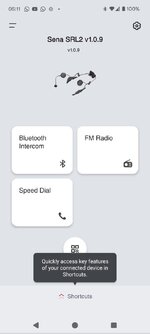
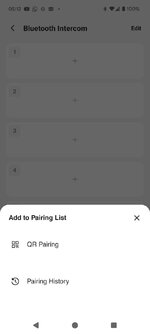
Interphone have a connection app called 'Interphone UNITE'. Sena have one as below. Download and connect each headset to it's respective app. Each of you then opens the app and find something like 'new pairing' or in the case of Sena, 'Add to pairing list'. You will then get a QR code on screen that the other scans. You will then be connected. They are fickle bastards and sometimes it only needs , say, your brother to scan your QR code for it to work, so maybe start there. They are compatible, according to Google.

Then one of two things might happen:

Your comms will be connected and off you go (unlikely, but it has happened).

Your brother works out how to puts his headset in scanning mode to look for your headset. At the same time, you press the middle bar of the Sena for 12 seconds until you hear 'configuration menu'. Then press the - button until you get 'universal intercom pairing' and press the middle button to enter. The light flashes blue rapidly and you get an intermittent sound in the headset as it scans for your brothers headset . You will hear a single beep when they have found each other. Press the middle bar again to pair. If you lose connection, just press the middle bar and wait for the single beep.

I wish you luck. Having comms is great when it works but they really are a law unto themselves.

And yes, Someone did set fire to my bed.

1745123003045.jpeg

1745123023466.jpeg

1745123048169.jpeg
1745123560249.jpeg
 
Last edited:
When I'm out RoSPA or ERS training, I often have to connect me SRL2 to other brands. The most common way to connect is to put the SRL in Universal Pairing Mode and the other unit in normal intercom Pairing mode. If that fails, I've had success with Sena in Mobile Phone 2 Pairing and the other branded unit in Universal Pairing.

As already said, going from one brand to another is always fickle and frustratingly they don't auto connect, you have to go through the process each time you go out.

Sent from my SM-S921B using Tapatalk
 
Cheers guys - brilliant info indeed. I’ll report back on my findings.
 
How did you get on?
We spent 1.5 hours on the ferry crossing trying all of the above but no joy I’m afraid.
I give up!!
Oddly my brothers interphone connection to his phone kept failing to connect so maybe he needs some sort of firmware upgrade. Either way it didn’t work.
It’s so frustrating!
 
It bizarre, isn't it? I was riding with a friend this week who I don't see often as he now lives in the Cotswolds. He still has me in his Sena app but I don't have him. We connected straight away, every time. Yet I can't connect with the guy I ride with most for love nor money. We have the same setup?
 
It bizarre, isn't it? I was riding with a friend this week who I don't see often as he now lives in the Cotswolds. He still has me in his Sena app but I don't have him. We connected straight away, every time. Yet I can't connect with the guy I ride with most for love nor money. We have the same setup?
Weird! Is your Cotswolds friend using Interphone?


Back
Top Bottom