Don’t worry about it.
I’m not.
Not least as I no longer use BaseCamp.



Don’t worry about it.

I’ll check when I’m next at my “Garmin” puter….Thank you too Joe. BUT....how do I download the maps to my poota and where do I download them from. ( Sorry, I know it's painful, it is for me too.)
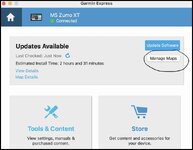
Edit: I don't have that option on my Garmin Express. The box for it just isn't there!

OK,Thank you too Joe. BUT....how do I download the maps to my poota and where do I download them from. ( Sorry, I know it's painful, it is for me too.
Point taken; hav you checked the maps aren't already up-to-date, then? (apologies, but this intended to be patronising.)Edit: I don't have that option on my Garmin Express. The box for it just isn't there!


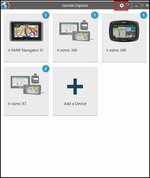

And there's the rub @Berin. Compared to your second screenshot of your device, this is my screenshot at the same stageSome notes. Don't have both Basecamp and Express open at the same time - make sure you quit BC fully. Use a Garmin USB cable. Connect the cable directly to the computer, not via a hub
Then, try this:
1) Fire up Garmin Express. Make sure it's updated to the latest version
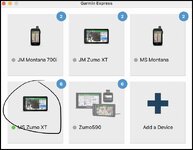
2) Plug in the Zumo XT to the computer (nb this is for a Mac). Wait till the graphic for you device goes green:
View attachment 463411
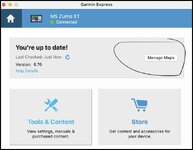
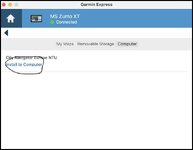
3) Click the tile for your device - if you need to do updates, complete all the updates, usually meaning you have to disconnect and reconnect the device a couple of times. Once it's updated, click "manage maps"
View attachment 463419
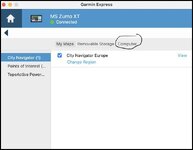
4) On the manage maps page, click the tab "computer"

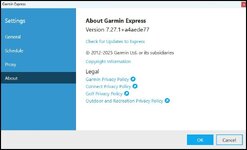
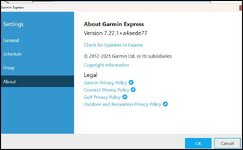
Good evening @Mzokk. I have Version 7.27.10 as per screenshot belowHi TT Sorry to hear that you are still having a mare. Lets roll back a bit. Do you know what version of Garmin Express you have at the moment.
It will open this page on "General" scroll down to about.
View attachment 463481
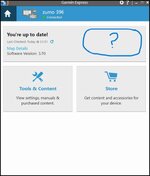
Done all of the above Mzokk re uninstalling completely via control panel add/remove programmes etc etc until I'm blue in the face and nothing changes/improves.You're up to date by the looks TT. I'm not sure why you aren't getting the option to load maps to the PC or to change the maps on the Zumo 396. If you could try uninstalling express completely via control panel add/remove programmes reboot the machine and download it and install it from Garmins website to give you a clean install. Reconnect the 396 and see if any new options turn up.


A thought.Sorry TT. I’ll give my head a scratch and have a think.
A thought.
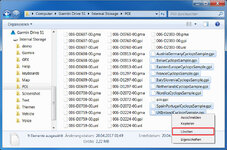
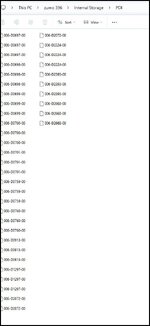
If you go into the internal memory POI folder and find the CYCLOPS files and delete them, express will always have something to update. I deleted mine years ago as I use SCDB.
The files are called "countryCyclops.gpi"
Like this: (with or without the word "Sample")
View attachment 463557

I recognise that walkthrough detail…
Anything in this article that might help? (is a French page but the detail is in English)
Installing Maps to the Computer Using Garmin Express
That’s why I think he may have a glitch in the device.He said earlier that he has 2026.30....
Maybe as reset then.That’s why I think he may have a glitch in the device.