How to install Garmin maps onto a home computer

Thank you too Joe. BUT....how do I download the maps to my poota and where do I download them from. ( Sorry, I know it's painful, it is for me too. 🙄)

Edit: I don't have that option on my Garmin Express. The box for it just isn't there!
I’ll check when I’m next at my “Garmin” puter….👍

What’s not helpful is Garmin continually change the functionality of GE and the way it interacts with different devices. This thread started in summer of 2023 and there’s a lot of old, irrelevant guidance which isn’t helpful to you.
 
Some notes. Don't have both Basecamp and Express open at the same time - make sure you quit BC fully. Use a Garmin USB cable. Connect the cable directly to the computer, not via a hub

Then, try this:

1) Fire up Garmin Express. Make sure it's updated to the latest version

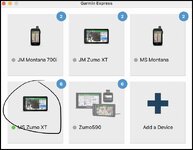
2) Plug in the Zumo XT to the computer (nb this is for a Mac). Wait till the graphic for you device goes green:

Screenshot 2025-12-02 at 13.24.07.jpg

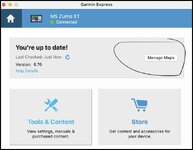
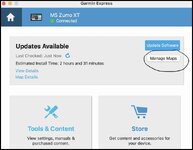
3) Click the tile for your device - if you need to do updates, complete all the updates, usually meaning you have to disconnect and reconnect the device a couple of times. Once it's updated, click "manage maps"

Screenshot 2025-12-02 at 13.51.44.jpg


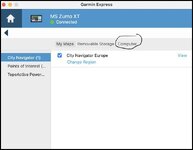
4) On the manage maps page, click the tab "computer"

Screenshot 2025-12-02 at 13.52.00.jpg

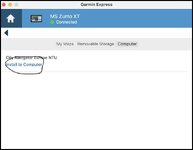
5) Click "install to computer"

Screenshot 2025-12-02 at 14.04.20.jpg

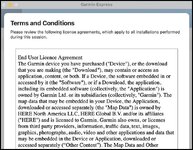
6) Accept the EULA and wait for the maps to install

Screenshot 2025-12-02 at 13.52.09.jpg
 

Attachments

  • Screenshot 2025-12-02 at 13.24.17.jpg
    Screenshot 2025-12-02 at 13.24.17.jpg
    33.3 KB · Views: 1
Thank you too Joe. BUT....how do I download the maps to my poota and where do I download them from. ( Sorry, I know it's painful, it is for me too. 🙄)
OK,
You download the maps to poota from the same place (Garmin Depress) as you download to your device; you should be able to do both together, but it may have to be done in two separate steps (I don't know the Z396 idiosyncracies ...).
Edit: I don't have that option on my Garmin Express. The box for it just isn't there!
Point taken; hav you checked the maps aren't already up-to-date, then? (apologies, but this intended to be patronising.)
If they're already up-to-date, then it wont allow an update.

Next, @Berin description, above, is pretty sound. His walk-through is worth following.

Beyond that, if you baulk - take a screencapture and let us know where its falling over. (y)

Lastly, the map file sizes are hefty....
1764693403553.jpg
 
Hi TT Sorry to hear that you are still having a mare. Lets roll back a bit. Do you know what version of Garmin Express you have at the moment.

You get there this way

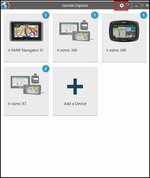
Open Express and click on the setting button
1764697813380.jpg

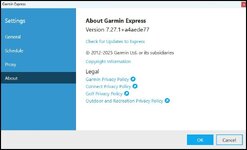
It will open this page on "General" scroll down to about.

1764697948021.jpg

There was a version of Express might have been 7.26.1 or 7.25.1 that required XT units and possibly 396 that runs similar software to be connected to the computer to work with maps in Basecamp. A lot of folk myself included asked Garmin to fix this which was done when they released 7.27.1 on the 12th of November. Have a look and tell us what you have so that we know we are all looking at the same thing. Thank you.
 
Some notes. Don't have both Basecamp and Express open at the same time - make sure you quit BC fully. Use a Garmin USB cable. Connect the cable directly to the computer, not via a hub

Then, try this:

1) Fire up Garmin Express. Make sure it's updated to the latest version

2) Plug in the Zumo XT to the computer (nb this is for a Mac). Wait till the graphic for you device goes green:

View attachment 463411

3) Click the tile for your device - if you need to do updates, complete all the updates, usually meaning you have to disconnect and reconnect the device a couple of times. Once it's updated, click "manage maps"

View attachment 463419


4) On the manage maps page, click the tab "computer"
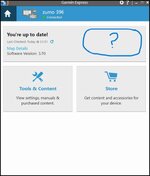
And there's the rub @Berin. Compared to your second screenshot of your device, this is my screenshot at the same stage

Manage Maps My Arse.jpg

so I cant progress any further ! Cant manage fekk all :tears
Hi TT Sorry to hear that you are still having a mare. Lets roll back a bit. Do you know what version of Garmin Express you have at the moment.

It will open this page on "General" scroll down to about.

View attachment 463481
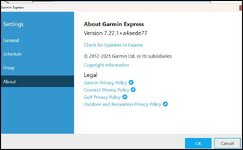
Good evening @Mzokk. I have Version 7.27.10 as per screenshot below


Screenshot 2025-12-02 220923.jpg
 
You're up to date by the looks TT. I'm not sure why you aren't getting the option to load maps to the PC or to change the maps on the Zumo 396. If you could try uninstalling express completely via control panel add/remove programmes reboot the machine and download it and install it from Garmins website to give you a clean install. Reconnect the 396 and see if any new options turn up.
 
You're up to date by the looks TT. I'm not sure why you aren't getting the option to load maps to the PC or to change the maps on the Zumo 396. If you could try uninstalling express completely via control panel add/remove programmes reboot the machine and download it and install it from Garmins website to give you a clean install. Reconnect the 396 and see if any new options turn up.
Done all of the above Mzokk re uninstalling completely via control panel add/remove programmes etc etc until I'm blue in the face and nothing changes/improves.

😭
 
Sorry TT. I’ll give my head a scratch and have a think.
 
Tiny Tim send me your address and i will send you city navigator NTU 2026.30 on a usb stick that you can install onto your pc that will just work. genuine offer.
just send the usb stick back when done.

i hate seeing a grown man cry.
i did the same for Lord snooty when he was having trauma.
 
Last edited:
Sorry TT. I’ll give my head a scratch and have a think.
A thought.
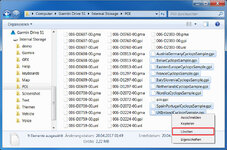
If you go into the internal memory POI folder and find the CYCLOPS files and delete them, express will always have something to update. I deleted mine years ago as I use SCDB.

The files are called "countryCyclops.gpi"
Like this: (with or without the word "Sample")
garmin_de_58.jpg
 
A thought.
If you go into the internal memory POI folder and find the CYCLOPS files and delete them, express will always have something to update. I deleted mine years ago as I use SCDB.

The files are called "countryCyclops.gpi"
Like this: (with or without the word "Sample")
View attachment 463557
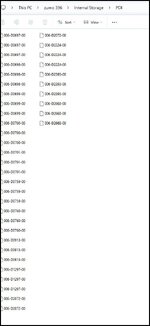

Nope. Got this thats all. Thanks for trying though. (y)

Zumo Internal Storage POI.jpg


Back
Top Bottom