I can’t get MRA Routeplanner (website) to work

glenn2926

Well-known member
UKGSer Subscriber
Joined
Oct 7, 2009
Messages
5,693
Reaction score
6,158
Location
Right Here
Anyone got any idea how MRA works please? I’m try to watch the tutorial on it and it’s just staying on the same page permanently. It has a little box saying something like there are various maps to choose from. Ok great, it then just sits there never moving on.

=========

Moved, so as to prevent a thread hijack of a post and subsequent thread about MyRoute’s ability to salvage deleted routes.

Richard
 
Last edited by a moderator:
If you're comfortable with Basecamp then MRA should be a breeze. To start a route just click on the map where you want the route to start then just keep clicking to add shaping points or waypoints. All the learning tutorials are on YouTube so should be easily accessible.
 
Anyone got any idea how MRA works please? I’m try to watch the tutorial on it and it’s just staying on the same page permanently. It has a little box saying something like there are various maps to choose from. Ok great, it then just sits there never moving on.
Remember the first time you used Basecamp and how bewildering it was? Maybe it was just me! Stick with it, it's worth learning, as any new service/system, it has so, so many plusses compared to Basecamp, but then we're all different. MRA is good as a freebie, but, way better if you subscribe, try it for a month and see how you get on with the Gold subscription.
 
Remember the first time you used Basecamp and how bewildering it was? Maybe it was just me! Stick with it, it's worth learning, as any new service/system, it has so, so many plusses compared to Basecamp, but then we're all different. MRA is good as a freebie, but, way better if you subscribe, try it for a month and see how you get on with the Gold subscription.
I didn’t think one had to pay for it. Definitely Basecamp for me. It doesn’t cost anything and as I’ve said it’s much, much more user friendly. I can’t even find a new route icon on MRA. There doesn’t seem to be anyway of drawing a route on MRA. As for having to change the format to send it to my Garmin. That’s just ridiculous. I have been playing with calimoto and that is much better than MRA. Unfortunately that also has a subscription fee. I’m just hoping Basecamp is going to be supported for a good while yet.
 
If you're comfortable with Basecamp then MRA should be a breeze. To start a route just click on the map where you want the route to start then just keep clicking to add shaping points or waypoints. All the learning tutorials are on YouTube so should be easily accessible.
I have clicked on the start point and I just get a spinning white circle. It’s been spinning for over an hour now. It’s crap. I could have plotted a dozen routes in Basecamp in this time.
 
It seems you're determined that MRA is no good, in realiality it much much better than Basecamp, and ultimately much easier to use. Basecamp hasn't been supported or updated for quite some timd, and is no longer compatible with the latest Garmin units (XT2). If you have a spinning wheel for any time I'd suggest that either your PC/MAC or your Internet is to blame not MRA.

The basic MRA is free, you only need to pay if you want additional features, which are well worth having. Even the free version is now better than Basecamp, and I've been a Basecamp fan since it replaced Mapsource in 2009.
 
It seems you're determined that MRA is no good, in realiality it much much better than Basecamp, and ultimately much easier to use. Basecamp hasn't been supported or updated for quite some timd, and is no longer compatible with the latest Garmin units (XT2). If you have a spinning wheel for any time I'd suggest that either your PC/MAC or your Internet is to blame not MRA.

The basic MRA is free, you only need to pay if you want additional features, which are well worth having. Even the free version is now better than Basecamp, and I've been a Basecamp fan since it replaced Mapsource in 2009.
I have managed to make a route although only around 500 metres long as it wouldn't go any further and then the map tilted which stopped everything working. Why? Just why would the map tilt and what use is it? Utter crap. And as for having to change the format to upload it, which again I can’t do as my iPad doesn’t have a usb port to connect to the sat nav. I cannot get MRA onto my lap top for some reason. You honestly think this type of crap is easier and better than basecamp? It’s not even playing the same game as Basecamp.
With Basecamp I draw a route and send it to my sat nav. Job done. None of this tilting maps and changing format type stuff. Just why have the MRA staff made it so difficult to use? And on top of all this they have the cheek to charge us to use it.
 
A mechanic, an engeneer, Mr. Know it All, call it what you like, but can’t figure out the most simple route planning piece of software there is.

Why do you feel the need to slag something off that 100’ of thousands of users worldwide have the contrary experience, not leaset as there are plenty of very happy users on these very pages.

Perhaps your user name should be glennNEG2926. You oozing negatively matey, makes it for a horrible experience to read any positive threat with you commenting on.

Just my tuppence worth…
 
A mechanic, an engeneer, Mr. Know it All, call it what you like, but can’t figure out the most simple route planning piece of software there is.

Why do you feel the need to slag something off that 100’ of thousands of users worldwide have the contrary experience, not leaset as there are plenty of very happy users on these very pages.

Perhaps your user name should be glennNEG2926. You oozing negatively matey, makes it for a horrible experience to read any positive threat with you commenting on.

Just my tuppence worth…
Perhaps if it was easy use I would be more happy with it. I can’t even draw a route as it just goes around the first corner and then won’t extend any further. I get a start symbol and the a chequered flag finish point. I just cannot get the route to go past my first waypoint. To me at least that not a very long ride. I’ve watched the YouTube thing and for some reason I just cannot make it do what vids say it should. Perhaps uninstall it and try again might help but as it is it’s unusable.
 
Perhaps if it was easy use I would be more happy with it. I can’t even draw a route as it just goes around the first corner and then won’t extend any further. I get a start symbol and the a chequered flag finish point. I just cannot get the route to go past my first waypoint. To me at least that not a very long ride. I’ve watched the YouTube thing and for some reason I just cannot make it do what vids say it should. Perhaps uninstall it and try again might help but as it is it’s unusable.
You create routes on the MRA Website . Yes, you can create it on your mobile device, but it is easier on the website.
Log on with your credentials. You do not drag anything anywhere, it isn’t Basecamp. Just place waypoints on the roads you wish to travel. It simply couldn’t be any more simple.

The fault is not with the software, but the negative nature of the user. Perhaps you have a severe aversion to things changing around you and/or prefer to be stuck in the “old ways the best ways” mindset.
Change your mindset to a positive one and the rest of your life will follow suit. You’ll feel better for it and so will the people you interiac with.
 
You create routes on the MRA Website . Yes, you can create it on your mobile device, but it is easier on the website.
Log on with your credentials. You do not drag anything anywhere, it isn’t Basecamp. Just place waypoints on the roads you wish to travel. It simply couldn’t be any more simple.

The fault is not with the software, but the negative nature of the user. Perhaps you have a severe aversion to things changing around you and/or prefer to be stuck in the “old ways the best ways” mindset.
Change your mindset to a positive one and the rest of your life will follow suit. You’ll feel better for it and so will the people you interiac with.
Managed to make a route on the laptop. couple of questions for anyone that can work this app. How do I drag the route to another place on the map? How do I delete a way point? How do I get my route into miles not KMs? Also how do I change the colour of my routes so that I can see the different routes on one map as in multi day routes so that the first day is shown in say blue the second day in yellow etc?
 
Perhaps if it was easy use I would be more happy with it. I can’t even draw a route as it just goes around the first corner and then won’t extend any further. I get a start symbol and the a chequered flag finish point. I just cannot get the route to go past my first waypoint. To me at least that not a very long ride. I’ve watched the YouTube thing and for some reason I just cannot make it do what vids say it should. Perhaps uninstall it and try again might help but as it is it’s unusable.
I use MRA and still use Basecamp. In terms of drawing a route on a PC the cursor controlled by the mouse is multi-modal in that if you click and hold (not on a road) you can move the map when you click on a road that you want to put a shaping point or a waypoint the click will produce the shaping point or waypoint and a dialog box to accept the default name or give it your own. This is very different from basecamp where the tools are single mode (and also part of the reason people have difficulties with it). Also if you use the companion phone app for navigation (I don't I use garmin devices) you can put narrative to those way-points that will be read to you as you arrive at them. It is very easy to construct a route in MRA particularly if you are familiar with Google Mymaps as the interface is similar.

What is a game changer for me is the ability to construct routes on the fly while on tour on a phone or Ipad rather than carry a Windows device around with basecamp installed or as I did create loads of routes to cover every eventuality for example wet routes and dry routes and load them on the device. For me the ability to create and change routes on the fly so to speak was worth a lifetime membership. (Wish i was 21 and not 63 :D)

A couple of things it does not do as well as Basecamp is seeing a number of routes on a tour on the map and how POI's are handled. For the rest its easily as good. On the XT route transfers are easy with Garmin Drive and on the older Garmin GPS units they can be connected to your phone with a cable to transfer the routes.

Its just different put a bit of time into learning it with the free app and see how it goes. (y)
 
I use MRA and still use Basecamp. In terms of drawing a route on a PC the cursor controlled by the mouse is multi-modal in that if you click and hold (not on a road) you can move the map when you click on a road that you want to put a shaping point or a waypoint the click will produce the shaping point or waypoint and a dialog box to accept the default name or give it your own. This is very different from basecamp where the tools are single mode (and also part of the reason people have difficulties with it). Also if you use the companion phone app for navigation (I don't I use garmin devices) you can put narrative to those way-points that will be read to you as you arrive at them. It is very easy to construct a route in MRA particularly if you are familiar with Google Mymaps as the interface is similar.

What is a game changer for me is the ability to construct routes on the fly while on tour on a phone or Ipad rather than carry a Windows device around with basecamp installed or as I did create loads of routes to cover every eventuality for example wet routes and dry routes and load them on the device. For me the ability to create and change routes on the fly so to speak was worth a lifetime membership. (Wish i was 21 and not 63 :D)

A couple of things it does not do as well as Basecamp is seeing a number of routes on a tour on the map and how POI's are handled. For the rest its easily as good. On the XT route transfers are easy with Garmin Drive and on the older Garmin GPS units they can be connected to your phone with a cable to transfer the routes.

Its just different put a bit of time into learning it with the free app and see how it goes. (y)

Thanks, I'm playing with it now. It feels a bit clunky just now and I cannot make different routes different colours they're all just gray which is a pain. Is there a way change the colour of each route so that on multi day tours I can see which day is which? The dialog you use is no good for me as I always have all my sat nav devices on mute. I don't want to listen to them. I haven't tried sending the route to my Zumo 660 yet so we'll see how that goes.
 
1. Hold down the left mouse button and you can drag the map around. Click on a rod and it will extend the route to that point.
2. Delete a waypoint click on it and a dialog box opens click the wee red bin and the point disappears.
3. To change units click on your account and change units from Metric to imperial.
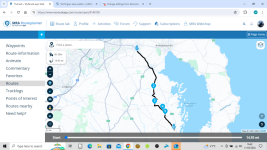
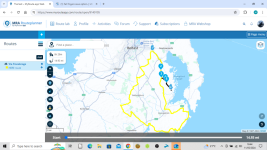
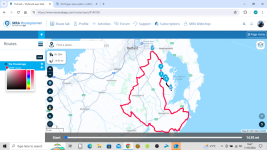
4. To see routes on the map in different colours open your route. On the left panel click on Routes...add the routes you want to see and below the route you can click on the colour and change it.

1715442255822.png

1715442306433.png
 
Oh and the wheel on the mouse is for zooming out and in. So quicker than basecamp as you don't have to change tools to do different things.
 
Literally just a moment ago down loaded this MRA app. It seems very, very complicated to use compared to Basecamp. I can’t even find how to start a new route on it. It also asks if it’s a destination or a loop ride. Why does that matter. Basecamp for me thanks MRA is just not user friendly enough.
Oh come on!
I have managed to make a route although only around 500 metres long as it wouldn't go any further and then the map tilted which stopped everything working. Why? Just why would the map tilt and what use is it? Utter crap. And as for having to change the format to upload it, which again I can’t do as my iPad doesn’t have a usb port to connect to the sat nav. I cannot get MRA onto my lap top for some reason. You honestly think this type of crap is easier and better than basecamp? It’s not even playing the same game as Basecamp.
With Basecamp I draw a route and send it to my sat nav. Job done. None of this tilting maps and changing format type stuff. Just why have the MRA staff made it so difficult to use? And on top of all this they have the cheek to charge us to use it.
You sound like a 13 year old girl having a tiz. It's Saturday afternoon, get a drink and chill. Come back to it another time.
 
Doing this between watching NW200 races online and a few beers......hope it makes sense :ROFLMAO:
 
As @Mzokk has already pointed out. To change colour of the routes (see his post above)
You can also add multiple routes to that line up for an entire tour. That way you can see what is overlapping (if you are basing your self let say in Castellane and doing day trips in and out the town)

I’ve done this in my iPhone, but it is same process in the desktop pc/laptop website.

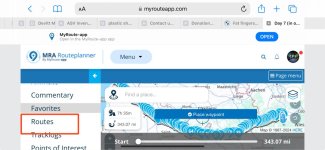
Select a route you wish to use from the list.
IMG_2095.png

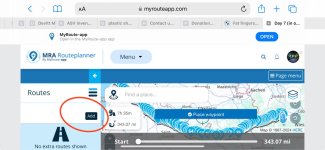
Then click on on the “pancake stack” and select Routes
IMG_2096.jpeg

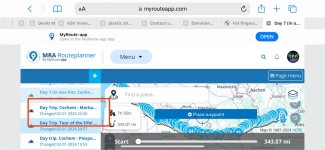
Add as many routes as you wish, by clicking on “add” button

IMG_2097.jpeg

Select route you wish to use. It’ll appear in this submenu. Note. That already selected routes are shaded.

IMG_2098.jpeg

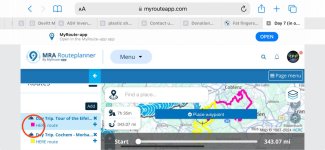
Repeat the process until al routes are selected. By default these will all be shown in yellow and the first (master if you will) route selected will be shown in grey.

Click on a yellow (in my case pink) square to change the colour of the route. You should be able to see now, all routes in different colours.
IMG_2099.jpeg

Something like this.

IMG_2100.jpeg

To quote @Wapping. Poke about. Create a route you wish to ride (make sure to lock it 🔒 icon. Then make a duplicate of it. Use duplicate route to muck about with.

Watch multiple tutorial videos on official MRA YouTube channel as well as many others bods producing them out there.
 
Thanks again, I'm getting there, slowly but I am better with this than I was a few hours ago. I have managed to send a route to my old Zumo 660 and it has accepted it. I'v e changed the colour of some short routes too. I'll get there eventually but like you said you do. I'll continue to use Basecamp too.


Back
Top Bottom