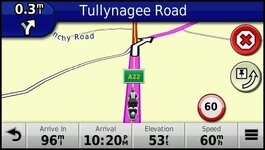
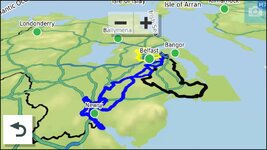
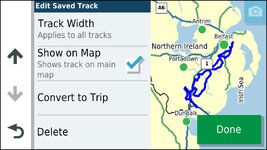
I've had enough. But going to waste some more money on Garmin.

Just a thought, it might be worth checking 'my maps' in the settings to see if you have more than one of the installed maps ticked, as that can cause navigation errors etc.,
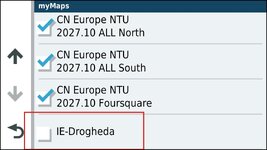
Good call. As I stated above I use my XT primarily for POI's and tracks these days, but ran a route on if in parallel to MRA on my Africa Twin AA screen last week in the Borders and it had a shit fit for some reason later in the ride. I was navigating with voice directions from the AT and just turned the route off and the bike ICON stuck to the track as usual. I had a bit of a play last night with the unit and ran a simulation of the route and the bike Icon wandered off the route line as soon as I started it. I'd forgotten that I'd installed a small experimental OSM map on the SD card on the device (I was experimenting with "Garminised" OSM map colour schemes) I found that this little maps was ticked.

1778237559385.jpg

And it was enough to bugger the units ability to navigate. I turned it off and the simulation ran perfectly. I wondered because the XT got me out of a hole in October when I reverted to it after the USB connection to the AT screen got wet and it refused to function. I'm now running MRA and a wireless AA dongle with that..........but thats a hole other story :D
 
Having a cursory look, for some obscure reasons, on Amazon the 760i (camera - no need) costs less than the 710i…

Also, is there a CN lifetime sub to buy separately, like the one included with the Zumo series (LM)?
The i versions have a CN lifetime subscription
 
Hi Mzokk, This would be amazing if you could fully explain how to do this? It appears to be a notepad document? how do you apply it to the device?? can this be applied to a Nav6 too???
Found it I thought I'd done this before :D

 
Yes I would imagine that it could work for the NAV 6 as it does on the old Zumo 340/90. I may have explained customised themes here elsewhere. If I have I'll link it if not I'll plonk it here.
And it should work on a NAV 6 though it may already display the track over the route like the old 3XX units. Garmin changed to Track under the route for some reason with the ZumoXT. On the Zumo 3XX devices it looks like this with a thin yellow (or whatever colour you select) line over the route.

1778616183507.jpg
 
Found it I thought I'd done this before :D

Thank you! thats fantastic, much appreciated :thumb2
 
OK after much testing and changing the copied widetrack theme i have eventually got the XT, Nav6 and Nav5 to a place where i believe (i havent yet tried it on a ride) I can see the track and route together.
I made the track wider, however I struggled to see the track under the route on my Nav 5 & 6, so I reduced the route thickness. below are the paramater changes i made to the theme document for the Nav 5 & 6

<STYLE field = "MAP_RTE_ACTV_LEG_CLR" scale = "0.35" border = "0.35" >
<COLOR >
<PRIMARY day = "#F046F0" night = "#F046F0" />
<SECONDARY day = "#C800C8" night = "#C800C8" />
</COLOR>
</STYLE>

<STYLE field = "MAP_RTE_ARRW_CLR" scale = "1.00" border = "1.00" >
<COLOR >
<PRIMARY day = "#FFFFFF" night = "#FFFFFF" />
<SECONDARY day = "#000000" night = "#000000" />
</COLOR>
</STYLE>

<STYLE field = "MAP_RTE_GPI_EMB_CLR" scale = "0.50" border = "0.50" >
<COLOR >
<PRIMARY day = "#467814" night = "#78BE28" />
<SECONDARY day = "#283C0A" night = "#283C0A" />
</COLOR>
</STYLE>

<STYLE field = "MAP_RTE_INACTV_LEG_CLR" scale = "0.50" border = "0.50" >
<COLOR >
<PRIMARY day = "#826482" night = "#826482" />
<SECONDARY day = "#423242" night = "#423242" />
</COLOR>
</STYLE>

<STYLE field = "MAP_TRK_CLR" scale = "12.00" border = "12.00" >
<COLOR >
<PRIMARY day = "#06EEEE" night = "#06EEEE" />
<SECONDARY day = "#0A92E2" night = "#0A92E2" />
</COLOR>
</STYLE>

<STYLE field = "MAP_TRK_SAVED_CLR" scale = "12.00" border = "12.00" >
<COLOR >
<PRIMARY day = "#06EEEE" night = "#06EEEE" />
<SECONDARY day = "#0A92E2" night = "#0A92E2" />
</COLOR>
</STYLE>

Thank you Mzokk really appreciate giving the details of how you change this. Now I have done it, it is very easy if your careful :thumb2
 
The trouble I found with displaying tracks, when staying in one hotel and riding out each day, is that you can’t tell which track is which on the screen. Or am I doing something wrong?
 
The trouble I found with displaying tracks, when staying in one hotel and riding out each day, is that you can’t tell which track is which on the screen. Or am I doing something wrong?
You can have a different colour for each track. That might help? I tend to enable just the track of the route that I'm using and disable those I'm not.
 
The trouble I found with displaying tracks, when staying in one hotel and riding out each day, is that you can’t tell which track is which on the screen. Or am I doing something wrong?
Still connected to Garmin Explore???

That seems to really fuck things up, some bullshit like you can only turn tracks on for a entire selection (according to a mate) but I could not get them to show up at all, very early on I ditched Explore, did full factory reset and started again.

I now can turn tracks on and off individually, have ammended the config file so the track is wider than the route and always run both to help avoid the issues where it decides to send you on a stupid detour.

First year with XT I was having so many issues I used my old 345 for my trip, and could clearly see the old unit was way better at the primary function of directing you / following your planned route.

A shame that Garmin managed to make it better in almost every way, except the primary reason most folk buy these things!

Knowing its quirks, checking the route vs track BEFORE you set off, ensuring the track is always displayed and just not trusting it too much and it does the job, pity Garmin seem completely allergic to customer feedback and refusing ot fix the most glaring bugs or improving things that would be so easy to do - like track widths really pisses me off, and with Tom Tom pulling out of this market I cannot see Garmin improving their customer focus.
 
that you can’t tell which track is which on the screen. Or am I doing something wrong?

Disconnect Garmin Explore from the XT.
So you can toggle them by hand.

Also, as suggested above: colours.
 
Last edited:
I don’t use Garmin Explore.

I’ll change the colours. There again, I don’t overlay the track too often.

:beerjug:
 
This is a colour coded selection of trips from my usual starting point............think just enabling the track of the active route is better particularly if the tracks use the same roads in places. :D

1778789822103.jpg
Still connected to Garmin Explore???

That seems to really fuck things up, some bullshit like you can only turn tracks on for a entire selection (according to a mate) but I could not get them to show up at all, very early on I ditched Explore, did full factory reset and started again.

I now can turn tracks on and off individually, have ammended the config file so the track is wider than the route and always run both to help avoid the issues where it decides to send you on a stupid detour.

First year with XT I was having so many issues I used my old 345 for my trip, and could clearly see the old unit was way better at the primary function of directing you / following your planned route.

A shame that Garmin managed to make it better in almost every way, except the primary reason most folk buy these things!

Knowing its quirks, checking the route vs track BEFORE you set off, ensuring the track is always displayed and just not trusting it too much and it does the job, pity Garmin seem completely allergic to customer feedback and refusing ot fix the most glaring bugs or improving things that would be so easy to do - like track widths really pisses me off, and with Tom Tom pulling out of this market I cannot see Garmin improving their customer focus.
I think that Garmin are milking the last out of consumer type motorcycle navigators at the moment. The Zumo's are just slightly modified versions of the car nav's they still produce but at twice the cost. They have been informed of the shortcomings of recent units like the XT and associated software (explore, routing rut behaviour etc.) and have not fixed those and have chosen to carry over those faults to newer units. I won't be buying any more Garmin units because a rugged phone and the variety of good navigation software now available makes the use of a dedicated nav a bit redundant?
 
don’t use Garmin Explore.

Even if you do not use it, but the XT is linked to it, it will change the way the XT manages the tracks.

Unlinked: you can manually toggle tracks on and off for visibility on the map.

Linked: XT will display by default all tracks within a certan distance from your position (I think 100 or 200km).

This could be overridden in part using “collections” in Explore, but it’s a faff. And if one doesn’t use Explore all tracks will be archived in a single collection anyway.

Link can be broken via the diagnostic menu.
 
I’m not aware that my XT is linked to Garmin Explore. I’m pretty I don’t even have the app.
 
When disconnected from explore when you select the track and hit the spanner icon top left of screen on the selected track this screen appears. Helpfully it gives a preview of the track you are turning on or off. I make sure the route and track share the same name so I can enable the track that matches the route. These days I tend to run the track on the XT and the route on the built in AA screen of the Africa Twin.......mainly because both are attached to the bike anyway. Can be useful to run the Garmin a bit more zoomed out than MyRoute app on the Africa Twin to give a visual heads up of complex direction changes.

1778794548316.jpg
 
I’m not aware that my XT is linked to Garmin Explore. I’m pretty I don’t even have the app.
It links during initial setup unless you explicitly tell it to fuck off, then it is impossible to unlink it, does not matter if you do not have the app, or even if you try a restore, the bastards have deliberately made it impossible to undo - as stated the only way to stop the bastards spying on you is ot use the hidden diagnostic menu.
 
It links during initial setup unless you explicitly tell it to fuck off, then it is impossible to unlink it, does not matter if you do not have the app, or even if you try a restore, the bastards have deliberately made it impossible to undo - as stated the only way to stop the bastards spying on you is ot use the hidden diagnostic menu.

Where in the Diagnostic Menu is it ? :confused:
 
Last edited:


Back
Top Bottom