No detail on 2610 - mapsource

Marks adventure

Through life
UKGSer Subscriber
Joined
Mar 9, 2005
Messages
2,036
Reaction score
3
Location
Hertfordshire - England
Hi

just playing around and i seem to have lost the map detail on my 2610.

no local road names or roads?

even if i zooooooom in there is nothing

any ideas please
 
you're on the basemap.

city navigator not loaded or turned off. sorry, can't remember how you turn it back on, on a 2610.
 
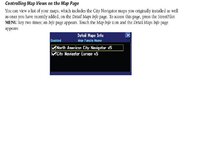
When you turn the 2610 on it gives a list of all the map areas loaded. Make sure there is a tick alongside each map area. That might do it. I hope. :)
 
you're on the basemap.

city navigator not loaded or turned off. sorry, can't remember how you turn it back on, on a 2610.

Still got problems

Did a re set, re installed maps etc but still no detail??? any ideas how to get my map details back.]

Got basic map but no great detail..:(
 
Just to confirm - you have re-installed the maps from Mapsource?


Also check that the card is fully in. I lost maps once and they all magically returned when I took out the CF card and then pushed it back in firmly.
Does this help:
 

Attachments

  • map.JPG
    map.JPG
    31.9 KB · Views: 119
Now sorted.

Emailed Garmin and this was the reply

Thanks for contacting Garmin Technical Support.
--
If you've formatted the data card, there won't be any map data on it and
the only thing you will see on the gps is the basemap file. If you
don't see any map detail in Mapsource, go to the View menu and select
Product or Switch to Product and make sure that your map is selected.
Also in the View menu, select the Show GPS map Detail option if it is
there.
You will also need to send new maps to the data card to get the
detail showing there.


That was my problem, now sorted.

That will teach me to play with gadgets :blast
 
So it was Mapsource on your PC you couldn't see the maps on not the GPS?


Back
Top Bottom