Offline Routes

Berin

Well-known member
UKGSer Subscriber
Joined
May 29, 2006
Messages
7,788
Reaction score
3,606
Location
South Oxfordshire
I’m sure we’ve been here before, but anyway.

I’ve downloaded the maps I need to the Myroute App.

The routes I want appear in a folder, nicely numbered.

How do I ensure these routes are available offline?
 
You need to have exported them to your downloads folder on your phone first!
Otherwise, with no signal or WiFi you are buggered.

Then offline you can go to the download file, just open it with MRA and away you go.
That’s how i do it if needed anyway.
 
Download the routes and the maps to your phone.

Then check that everything works by turning your phone ‘off line’.
 
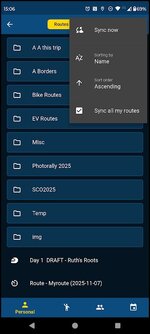
You don’t need to export them. MRA has a sync option to keep them available offline on your phone.

You can make all your routes available:
69834bfc9af97b1a9077a4aa02c54991.png


Or you can selectively sync just the routes you’re bothered about:
e9709147789b59028b891ee3ae826def.png
 
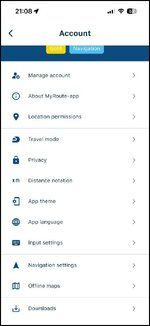
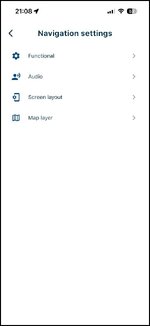
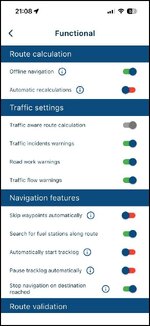
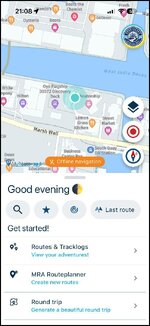
In the navigation option set the “ slider” on the offline maps option to “green”. This way you have the maps offline whilst still being able to use your phone for all data services

See screen shots from main menu

Last screen shot shows what you should have in the menu when you have your maps accessible off line. The orange banner

Provided you have downloaded the maps you need to your phone it will all work without internet connection.

IMG_6953.jpgIMG_6954.jpgIMG_6955.jpgIMG_6956.jpg
 
‘Sync all Routes’

For me - that has never worked for Nav.
Only allows the routes to be opened and edited - not navigated.

But more than happy to be shown I’m doing it wrong !
👍
 
As above. Also tend to navigate Offline as Here road warnings tend to be useless. Easier to check with google maps before you set off!.

1782331871648.jpg
 
Provided all is synced before you go “off line” then you simply chose the route form. The menu and hit start navigating
 
In the navigation option set the “ slider” on the offline maps option to “green”. This way you have the maps offline whilst still being able to use your phone for all data services

See screen shots from main menu

Last screen shot shows what you should have in the menu when you have your maps accessible off line. The orange banner

Provided you have downloaded the maps you need to your phone it will all work without internet connection.

View attachment 515492View attachment 515493View attachment 515494View attachment 515495
Cool, thanks. - I did all that and then put the phone in airplane mode and it seems it's happy to navigate me!

Thanks Grant.

I didn't sync anything unless it did it without me noticing...
 
2 things you must do and that is sync your routes before navigating especially if you have made any last minute changes to them. To do this you must have your MRA app on line. Once synced then you can go off line
You don’t need to go to airplane mode unless you want to avoid using any data on your phone hen abroad.
 
Or you can selectively sync just the routes you’re bothered about:

I and I think Mzokk too, make a copy of the route(s) I want to sync and use offline. I then sync the copy, not the original. That way, I always have an original to fall back on. That and the simple fact that my MyRoute Routeplanner library has hundreds of routes in it, which I don’t need syncing.

I too, use the MyRoute app in offline mode by default. I don’t though bother with switching to aeroplane mode, as the data usage through navigation is very small.


Back
Top Bottom