
streaky
Registered user
Can anyone help,when i try to upload new route it cant find device and says you need to set your zumo interface to ,garmin or host 



Has it ever found your Zumo? Try plugging it in to a different USB port.
The web updater is another thing. Has Mapsource ever found your device?

OK. Remove Mapsource then reinstall it.
Hi Streaky,
I had a similar problem when I first tried to transfer a new route from mapsource, but don't remember getting the message you have.
Anyway, the window which opened to show files to be transfered was something like MAPS, DIRECTIONS, WAYPOINTS. with check boxs all marked. However, the files would not transfer, I deselected MAPS, but left the others and tried again. The route was transfered and I could Import it when I disconnected the Zumo and switched it on.
I don't know if this is of any use to you?
Lee.
Thanks lee,I have let the zumo go through its mass storage mode but still no joy,will reinstall it again and try that,Thanks again for your help,ThomasHi Thomas,
Just tried it again myself, and got the same message as you.
The problem I had was that the Zumo hadn't saved its data before entering mass storage mode. As soon as it had finished doing that it allowed me to select a route and upload it. When the select window opened it automatically found the Garmin.
So if you are still having problems It may be a connection problem? Although I'm no expert. May be worth reinstalling.
Good luck.
Lee.
PS. Try technical support on mygarmin if you have no luck.

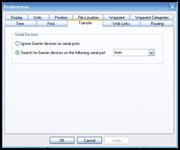
Streaky, the first thing we need to do is get Mapsource to recognise your device, after that things should be easy. I will stick with you on this until it is resolved.




