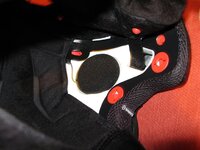
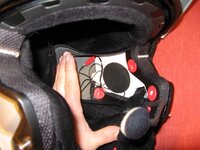
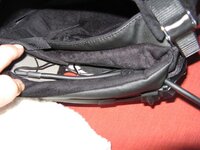
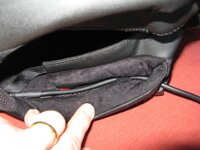
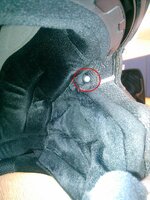
Schuberth C3 headset fitting.

So then chaps we are looking at getting a small batch made up for stock as I think they are going to be a very popular part for us. But as an in-between solution we are making some up classed as special order/special builds for our customers who have seen the parts and want them ASAP etc.

We are taking orders over the phone 01926 431249 so you guys are more than welcome to place an order and leave it with us to build the headsets up for you. Casper you would need to order the part via Splash Designs as we can not send any parts direct from here within the UK to Holland

Rich :beerjug:
 
Its our new style headset loom designed for in-ear speakers. The loom will come with the white connections for plugging in speakers, the mic and a BGNS if being used on a Super Pro etc. The wiring loom will run down to a 7 pin din plug and also have a seperate tail with a 3.5mm jack plug socket fitted. This is where the in-ears will plug into.

So basically replacing our parts 1187 and 1188, cost wise £20 each.

Rich :beerjug:
 
Rich,

I am in the USA and have a c3. Looking for a pictorial fit guide also. Do you have this?

Thanks
Alan
 
Autocom/Schuberth C3 fitting pictures (1/3)

The nice guys from Autocom fitted the headset to my helmet, so hopefully it's an approved method.

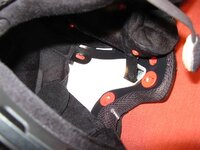
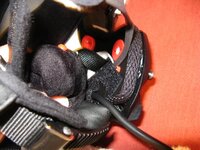
1. Unclip the front right hand (as wearing) padding. There is a pre-formed mark on the side of the helmet for headphones.
autocom-schuberth-c3-1.JPG

2. Cut a ~10mm strip of velcro provided with the kit and stick across the moulding.
autocom-schuberth-c3-2.JPG

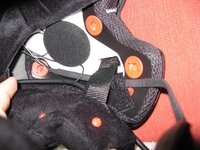
3. Stick the headphone onto the velcro. It's a good fit for the moulding. Reclip the padding. Route the cable around the back of the helmet - the lining pulls up without any clips.
autocom-schuberth-c3-3.JPG

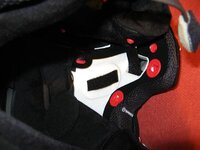
4. Follow the steps 1-3 for the left hand speaker.
autocom-schuberth-c3-4.JPG
 
Last edited:
Autocom/Schuberth C3 fitting pictures (2/3)

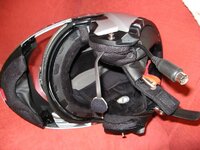
5. The main connector is routes from the front, under the chin strap and allong the bottom edge of the helmet.
autocom-schuberth-c3-5.JPG

5b. The cheek padding keeps it all in place. From photo #8, i have about 2 inches of cable + connector out of the helmet.
autocom-schuberth-c3-5b.JPG

6. Use some of the sticky velcro to stick the connector cable to the helmet and keep it in place.
autocom-schuberth-c3-6.JPG

7. Route the microphone under the chin-strap and also stick down with some of the velcro. At the back, make sure the clip is not obscured.
autocom-schuberth-c3-7.JPG
 
Last edited:
Autocom/Schuberth C3 fitting pictures (3/3)

8. Clip the pading back and try it on. Make sure that things like the connector for the microphone is not digging in your head and it fit's well.
autocom-schuberth-c3-8.JPG

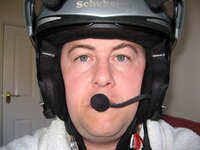
9. Adjust the microphone position so that it just 'sits' on your lips.
autocom-schuberth-c3-9.JPG

Connect it to your bike and:
- check the speaker is closely aligned to each ear.
- test and adjust the microphone as required

Sorry about the scary face / early morning photo!

Steve
 
Its our new style headset loom designed for in-ear speakers. The loom will come with the white connections for plugging in speakers, the mic and a BGNS if being used on a Super Pro etc. The wiring loom will run down to a 7 pin din plug and also have a seperate tail with a 3.5mm jack plug socket fitted. This is where the in-ears will plug into.

So basically replacing our parts 1187 and 1188, cost wise £20 each.

Rich :beerjug:


Are these in production, or special order, was thinking of changing to custom monitors and i suppose this is a better solution to cutting the speakers off and soldering a 3.5 jack, when will they be in production, as I wont need them untill i've sorted the monitors out :nenau
 
They certainly are and to be honest they are flying out the doors, if you could phone us direct on 01926 431249 someone will be able to take your details once you are ready.

Rich :beerjug:
 
Hi Bernd,

Unfortunately not, hopefully with the next C3 we have got booked in we are going to take some pictures and sort out a specfic PDF fitting guide that will hopefully be put on our web site. I beleive we have got two booked in for next week so we will sort some pics out then.

Rich :beerjug:

Does anyone have any fitment guides for the S1/S1 Pros?

Cheers.
 
Another way of mounting the Autocom headset

Hi Guys,
I'd like to show how I fitted an Autocom headset to a Schuberth C3 helmet. It requires some needlework, so if that's not up your alley, or there's no one around to help you out, you can skip this post (really). I had a good look at several sources of information to find out the best way to fit an Autocom headset to a Schuberth C3 helmet, and put together two different methods that IMHO give a 'neat' result.

First, I'd like to thank divelandy for his excellent DIY guide. :clap

Then, I had a good look at the Schuberth SRC (bluetooth) system, especially their video showing how to mount the SRC into a C3 helmet. If you watch this video, you'll see that all wiring and buttons in the SRC kit sit in the 'whisper collar'. Link : http://www.youtube.com/watch?v=jlEI_ZgHzDA

Apparantly Schuberth thinks that buttons and wires in the collar don't bother the rider, so I decided to go the same way, and combine it with divelandy's fixing of the Autocom microphone.

I kitted out two C3 helmets to my satisfaction, but following this method is at your own risk. It is actually easier than it reads, have a look at the pictures underneath.

1. Take out the 'whisper collar' (as shown in the Schuberth video).
2. Put collar in front of you with the inside up (as shown in picture below).
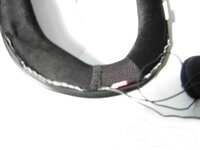
3. Cut 2 holes : one in the 'mesh' structure at the bottom, one in the crease at the top.
My Autocom system is installed at the left hand side of my bike, so I chose the top left side of the collar.
Note : these holes have to be large enough to let the Autocom 7pin plug through.
4. Slide Autocom 7pin plug in at hole in mesh structure at the bottom, and pull it back out at the top end.
Note : this is actually the hardest part : pushing the plug through the collar requires some perseverance.
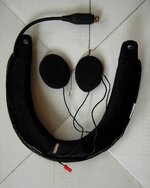
DSCN1145_500x500_100KB.jpg

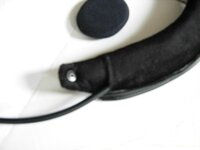
5. Here's the needlework : sew both holes so that they only let through cables, effectively closing the holes.
To make sure the cable stays in place when pulled I fixed the cable halfway with some extra needlework (see left hand side of picture).
There's no need to do a 'pretty' job, since you won't be able to see the needlework when the collar is mounted again. :)

DSCN1149_500x500_100KB.jpg
DSCN1148_500x500_100KB.jpg

6. Mount Autocom microphone (see divelandy's method); I fastened it with Ducktape so that the mic doesn't move.
Note that I made a hole in the tape for the red clip to go through (at right in the picture).
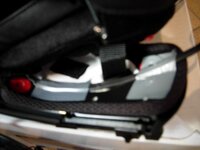
DSCN1151_500x500_100KB.jpg

7. Mount speakers (see Schuberth video) and connect all wires.
8. Put 'whisper collar' back into its' place (see Schuberth video).

That's it. The end result I think is neat, because most cables are in the 'whisper collar', where they don't take up extra space and (from experience) don't bother you at all.

I hope someone can use this to his advantage.
Cheers,
GSband

 
8. Clip the pading back and try it on. Make sure that things like the connector for the microphone is not digging in your head and it fit's well.
View attachment 113633

9. Adjust the microphone position so that it just 'sits' on your lips.
View attachment 113634

Connect it to your bike and:
- check the speaker is closely aligned to each ear.
- test and adjust the microphone as required

Sorry about the scary face / early morning photo!

Steve

I have just got a super pro AVI and I have a BMW sys 6 helmet. May I ask where you put BGNS on your helmet? I seem to have loud music when stationary but at speed it goes quiet. I have tested it stationary by tapping it and it works correctly, but have read that it is probably the position of the BGNS on quiet helmets.
 
I have just got a super pro AVI and I have a BMW sys 6 helmet. May I ask where you put BGNS on your helmet? I seem to have loud music when stationary but at speed it goes quiet. I have tested it stationary by tapping it and it works correctly, but have read that it is probably the position of the BGNS on quiet helmets.

The back ground noise sensor (BGNS) is just in the bottom of the cheak-pad curve of the helmet, by my left eye and fit's neatly between the lining and the shell. I'll take a photo later and post to this thread.
 
please that would be a great help. Also thanks for getting back to me on this, I was a little perplexed for some time not knowing what I had installed incorrectly.
 
Thanks, just put mine in same position and is working perfectly now. Thanks for your time and effort much appreciated cheers :beerjug: .


Back
Top Bottom