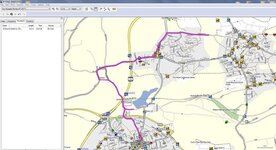
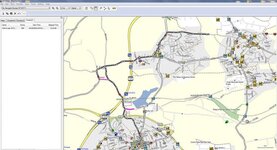
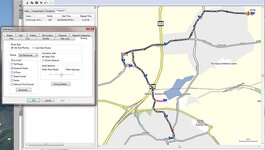
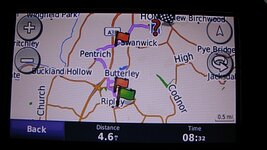
another point on the above it goes without saying that your preferences will need to be the same in both mapsource and basecamp to do this seamlessly, without an alteration of the route taking place.


........................
Just as a point of interest to those who use mapsource, if you do want to turn on and off announcements in a route you have created in mapsource you could just copy and paste the route into basecamp and do it from there and then just copy and paste it back into mapsource to send it. Sorry my mistake, the last bit is incorect and should have read copy itYou don or send it to your map folder on your unit and not into mapsource. or just send from basecamp.
 . This is to ensure that the 590 is behaving. I have had more routing anomalies with this over the 660.
Actually you don't need to do anything to make Mapsource via points unannounced, they become so automatically. Just one of the many reasons I prefer it to Basecamp You might need to do this if you want them announced but not if you are happy with them being unannounced.
John
Leedude thanks for trying that same route from Mapsource. I think it therefore means that it is down to the units themselves then. For me it confirms that I shall continue to use Basecamp as for the majority of my runs it works really well. I regularly make local runs up in the Peak District even though I know just about every pebble on every road
With the problems you have encountered,when this has happened on our trips ,we pan out navigate back to route and turn the beggars off and back on. If this fails,have deleted route and reloaded from memory card. This usually works, if not old school list of waypoints map.New route to there,all part of the trip. Someone on here suggested having a track and a route showing to define any GPS nonsense. Also from that New England Rider GPS info they recommended having unit and software on car. Seems to be less glitchy like that.
Andrew

In the end...we all go about this the way that suits us best

good to hear from another source, and glad you tried it for yourself as in post number 10 on this thread you were unsure, and presumably were not to sure to take my word for it, and neither would i, as we were dealing with different units. with your 590 i believe there is a skip function that maybe able to cancel this problem out for you.
I had in my mind a view of how I thought it works whereas reality of how it actually works is slightly different but good to know/understand how it handles shaping points.

.........................
So if your recalculate is set to auto, you'll be un-wittingly riding around in circles all day!!
Not that I didn't believe you
As for skip function yes could have tried it (I may do a re run and try it) thought it was only for Waypoints
I must be doing it wrong! I always have auto recalculate on and so far I have avoided going around in circles, unless I use the motorcycle mode-
John
It may be of some interest to people, if you gave a few details as to what your preference settings are , just In case others wish to try them, to avoid this particular issue

The only problems I have experienced are when I switched the 390 into motorcycle mode. Every time I have tried this mode I get problems. These range from the insistence on picking tiny lanes over much faster B roads to trying to send me on 50 mile diversions for no apparent reason. I have posted on here about some of these problems. I am convinced that there are some hidden settings that are used when the motorcycle mode is engaged. I have tried several times with what settings there are set exactly the same in both car and motorcycle mode only to find that using the motorcycle mode causes the route to calculate differently.
Also when in motorcycle mode the auto recalculate function becomes erratic, often sending me down miles of narrow gravel strewn lanes rather than more direct roads back to the intended route. On the last occasion this would have added nearly and hour to a 90 min journey had I blindly followed the directions. I stopped, switched back to car mode, and it came up with a more logical route straight way. Leaving the 390 in car mode is the solution but, as I have said before, a great shame as the ability to switch between two different sets of setting would be very useful.
John
Interesting post. Exactly my experience, too. You mention hidden settings...
I'm more tempted to suggest there are different algorithm values placed (possibly by Garmin?; or the digital mappers?) on the roads themselves. (I hope that makes sense...) and when the route calculation summation takes place - a whacky route is the result.
The oddball behaviour seems to change with each mapset update, too; which is why I think it's the mapping rather then the device.
I've seen the device knock out a deviant route taking me on an obvious wild turkey hunt round a dead-end housing estate, re-emerging on exactly the same road and then head off past the start/origin point towards the destination. Curiously, this only happens in motorcycle mode. I even took a screenshot to send to Garmin for their comments, but never gotten round to it. This erratic behaviour is tolerable if you have a knowledge of the roads or area; however, when the device pulled some similar stunts tootling through darkest France, last year, it was tedious and frustrating.
Very helpful analysis by everyone. I think in my mind it's clear how shaping points work, though next time will switch to planning in car mode and see what happens, though I don't think that makes much difference on a Nav V, we shall see. Joe Biff makes an interesting point on mapping, see this article in The Times the other day
http://www.thetimes.co.uk/article/sat-nav-that-knows-every-wrong-turn-to-unblock-britain-d89k8jcpt
Sent from my iPad using Tapatalk[/QUOTE
Planning the route in car mode is one thing, you will need to check that your device does not change it back to motorcycle mode if that is how the device is usually set. As I use Mapsource my routes do not have modes attached when they are transferred to the device but if I set a route to motorcycle mode on the device it will remain that way even if I switch the main device setting to car. This seems logical and would be useful if the motorcycle mode worked properly. It would allow a selection of routes with different settings, you could have two versions of the same route and switch between at will.
As for the article about truck drivers , aren't a lot of those problems due to users not setting the device for the right type of vehicle. Both Basecamp and Mapsource have vehicle settings for trucks and I suspect devices sold for use in truck have such settings too. Are they used?
John
I though I had done that before but here goes-
Firstly I always use Mapsource to plan my routes. I always have my start and end points as waypoints and usually let Mapsource produce a route by highlighting the two waypoints and right clicking on the "create route from the selected waypoints" option. I then drag and drop the route to pick the roads I want. This creates unannounced via points used to ensure the device follows my wishes. These points are usually placed just after a junction for this purpose. For bike routes I have the road selector set in the middle, for car routes I sometimes move it more towards the prefer highways end of the scale.
I use two devices, a 390 on the bike or my car and a nuvi 2497 in my wife's car. The 390 is usually set to avoid motorways and unmade roads. the 2497 just to avoid unmade roads. Both are set to fastest time and have auto recalculation turned on. Both perform as I would expect and cope with missing via points without insisting I turn around. Both devices have the latest Garmin mapping plus OSM maps. I usually use OSM mapping on the 390 and Garmin on the 2497. The OSM maps are far more accurate and detailed but my wife uses her car for work and needs the post code search facility that is not available on the OSM maps. Having said that I often have to use OSM maps with mapsource to pinpoint destinations, make a waypoint and then transfer that to the Garmin maps. If we use my wife's car for trips I used OSM maps
The only problems I have experienced are when I switched the 390 into motorcycle mode. Every time I have tried this mode I get problems. These range from the insistence on picking tiny lanes over much faster B roads to trying to send me on 50 mile diversions for no apparent reason. I have posted on here about some of these problems. I am convinced that there are some hidden settings that are used when the motorcycle mode is engaged. I have tried several times with what settings there are set exactly the same in both car and motorcycle mode only to find that using the motorcycle mode causes the route to calculate differently.
Also when in motorcycle mode the auto recalculate function becomes erratic, often sending me down miles of narrow gravel strewn lanes rather than more direct roads back to the intended route. On the last occasion this would have added nearly and hour to a 90 min journey had I blindly followed the directions. I stopped, switched back to car mode, and it came up with a more logical route straight way. Leaving the 390 in car mode is the solution but, as I have said before, a great shame as the ability to switch between two different sets of setting would be very useful.
John