Tracks?

GSwadd

Registered user
Joined
Sep 8, 2006
Messages
616
Reaction score
0
Location
Mackay, Queensland, Australia
Just downloaded the tracks from my weekend away and noticed the Zumo didn't keep a track log of the first day except for a section that night where I iwent for fuel. I thought it kept log as long as it was turned on? Any reason why it skipped the first day's journey? I did have a route active and it was switched on and off a few times. :nenau
 
Di you run out of space for the tracklog?
Is it perhaps overwriting the oldest tracks with the newest set of logs?
 
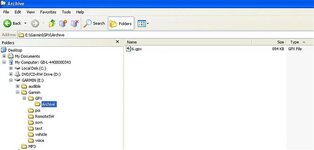
Plug your Zumo into your PC.

Open Windows explorer and look at the Zumo drive.

The Zumo archives tracks to the folder shown below when the active tracklog gets to a certain size. Your older tracks may well be there :thumb2

If they are then just copy them accross to your PC and open them in Mapsource.
 

Attachments

  • ScreenShot011.jpg
    ScreenShot011.jpg
    29.7 KB · Views: 410
Waldin I am in awe of you! That solved my problem. The first days track was in the archive even though the file was only 985kb and the new files are bigger. I had checked the log file size on the Zumo and it was only at 9% so thought plenty of size to keep tracks.

Thanks again. :thumb2
 
I had this same problem too, thanks for the fix Kev :thumb2 Can I now delete these archived files from the Zumo drive?
Ta.
Andy.
 
opening gpx archive tracks from zumo

Help required
do you need a special software for coverting files + opening these as when i go into my archive the tracks are there in gpx format but it asks me what program do i want to use to open them + that windows can look up online for them?

or am i doing something stupid
i have the same problem if i go to download tracks as well?:confused:
thanks
 
... The Zumo archives tracks to the folder shown below when the active tracklog gets to a certain size. Your older tracks may well be there :thumb.
Kin Ell - the things you learn from here eh. :clap

Does this work for the 2610 as well Kevin? :nenau

Help required. do you need a special software for coverting files + opening these as when i go into my archive the tracks are there in gpx format but it asks me what program do i want to use to open them + that windows can look up online for them?
The most obvious question is do you have Mapsource on your computer?
 
yes :confused:


Kin Ell - the things you learn from here eh. :clap

Does this work for the 2610 as well Kevin? :nenau

The most obvious question is do you have Mapsource on your computer?
 

OK, open Mapsource. Then top menu, File, Open (or use the 'open' icon) and a new window opens. Check that Mapsource is looking for file type 'all'. Drill down to the location of your tracklog file - if its still on the Zumo SD card then obviously you'll need this connected :augie

HTH
 
Thanks Tomcat you are indeed a top cat
file type 'all'.was the problem
cheers mate :beer:


OK, open Mapsource. Then top menu, File, Open (or use the 'open' icon) and a new window opens. Check that Mapsource is looking for file type 'all'. Drill down to the location of your tracklog file - if its still on the Zumo SD card then obviously you'll need this connected :augie

HTH


Back
Top Bottom