Grumpy Lee Ex Supported Member UKGSer Subscriber Joined Jul 26, 2004 Messages 1,128 Reaction score 0 Location Yeovil-ish Jan 4, 2009 #1 I've been given a USB lead thingy that has a USB connector on both ends i.e. you can plug either end into a USB port. What is / can it be used for
I've been given a USB lead thingy that has a USB connector on both ends i.e. you can plug either end into a USB port. What is / can it be used for
Dahoum Registered user Joined Jul 20, 2004 Messages 16,183 Reaction score 2 Location ................ Jan 4, 2009 #2 tying up the missus?
Grumpy Lee Ex Supported Member UKGSer Subscriber Joined Jul 26, 2004 Messages 1,128 Reaction score 0 Location Yeovil-ish Jan 4, 2009 #3 Dahoum said: tying up the missus? Click to expand... It's not that long
(RIP) Proff 25 Mar 1949 - 10 Nov 2016 UKGSer Subscriber Joined Apr 11, 2006 Messages 11,393 Reaction score 3 Location Bollox yer nosey gits Jan 4, 2009 #4 Has it got male and female ends??try plugging them together if not sure If it's an extension lead it will come in useful when you get your mousemat hub
Has it got male and female ends??try plugging them together if not sure If it's an extension lead it will come in useful when you get your mousemat hub
Womble Well-known member UKGSer Subscriber Joined Apr 16, 2006 Messages 2,443 Reaction score 0 Location Suffolk Jan 4, 2009 #5 Grumpy Lee said: I've been given a USB lead thingy that has a USB connector on both ends i.e. you can plug either end into a USB port. What is / can it be used for Click to expand... Probably for an external hard disk or similar. If there's a bulge in the middle of the lead, it may also be for transferring files between 2PCs.
Grumpy Lee said: I've been given a USB lead thingy that has a USB connector on both ends i.e. you can plug either end into a USB port. What is / can it be used for Click to expand... Probably for an external hard disk or similar. If there's a bulge in the middle of the lead, it may also be for transferring files between 2PCs.
Grumpy Lee Ex Supported Member UKGSer Subscriber Joined Jul 26, 2004 Messages 1,128 Reaction score 0 Location Yeovil-ish Jan 4, 2009 #6 Tobermory Womble said: Probably for an external hard disk or similar. If there's a bulge in the middle of the lead, it may also be for transferring files between 2PCs. Click to expand... There is a bulge in the middle, but that is where it winds itself up on a spring thing thingy. The two ends are both the same and I have plugged one end into my lappy and the other into my desky but nothing seems to happen.
Tobermory Womble said: Probably for an external hard disk or similar. If there's a bulge in the middle of the lead, it may also be for transferring files between 2PCs. Click to expand... There is a bulge in the middle, but that is where it winds itself up on a spring thing thingy. The two ends are both the same and I have plugged one end into my lappy and the other into my desky but nothing seems to happen.
Wizard Registered user Joined Jul 15, 2005 Messages 5,608 Reaction score 0 Location Norn Iron Jan 4, 2009 #7 You can network using USB
Grumpy Lee Ex Supported Member UKGSer Subscriber Joined Jul 26, 2004 Messages 1,128 Reaction score 0 Location Yeovil-ish Jan 4, 2009 #8 Wizard said: You can network using USB Click to expand... How do you do that then? Like I said I joined them together and neither recognised the other - do I need anything else? I thought everything was plug'n'play, or is it because one is XP and the other Vista?
Wizard said: You can network using USB Click to expand... How do you do that then? Like I said I joined them together and neither recognised the other - do I need anything else? I thought everything was plug'n'play, or is it because one is XP and the other Vista?
Wizard Registered user Joined Jul 15, 2005 Messages 5,608 Reaction score 0 Location Norn Iron Jan 4, 2009 #9 Grumpy Lee said: How do you do that then? Like I said I joined them together and neither recognised the other - do I need anything else? I thought everything was plug'n'play, or is it because one is XP and the other Vista? Click to expand... No idea. I read about it, it looked like a pain in the arse, I bought a cheap 10/100 hub. But it can be done
Grumpy Lee said: How do you do that then? Like I said I joined them together and neither recognised the other - do I need anything else? I thought everything was plug'n'play, or is it because one is XP and the other Vista? Click to expand... No idea. I read about it, it looked like a pain in the arse, I bought a cheap 10/100 hub. But it can be done
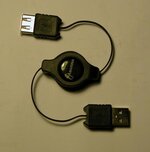
Redboots Member well-known UKGSer Subscriber Joined May 16, 2006 Messages 13,081 Reaction score 13,741 Location Deep in the Vosges du Nord Jan 4, 2009 #10 Grumpy Lee said: I've been given a USB lead thingy that has a USB connector on both ends i.e. you can plug either end into a USB port. What is / can it be used for Click to expand... If its like this, its just an extention lead. Mine came with 4 different ends to plug into it. Mine is male/female though. You should not plug it into 2 pc's. PC ports put a voltage out through them... 5v John Attachments usb.jpg 15.9 KB · Views: 68
Grumpy Lee said: I've been given a USB lead thingy that has a USB connector on both ends i.e. you can plug either end into a USB port. What is / can it be used for Click to expand... If its like this, its just an extention lead. Mine came with 4 different ends to plug into it. Mine is male/female though. You should not plug it into 2 pc's. PC ports put a voltage out through them... 5v John
SOAA Son of an Admin Administrator Joined Jan 21, 2003 Messages 852 Reaction score 296 Location Shrewsbury Jan 9, 2009 #11 It's probably one of these Used to transfer data, directly, from an old XP or Vista PC on to a new Vista PC using Windows Easy Transfer
It's probably one of these Used to transfer data, directly, from an old XP or Vista PC on to a new Vista PC using Windows Easy Transfer