Via/Route point

peter56

Well-known member
UKGSer Subscriber
Joined
Sep 25, 2016
Messages
529
Reaction score
60
Location
darlington, england
So I have the basic free MRA. Have sent a route gpx 1.1 to nav 5 its missing all via points just has start and destination. Before I spend any more time on this, I was thinking is because I only have basic
 
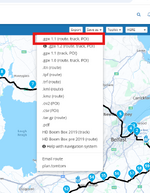
This is the one you need. Be careful the basic MRA uses Open Street maps instead of the Here maps used by your Garmin and the resulting route may not behave as expected.

1744909910762.png
 
So saved as gpx 1.1 (route , track , POI) then export to bmw motorcycle on the drop down list no good
 
So saved as gpx 1.1 (route , track , POI) then export to bmw motorcycle on the drop down list no good
I don't use the export function on my XT I use a Garmin app called drive or transfer the saved file directly to my Zumo 340 or 390 via cable. If you are using the exporter try using Garmin device. BMW motorcycle may be for the newer connected ride app or navigators (which I believe are tom tom based). The Nav 5 is a Garmin unit.
 
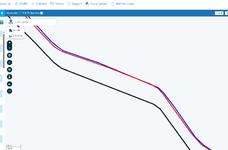
Yes you'd think that mapping would put all the roads in the same place but they don't. This is a route on the here map with Open Street map Blue and Tomtom roads. The Here map can be miles off so if you use OSM to plot a route for the Garmin the waypoints can be so far off the route that the unit won't compute.


1744912219953.png

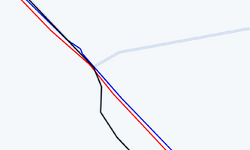
In other places the mapping may match up!!
1744912412562.png
 
Transferred a route yesterday to a Nav VI, used gpx 1.1 everything transferred as expected. I do have a Gold licence though
 
Transferred a route yesterday to a Nav VI, used gpx 1.1 everything transferred as expected. I do have a Gold licence though
I think having the gold would solve the problem. Hoping a discount will be on its way soon
 
Did you export the route to a device or save as?

I have been experimenting with the route planner lately also using a Nav V. I found that using the Connector app when I exported using "BMW Motorbike (GPX 1.1)" it missed out the via points (or shaping points in Garmin language). But using "Garmin New (GPX 1.1)" it included the via/shaping points. No idea why.

I have just bought Gold so am using Here maps, but even so, I had the issue the OP had.

I think the screenshot in Post #3 are the save as options.

 
Last edited:
Did you export the route to a device or save as?

I have been experimenting with the route planner lately also using a Nav V. I found that using the Connector app when I exported using "BMW Motorbike (GPX 1.1)" it missed out the via points (or shaping points in Garmin language). But using "Garmin New (GPX 1.1)" it included the via/shaping points. No idea why.

I have just bought Gold so am using Here maps, but even so, I had the issue the OP had.

I think the screenshot in Post #3 are the save as options.
I tried export first. Then saved as and export after save. Also changed the points in-between start and finish into the hand symbol, Have used gpx 1.1 and bmw motorbike gpx1.2
 
I tried export first. Then saved as and export after save. Also changed the points in-between start and finish into the hand symbol, Have used gpx 1.1 and bmw motorbike gpx1.2

I would use gpx 1.0 or 1.1 (Route, track, poi). You should go into route, then hit the page menu, top right. Then save as, select gpx1.1 and then hit save, it should then save the route onto your computer. Then hook up the Nav and copy to the nav gpx folder. I just did this again to check with a route I did yesterday and all went across ok. Then go into trip planner on the Nav and saved trips to open
 
Ok so its sorted thanks for all advice. Need to unpick what I did different this time and make a note of it for future reference.


Back
Top Bottom