Waypoint pain

Berin

Well-known member
UKGSer Subscriber
Joined
May 29, 2006
Messages
7,769
Reaction score
3,579
Location
South Oxfordshire
I’ve just been using MRA to plan a short European trip.

The waypoint/favourites handling is still dire. If you want to use the same waypoints/favourites in different routes, it’s still a massive pain as every single favourite ever made is listed with no way to search or and no other way to include a waypoint that is not part of a route.
 
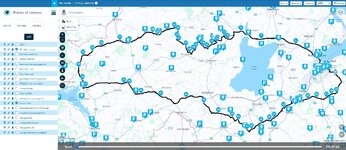
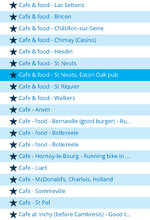
I sort (sort of) my favourites, which are predominantly hotels and cafes) by giving them a distinct name.

IMG_0773.jpeg

This makes them pretty easy to find and use.

As to the latter, you can. Here’s an example:

IMG_0774.jpeg

IMG_0775.jpeg

:beerjug:
 
Last edited:
I’ve just been using MRA to plan a short European trip.

The waypoint/favourites handling is still dire. If you want to use the same waypoints/favourites in different routes, it’s still a massive pain as every single favourite ever made is listed with no way to search or and no other way to include a waypoint that is not part of a route.

If you have multiple favourites/waypoints from one route, you could import that route to your current route planning. Saves you searching for them, and potentially re-creating what you already have made.
 
I’ve just been using MRA to plan a short European trip.

The waypoint/favourites handling is still dire. If you want to use the same waypoints/favourites in different routes, it’s still a massive pain as every single favourite ever made is listed with no way to search or and no other way to include a waypoint that is not part of a route.
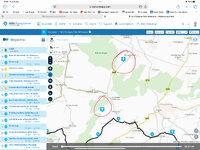
Agreed it's a bit pants. The best way I've found is to upload POI files to your library and display them on the route and convert those you need into waypoints. Unfortunately the POI's don't hold as much information as I'd like, or as much as basecamp does. This is a route with custom Loos and Picnic sites enabled. I chose which ones I want to include in my route and then turn them off before export.

Screenshot 2025-04-22 190228.jpg
 
None of it works well. You have to zoom right in to see them on a map, even Wapping has duplicates, no doubt because he didn't see the one he needed and created another.

POI's are a faff to create, I did that for my Templars and Castle's trip but it seemed hardly worth it for this.

I suspect Basecamp has a proper relational database under its which allows a waypoint to exist once but be viewed in many places, and MRA doesn't - and that'd will be hard to fix, which is why they haven't.

But, it does run on an iPad.
 
even Wapping has duplicates, no doubt because he didn't see the one he needed and created another.

Not so.

There is two cafes in Bolezeel (see the recent trip report from Ectopic). Likewise, two in St Whatsot, one on the town square, the other being the pub, Eaton Oak, outside the town.
 
All this waypoint creation stuff puts me off MRA, Google and Apple Maps. Rubber banding just makes route creation in apps such as Pocket Earth and Basecamp such a doodle
 
All this waypoint creation stuff puts me off MRA, Google and Apple Maps. Rubber banding just makes route creation in apps such as Pocket Earth and Basecamp such a doodle

You can rubber band in MRA too. You don’t have to create waypoints, but many of us do for things like food or fuel stops. There’s nothing stopping you though from just making the start/end and rubber banding an entire route if that’s your preferred method.

We tend to do that at first, then look around where we’ll be at lunch time and add in a stop. Same for petrol based on distance. Having the Google Maps overlay on the route, all within MRA makes this easy, as does the integrated street view option.

We don’t use the POI/favourites in MRA as they’re poor compared to how Basecamp used to manage it.
 
You can rubber band in MRA too. You don’t have to create waypoints, but many of us do for things like food or fuel stops. There’s nothing stopping you though from just making the start/end and rubber banding an entire route if that’s your preferred method.

We tend to do that at first, then look around where we’ll be at lunch time and add in a stop. Same for petrol based on distance.

We don’t use the POI/favourites in MRA as they’re poor compared to how Basecamp used to manage it.
I have been using MRA since it started, never got on with Basecamp. I do the same as you, but I think Wapping, Berin and others are using far more options and pushing the limits of MRA, which is good as we all learn. But I doubt if I will ever go to the extremes of being anything but a basic user
 
I suspect Basecamp has a proper relational database under its which allows a waypoint to exist once but be viewed in many places, and MRA doesn't - and that'd will be hard to fix, which is why they haven't.

Absolutely agree that the relational database in Basecamp is how it should be done. You can tell it is, as when you look at objects you can see in the properties other things, like routes, that reference the object.
 
Not so.

There is two cafes in Bolezeel (see the recent trip report from Ectopic). Likewise, two in St Whatsot, one on the town square, the other being the pub, Eaton Oak, outside the town.
Aha. But only you would know which cafe in Bolezeel was which.
 
You can rubber band in MRA too. You don’t have to create waypoints, but many of us do for things like food or fuel stops. There’s nothing stopping you though from just making the start/end and rubber banding an entire route if that’s your preferred method.

We tend to do that at first, then look around where we’ll be at lunch time and add in a stop. Same for petrol based on distance. Having the Google Maps overlay on the route, all within MRA makes this easy, as does the integrated street view option.

We don’t use the POI/favourites in MRA as they’re poor compared to how Basecamp used to manage it.
I agree, and I do that too. But sometimes a planned route needs to be abandoned and then it’s handy to be able to route directly to a carefully placed waypoint.
 
I agree, and I do that too. But sometimes a planned route needs to be abandoned and then it’s handy to be able to route directly to a carefully placed waypoint.

Yeah. We do have a few in there, but since we use Scenic for actual navigation things like that are in there rather than MRA.
 
Aha. But only you would know which cafe in Bolezeel was which.

They are my ‘Favourites’, which is all that matters to me. Why should anyone else need them or want to know which cafe was which? Like the P in PC, it’s Personal (Computer). What makes sense to one person, may well be gibberish to another.

Or have I misunderstood you?
 
Garmin Tread app ( which controls XT2) has a feature called ‘Collections ‘, and as many as you like to create.
This makes it super easy to group yourwaypoints and/or routes
e.g Cafes , or Dolomites 2025
( there is then no need to name that waypoint as a cafe , because it is thereafter listed as being in the cafes collection )
It’s a feature that sells this device to me every time .
A bonus is that any of those collections are then easily shared ( they are all gpx files ) to others in your group.
At the same time , it’s all backed up online, invisibly, on explore.garmin.com website.
 
Last edited:
They are my ‘Favourites’, which is all that matters to me. Why should anyone else need them or want to know which cafe was which? Like the P in PC, it’s Personal (Computer). What makes sense to one person, may well be gibberish to another.

Or have I misunderstood you?
No, not at all, I’m not expecting you to share Cafe secrets with us - just a bit tongue in cheek, since they are both called the same thing.
 
Garmin Tread app ( which controls XT2) has a feature called ‘Collections ‘, and as many as you like to create.
This makes it super easy to group yourwaypoints and/or routes
e.g Cafes , or Dolomites 2025
( there is then no need to name that waypoint as a cafe , because it is thereafter listed as being in the cafes collection )
It’s a feature that sells this device to me every time .
A bonus is that any of those collections are then easily shared ( they are all gpx files ) to others in your group.
At the same time , it’s all backed up online, invisibly, on explore.garmin.com website.
I don’t think you’ll find many fans of Explore here. I abandoned it years ago.
 
None of it works well. You have to zoom right in to see them on a map, even Wapping has duplicates, no doubt because he didn't see the one he needed and created another.

POI's are a faff to create, I did that for my Templars and Castle's trip but it seemed hardly worth it for this.

I suspect Basecamp has a proper relational database under its which allows a waypoint to exist once but be viewed in many places, and MRA doesn't - and that'd will be hard to fix, which is why they haven't.

But, it does run on an iPad.

You can import your favourites (if saved as GPX locations) to the POI list. You can change each POI to the relevant flag for the location type (fuel station / food spot / hotel / etc). So when searching for POIs it will bring up those on the map & your favourites (as a POI). Or if you do not want to select any POI's except your favourites (imported as a POI), they will always appear on the map.
 
POI's are a faff to create, I did that for my Templars and Castle's trip but it seemed hardly worth it for this.
@Berin
Would that be the .gpx file I created and offered up for your trip? How did you find it?
Testing out the Montana 710 at the moment and it's doing well.
 
Last edited:
@Berin
Would that be the .gpx file I created and offered up for your trip? How did you find it?

Anyways, not being a luddite and having had a good look at MRA, it did nothing for me. Each to his own yet I'm surprised at the sheer amount of grief some will put up with trying to make 'things' work from one software package to the other mostly getting migraines!

Amongst a lot of other things, BC will allow you to classify your waypoints and allocate a custom icon to it (a picture speaks a thousand words)
You can then upload the file using POI loader. Searching by name/classification/or near your route etc (or route to) whilst on the go is a doddle.
Straight forward
Never let me down
Easy to create and customise
over 365,000 classified pois in my units now.
And no. I'll never visit them all!

IMHO, BC, despite its foibles and the time it takes to learn, is still good-
If only Garmin would tune it up.
Testing out the Montana 710 at the moment and it's doing well.
Hated BC with a vengeance. Not sure about amount of grief, I haven't experienced any grief with MRA, also like being able to use MRA Navigation in the car and being able to just pass routes to my XT via Garmin Drive and not messing with cables. But as you say, each to their own, its a piece of software, not life changing :)


Back
Top Bottom