Waypoints dissappear

MRA on its own works well, add in other software a Garmin or Tomtom and its can get quirky.
It does work if you stick with it, some trial and error will help.

I was really frustrated with it for months and nearly gave it up.
Glad i didn't now, it really is the best tool for planning routes.

As already suggested use Via points.
I usually have several stops planned on my rides, either breaks or things i want to see, so they are all locked in with Via points.
i even use Via points for roads i know are good rides, so my GPS doesn't reroute round them.

Stick with it 👍
 
I'm trying to stick with it, mra web based trip planning is no problem, its the app/android auto I'm struggling with tbh.

Sent from my SM-A236E using Tapatalk
 
I'm trying to stick with it, mra web based trip planning is no problem, its the app/android auto I'm struggling with tbh.

Sent from my SM-A236E using Tapatalk

can you get to grips with using the MRA web based planner on a laptop to share the route here rather than trying to do it on your phone?

I'm pretty sure people want to see the route as you have planned it so they can then see what happens when they send it to a navigation app
 
Hands are waypoints
Teardrops are shaping points

As a general rule MyRoute calls:

1. The inverted teardrop, a waypoint. MyRoute sometimes call these ‘shaping points’, too.

2. The hand, a via-point.

See here:


Waypoints are the basis of each route. In this manual, you can read about all the possibilities for waypoints in the MRA Routeplanner!


First: what does that mean?

  • Each point on the route is a waypoint that helps to determine how the route goes, other than the basic settings of the route calculation. That's why you can also call waypoints: 'shaping points'. These points form the route but otherwise have no specific information or value.
  • Some waypoints have not only been created to form the route but also indicate a special place that should not be missed while driving (such as a special road, a nice lookout or a monument). These are called 'viapoints'; points that we want to pass for a specific reason and that we would like to be alerted to (more about this further in the manual).


Via-points

So, as described above, via-points are waypoints at a special place that you don't want to miss. Here you can think of a beautiful mountain pass, a specific bridge or monuments. Via-points are also, for example, the location where we have planned a coffee stop or a lunch break.

The start and endpoints are always automatically a via-point.
 
autogs (Andy) it’s really hard to help you without the route. I am away in Grand Canaria but can access MyRoute on my iPad, so let’s have a go at helping you.

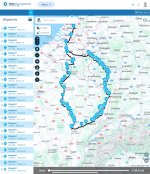
Here is a route with 88 waypoints (the inverted teardrops) between the hand start via-point (number 1) and the hand end via-point (number 90)


It looks like this:

IMG_0357.jpeg

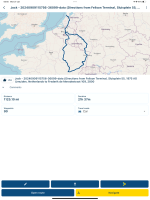
If I open the route in MyRoute’s Navigation app on my iPad, I see this:

IMG_0358.png

As you can see, the route displayed has taken away all the waypoints (the inverted teardrops) BUT it still knows that the route contains 90 waypoints AND the route has kept its correct shape. The route is ALSO the same length at 1125.10 miles and the same estimated time at 21 hours and 37 minutes.

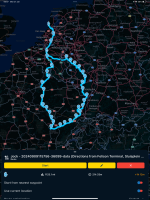
On my iPad, if I click on the ‘Navigate’ button, I get:

IMG_0359.png

As you can see, the distance is still correct at 1125.1 miles but the estimate journey time has altered by four minutes. That small discrepancy in the time does not bother me at all.

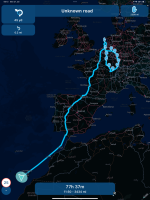
I am confident that were I not in Grand Canaria but was instead at point 1, the route would run perfectly. In fact I can check this by asking the Navigate app to take me from Grand Canaria to point 1 and then along the route with its 90 points, which it is happy to do:

IMG_0360.png

Obviously the total distance and the total estimated time have both increased, but that is to be expected, not least as I am sitting in Grand Canaria and not in Holland.

In short, we now know that the route I have shared with you above, works correctly in MyRoute’s Navigation app and will therefore work perfectly out on the road.

Now it’s your turn, Andy.

Please open the route I have shared, using MyRoute’s Navigation app on your phone. Then answer these four questions, please:

A. What do you see?

B. Is the route you see, the same shape?

C. Is it the same length of 1125.1 miles?

D. Is it the same time (or near enough) at 21 hours and 37 minutes?

If the answers to questions B, C and D are all “Yes” then we will know that you are OK. If though you are seeing something very different in answer to question A and / or that the answers to B, C and D are “No”, then we’ll know that something is wrong at your end.

Await your words and screenshots…..

:beerjug:
 
Last edited:
Woa loads of homework! Out on the bike today will be tackling later.
One immediate point Richard is someone on the mra forum said to save the route on the phone in 1.1 not 1.2 ? He reckons this stop the problem of intermediate waypoints being lost ?
Thank you for everyone who's tried to help.
Btw today is a garmin day..

Sent from my SM-A236E using Tapatalk
 
In MRA one thing I do is to change a waypoint to a Via point to ensure that if you copy to a Garmin or Tom Tom the route remains the same.

On the route page click on a teardrop which then opens a menu box, click on the right box which is 3 dots/more options, you'll then see a blue hand in a box, click on that and it will change the shaping point to a Via point which then forces the app to follow the route rather than deviate on another routing option.
 
One immediate point Richard is someone on the mra forum said to save the route on the phone in 1.1 not 1.2 ? He reckons this stop the problem of intermediate waypoints being lost ?

That has more to do with exporting a route, into a Garmin device.

From what you’ve told us so far, you are doing everything from within MyRoute and MyRoute’s Navigation app. In other words, you are not running the route in or on a Garmin.

In my post #25 I am not ‘Saving as’ anything. I am simply opening the Navigation app, then using the app to open the route from within MyRoute’s Routeplanner (website) app. Then navigating it, by tapping on the ‘Navigate’ button.

I think that in your opening posts, there is some simple user error creeping in. Or there is a misunderstanding between what we are reading and what you are doing. We’ll get to the bottom of it, I’m sure.

:beerjug:
 
Last edited:
Good news, I think.

I can replicate your problem, using MyRoute’s Navigation app on my iPhone. All from Grand Canaria. As I was hooning around the island, I thought about the advice that came to you from the MyRoute forum…. And a light came on.

I think it’s because you downloaded the route onto your phone, whereas I had been experimenting on my iPad, by simply using the Navigation app to open and display the route, then to navigate it.

Trying doing it again, saving your route (as MyRoute’s forum suggested) in version 1.1. Then open the saved route in the MyRoute Navigaion app on your phone. It should be OK with all the waypoints in place etc etc. In other words it should look perfect and (more importantly) navigate you from A to B, along the roads you want to take.
 
I think that last paragraph has hit the nail on the head Richard!
It's very frustrating with everyone else using it trouble free! I know how king rat feels now.


Sent from my SM-A236E using Tapatalk
 
If this doesn't work see the for sale section

Sent from my SM-A236E using Tapatalk


Back
Top Bottom