MyRoute waypoints - What happens if I miss one?

Rick 1600

Active member
UKGSer Subscriber
Joined
Mar 26, 2008
Messages
485
Reaction score
60
Location
Aberdeen Scotland
MyRoute. If I miss out a waypoint, will MyRoute try and take me back to it or will it recalculate to the next one? If it doesn’t can I make it do so?

=====

Moved and title edited.

Richard
 
Last edited by a moderator:
By ‘waypoint’ do you mean:

A. The inverted teardrop, used to shape routes?

B. The hand (viapoint), used to define a point that you must pass through?

Both can be skipped, either automatically or manually, depending on the type.
 
Last edited:
The hand Via Points are never skipped automatically. Shaping points (inverted teardrop) can be but this is a setting in "Functional" navigation settings. You can manually skip Via points.
 

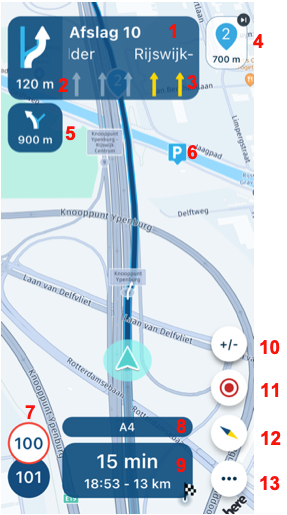
Route navigation

  1. Upcoming road: See the upcoming street name.
  2. Upcoming instruction: See the next instruction here.
  3. Lane instructions: See which lane is best for you to take at an exit, for example.
  4. Upcoming waypoint: See which waypoint will be next. Click on this button to immediately skip this waypoint.
  5. Next instruction: See what the next instruction will be. Have you checked the display of gas stations in the navigation settings? Then, if available, the nearest gas station will be shown here.
  6. Add POI: If you have added POIs to the route in the Routeplanner, you will see them on the map while navigating. Long press the POI to add it to the route.
  7. Speed: See here the allowed speed and how fast you drive yourself.
  8. Current road: See the name of the road you are currently driving on the screen.
  9. Time and duration: See here how long it is still driving. ATTENTION! Here you can choose between the end point, next shaping point, or viapoint. By default, the endpoint is shown. Click once to see the time and distance to the next shaping point. Then click once more to see the time and distance to the next viapoint.
  10. Zoom in/out: In principle, you will automatically zoom in and out, but click here to zoom in or out yourself. Go back to default? Click on the compass.
  11. Tracking: Click here to start, pause, or stop the track. The statistics can also be viewed here and a photo can be added.
  12. Compass: By default, the camera is set to dynamic, so it tilts and automatically zooms in and out. If you click once on the compass, you select the fixed camera. This is top-down and maintains the zoom level. This can be adjusted with the plus or minus. Keep the button pressed longer and the route will be shown in its entirety. If you have zoomed in or out, also click on the compass to return to the dynamic setting.
  13. Open menu: Click here to open the menu.
 
Thanks for replying.
Richard, both…. If I run into traffic and take another route it will keep directing me back to the one I have missed. Yes? So how do I skip it and return to my original route?
 
To skip a waypoint just poke the Icon (labelled 4) in the excerpt from the manual. It will ask you to confirm click the yellow yes that drops down into the screen. It will then route from where you are to the next waypoint. You can practice by sitting at home with your phone and create a short route with a mixture of shaping and via points. It you skip them in turn you can see the effect on the original planned route.
 
To skip a waypoint just poke the Icon (labelled 4) in the excerpt from the manual. It will ask you to confirm click the yellow yes that drops down into the screen. It will then route from where you are to the next waypoint. You can practice by sitting at home with your phone and create a short route with a mixture of shaping and via points. It you skip them in turn you can see the effect on the original planned route.
Or simply long press on same icon and it’ll skip said waypoint without needing for a confirmation tap. 👍🏻
 
bur note, if you stop navigation for any reason (break, phone off bike and to get it to stop speaking etc), when you restart the route, it will restart with all waypoints in the route again, even thos you have already gone through. It does not resume the route like a garmin will do. Your first waypoint will be right back at the beginning, so you have to manually skip all previous waypoints till you catch up where you are..Painful. Ther might be a "from my location" option but I had to do this a few times when using a route I created
 
bur note, if you stop navigation for any reason (break, phone off bike and to get it to stop speaking etc), when you restart the route, it will restart with all waypoints in the route again, even thos you have already gone through. It does not resume the route like a garmin will do. Your first waypoint will be right back at the beginning, so you have to manually skip all previous waypoints till you catch up where you are..Painful. Ther might be a "from my location" option but I had to do this a few times when using a route I created
If you leave the app running in the background, when you restart you get a "resume navigation" option on the screen and off you go. If you have cancelled navigation for any reason just long hold the next way-point from where you are and the apt will prompt you to restart from that way-point and ignore all previous way-points.
 
Right, on my phone all is well....
But... if I plan a route on Myroute on my laptop and export it to my Nav 5 then run phone and Nav 5 together, the route on the Nav 5 at first is a mirror image of the phone but when I press start the Nav 5 re routes me, same destination but not the same route.
 
The routing algorithm for My route and the Garmin/Nav 5 is slightly different. If you use enough waypoints you can make them follow the same route.
 
I used 10 over a 2 mile distance. Nav 5 shows the route I planned but changes it when I press start.
 
Ive sorted it. I put in my home address as a start point but Myroute thought I was four doors down so when I was asked where the the destination was I put the final destination. Then it must have recalculated to four doors down and made up a route.
Anyway, thanks for the help, I will run it tomorrow and see how they compare on screen.
 
I've a bit of trouble transferring routes as the Zumo, of course, recalculates them using its navigation settings.

I've had the most success with all avoidances off and Shorter distance selected.

If all else fails, and it's just being difficult, you can use the option in the Zumo of Route from Track; the Track always seems to transfer over faithfully.

Waypoints and Shaping points are lost with this method.
 
I ran phone and Nav 5 together today and intentionally missed out a waypoint. On the phone I cancelled the waypoint and it re routed to the next one but on the Nav 5 I couldnt as I can’t see a cancel button….
 
I ran phone and Nav 5 together today and intentionally missed out a waypoint. On the phone I cancelled the waypoint and it re routed to the next one but on the Nav 5 I couldnt as I can’t see a cancel button….
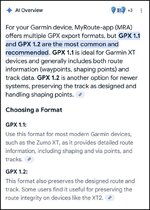
What GPX format do you use to export the route from MRA for use with the Nav V? Could it be that you just exporting it as a track, therefore you not seeing any (light blue dots) shaping waypoints on your Nav V?

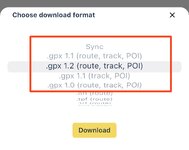
Which option from bellow list do you use to export the route?

IMG_7961.jpeg
 
Ok. When I click on export a drop down box comes up and I clicked on Garmin(GPX1.1).
Where is Choose download format?


Back
Top Bottom