Why won't it see the mapping file?

Status
Not open for further replies.
Update-
Despite not following why the Gmaprom files are missing, it seems we have been shot down by the manufacturer.
no you cannot get a partial install either- Grrrrr - well, you can but the map doesn't work as cannot be activated.
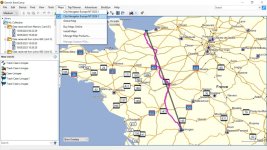
If licenced, we have been able to download the map update to CN2024 and the maps will be installed on BC on your PC. However, although you can transfer the mapping after having selected map tiles so that the resulting map is less than 4GB, the Zumo still shows then greyed out. That leads me to believe that there seems to still be a licence conflict; so useless.

So, the solutions are:
1- Keep the City Navigator maps which once and still work
I'm still not 100% sure about this as the OP appeared to have some files missing from his Zumo so I stand to be corrected but I am not hopeful.

2- A simple solution is to use OSM maps
To date, Mike and I have got the Zumo to recognize and use an OSM map when placed in the Garmin folder in the Zumo as a gmapsupp.img file.
Mike will next remove this file from the Zumo and place it on a micro SD to double check it still can be read and thereby free up the small Zumo OE memory.

3- To date, we have not been able to get the Zumo to recognize a second and different mapset named gmapsupp1 when an existing gmappsupp file exists etc and I wonder if the Zumo 660 satnav is actually capable of handling more than one gmapsupp type when different ones have been renamed gmapsupp1.img, gmapsupp2.img files. etc ???
If anyone has successfully done so I'd appreciate a heads up. Its hard to test satnavs without having an identical model at hand! and I thank Mike for hos patience.

So, for now, the solution for Mike is to just have one gmapsupp.img per micro SD per country. 4GB is more than enough but 8GB are almost just as cheap so I'd pick those.
Off to bed now 🛌 ...
 
Last edited:
We I'd just like to thank Bert for all of his help last night and the 90 minutes we have spent on the phone this morning.

We have not resolved the original problem with using 2024 mapping due to Garmin making it no longer available even though I have paid for lifetime mapping; see Bert's post #40. But at least we now know why.

However, the good news is that I now know how to find and download OSM maps, transfer to the Zumo and/or an SD Card and use those.
 
Have you had a read through this sticky?

Zumo 660

See what he says about the "gotcha"

Also, I thought you could only have one instance of gmapsupp.img.
The file on the SD card should be gmapsup1.img

You could have many SD cards with different maps all named the same and swap them in and out as you like
 
Last edited:
Yes
We tried one gmapsupp and one gmapsupp1
But the second one did not show.
Garmin has invoked its 'end of life product as per screen shot and I don't think it can cope. I suspect that the latest download may have something in it to prevent partial install with the appropriate map gma.
I may be wrong, without having one to tinker with, the result we have so far may be as best as we can do.
 
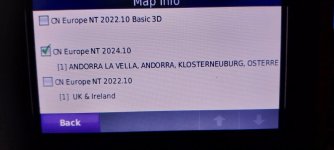
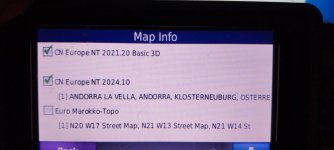
what map are you trying to install Mike i have cn2024.10 installed on my 660 n0 issue, installed from base camp, in fact i have it on 2 660s, you can see in pic20240303_172827.jpeg20240303_172931.jpeg
 

Attachments

  • 11111.jpg
    11111.jpg
    132.6 KB · Views: 5
Last edited:
@leedude03
Somewhere along the line, I believe that Mikes' 660 has certain system files missing. To help him, could you please put a screen shot of the content of your garmin folder of your 660? There may be files we could copy accross from your unit [not licence info]
 
Mike Pm me if you wish me to sort it i will send you my addy and all it will cost you is postage, or if you can wait bring it to Sids bash and i will sort it there.
 
Mike, can you summarise the steps you took to solve this problem, maybe with some screenshots, please.

I’ll then edit the thread.

Thank you.

Richard
 
Richard i sent Mike CN 2024,10 that i knew would work, why Mikes maps would not work i am unsure as i never got to see the unit.
 
Richard i sent Mike CN 2024,10 that i knew would work
How were you able to know this? :nenau
Confused!

Could you please post up a screenshot of the content of your Garmin folder on your Zumo 600 so that we can compare it to Mikes and check if there are any missing system files on his please?
That would help others and enable him to update future maps.
I'm still working on what's preventing him from doing so.
 
How were you able to know this? :nenau
Confused!

Could you please post up a screenshot of the content of your Garmin folder on your Zumo 600 so that we can compare it to Mikes and check if there are any missing system files on his please?
That would help others and enable him to update future maps.
I'm still working on what's preventing him from doing so.
I already sent Mike the screenshot of all my contents of the drive
 
All Mike wanted was a working reasonably current map he now has this, without seeing the unit I would be guessing what the issue was, possibly corrupt file who knows.
 
No problem, but with not having the unit in my possesion and downloading the map from garmin to my Pc , in other words starting from scratch, there are way to many variables to know for certain what's gone on.
 
This I. Have just read

Garmin doesn't allow users to install the City Navigator Lifetime maps on their computers anymore. This is a sudden change of policy. Searching online it isn't clear if this is a bug or intended behaviour.
I spoke with Garmin Support than confirmed, indeed, that it is not allowed anymore to install CN LM maps locally (on your computer) and that you have to connect the GPS unit and read the maps via USB.
 
:duno
Yes I saw that on the Garmin site BUT I think ( Mike correct me f I am mistaken) that Mike was able to download the map on his PC, he then selected an area and sent it via Mapinstall to his Zumo. Once Zumo restarted the map was on his micro sd ( saw that with windows explorer) but was it unreadable.
The reason the any sat nav needs to connected to the PC is that it reads the units ID and licence code same as does G.Express.
I sense some garmin shenanigans here...

You can also install 'Regions' and that got me stumped as Mike said he did not have that option despite having the latest GExpress more :duno.

Still, I guess the 600 is an old unit with electronic limitations and it comes a time that it is 'game over' for it IF you want to keep City Navigator.
On that subject, I suggest anyone compare the same area ( C.Nav. and OSM) and you will find that OSM has a great deal more data AND updates are available free 52 times a year.
It's a no brainer for anyone with an older satnav which still functions OK- abandon CN maps, clean up some (Caution- make copies before deleting if you do not how to) to make space in the internal memory- and install OSM maps on a micro SD card finally saying 'bye bye' to all those map headaches.

@leedude03
Could you try something on your 600 which may help others?
Download say two OSM maps
Rename them gmapsupp1 , gmapsupp2
Place them in the 600s' internal memory - can the unit read the maps?
THEN
=> Repeat with the maps moved to the SD card- can the unit still read the maps?

Then repeat above but change map names to say Romania.img France.img
Can the Zumo 600 read those in both the internal memory and/or the SD card?

This is to enable to write up a simple solution to those wishing to use OSM. More recent units can read renamed files of most characters like Romania.img or France.img as well as gmapsupp but I do not know, and that's where you can help by running above checks if you'd be so kind.
I'd gladly do it but do not have a Zumo.
Ta mouchos!
 
He're the bit about lifetime mapping taken from Garmin website:

Lifetime Maps Terms & Conditions​

If you purchase a nüMaps Lifetime subscription (sold separately) or if your Garmin product comes bundled with a nüMaps Lifetime or other lifetime map subscription, you will receive map data updates when and as such updates are made available on Garmin.com during the useful life of 1 compatible Garmin product or as long as Garmin receives map data from a third party supplier, whichever is shorter. A product’s “useful life” means the period during which the product (a) has sufficient memory capacity and other required technical capabilities to utilize current map data and (b) is capable of operating as intended without major repairs. A product will be deemed to be out of service and its useful life to be ended if no updates have been downloaded for such product for a period of 24 months or more. Unless otherwise stated, the updates you receive under the subscription will be updates to the same geographic area included with your Garmin product when originally purchased. In some instances, your Garmin product might not have sufficient memory remaining for you to load an update to the map data, in which case you will need to either (a) select reduced map data coverage for your updates, or (b) purchase separately a microSD™/SD™ card (if and as applicable to your Garmin product) and load all or a portion of the map data coverage for your updates to the card and insert the card into the microSD/SD card slot contained in your Garmin product. If neither of the measures in (a) or (b) can be used to address your product’s lack of sufficient remaining memory, then Garmin may conclude that the “useful life” of your product has expired. Garmin may terminate your nüMaps Lifetime or other lifetime map subscription at any time if you violate any of the terms of this agreement or your subscription. Your nüMaps Lifetime subscription or other lifetime map subscription may not be transferred to another person or another Garmin product.
 
On the very odd occasion I have used osm maps they always worked well apart from post code search as I remember it is a long time ago
 
Status
Not open for further replies.


Back
Top Bottom