XT route and A/B direct route calculation issues

er-minio

Well-known member
UKGSer Subscriber
Joined
Mar 10, 2008
Messages
10,457
Reaction score
3,463
Location
London/Rome
First, let me go though the "Garmin is shite. Get it off your chest here." section of this post:

Jesus fucking christ on a stick, this fucking piece of shit never - ever - for the love of fucking god - ever fucking worked as intended since I bought it when it came out.
Fuck Garmin. Fuck their software development pipeline, fuck their promise of GPS for adventure riding. This fucking piece of shit wouldn't be able to find its own fucking arsehole.
The only reason I didn't smash this against a wall completely (I tried once in desperation) is because I work under the assumption that this fucken poor excuse for a fucking GPS navigator is completely unreliable and so I take extra steps as backup.

Fucking christ.

Ok - rant done. Now...

I am traveling in Europe this August.
For the first three days of my way down to Italy I created a couple of routes and then I converted those to tracks (as a backup) and also have some tracks only for my third day of traveling as that was 90% off road.
After that, traveling with a friend, him leading - so nothing planned on my part.

All created in Basecamp, transferred via USB.
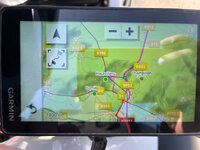
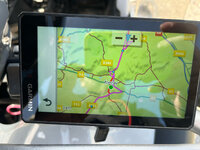
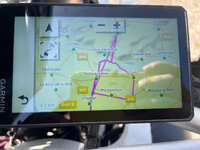
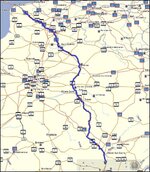
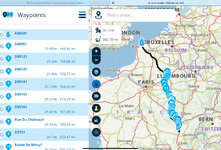
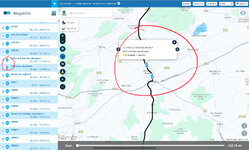
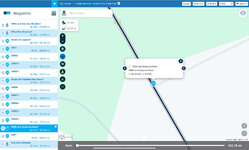
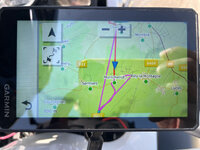
First day route is from Calais to south of Dijon. Thank god I had the "underlying" backup track because after about an hour riding I saw the XT recalculating and the expected arrival time jumped from 5:30pm to almost midnight.

Stopped and saw this:
xt-route01.jpg

xt-route02.jpg

xt-route03.jpg

xt-route04.jpg

See video here:

Red line is the backup track.

Basecamp did "hang" when uploading this route to the XT, so I assumed that was the problem. After trying to recalculate or restart the route a number of times I just gave up and traveled the ~600km following the track. All "good".

Day after, same problem (but there was no issue with data transfer there).
Did the same thing (track) even though it's a bit inconvenient when you find the road blocked or you get re-routed (it happened going through Grenoble) as when you get off the track it doesn't re-calculate or direct you. You have to stop, find a place where you think you can rejoin the track, tap on it and navigate to that point.

IF THAT WORKS

Met my friend on Tuesday and we started going up and down the alps semi-randomly. In the evening we would book an hotel, put the address into the XT (he has an XT2) and go to the place directly. This is A to B navigation - the bare minimum a GPS should do.

I am experiencing weird recalculation issues even in this case. My friend is experiencing very similar issues on the XT2.

Only avoidance I have is unpaved road.
Maps updated before leaving to 2026 latest version.

Today riding direct to the hotel from Grimsel pass to Sion, it would repeatedly recalculate the route going from 70km to 180km as it would detour around the valley. It did this for more than an hour, recalculating every minute or so, see the video here:

hotel location is on a normal road, no avoidances, accidents or other

I have no idea what this is.

It happened in other points in Switzerland and I had phantoms "closed roads" or "no access" signs on the map. Is the updated cartography fucked?


I'll try to upload the GPX from the first day as well...
 
Your problem is Basecamp. Utter rubbish.
Use my route or TomTom to plot and upload those and convert the tracks to route on the CT.
I never have any issues.
 
Feel for you on this one and Iike Siddo, I’ve given up trying to use Basecamp and use MyRoute App and Beeline. It wont help you for this trip, but the most ‘faithful’ replication of routes transferred is from Beeline. When you transfer them to the Garmin a message comes up saying there are two many waypoints and do you want to convert the route or split it into two? I usually convert it and it has never gone awol after that. Downsides? You have to learn to do the routes in the Beeline app and thats not as easy as MyRoute App.

To then ensure i have a back up, I use the Beeline Moto 2 and Garmin running the same route. Should both of those fail I have my phone as a third option. Last course of action if everything goes south? Tracks on the garmin.

We shouldn't have to use multiple back up options after shelling out so much!
 
Feel for you on this one and Iike Siddo, I’ve given up trying to use Basecamp and use MyRoute App and Beeline. It wont help you for this trip, but the most ‘faithful’ replication of routes transferred is from Beeline. When you transfer them to the Garmin a message comes up saying there are two many waypoints and do you want to convert the route or split it into two? I usually convert it and it has never gone awol after that. Downsides? You have to learn to do the routes in the Beeline app and thats not as easy as MyRoute App.

To then ensure i have a back up, I use the Beeline Moto 2 and Garmin running the same route. Should both of those fail I have my phone as a third option. Last course of action if everything goes south? Tracks on the garmin.

We shouldn't have to use multiple back up options after shelling out so much!
True enough

Alternatively as back up …..there’s always a 2610🤩🇮🇪🏍️

Seriously your dedication to coping with all the frustrations is admirable
 
…..You have to stop, find a place where you think you can rejoin the track, tap on it and navigate to that point.
FWIW, this is where I believe the fundamental problems lie.
Garmin do not seem to know how to resolve this IMHO. Or have made no attempt to do so.
 
I’m ok traveling with tracks. I actually almost prefer it. Reach a junction, quick glance down at the gps and see where to go.

It’s a faff inside cities, but I can live with that for now.

It would be nice to be able to “navigate a track” (osmand does) but I don’t expect or demand it to do to be fair.

Main issue here is the recalculation problem when pointing the sat nav to a single point of destination. See my second video in the original message.

I’ll try again today, but seems unreliable even for A/B navigation. This wasn’t the case before.
 
Switch off auto re-calculation. It will completely re-route you from your chosen way points/selected route.

I use MRA to plan my trips - and import them as a track and route to the XT. Not had an issue with routing since switching off auto re-calculation. Any errors i come across are those i did not capture during route creation!
 
The XT and XT2 are not helpful when trying an A to B route as the algorithm in the "faster" option prefers faster roads rather than the shortest time between the end and the start. Not "helpful"!

For the straight lining IIRC doing a reset of the XT can cure it.

For much more information, have a look at this forum where there's loads of knowledge and useful information: https://zumouserforums.co.uk/index.php or there's a Facebook page which has more opinions, and less facts.
 
I’m ok traveling with tracks. I actually almost prefer it. Reach a junction, quick glance down at the gps and see where to go.

It’s a faff inside cities, but I can live with that for now.

It would be nice to be able to “navigate a track” (osmand does) but I don’t expect or demand it to do to be fair.

Main issue here is the recalculation problem when pointing the sat nav to a single point of destination. See my second video in the original message.

I’ll try again today, but seems unreliable even for A/B navigation. This wasn’t the case before.

You can convert a track to a route, and it will give you the guidance you want.
 
I turn the reroute off. It just fucks up your route. When off track, I just head back and rejoin.
Watch this on how to convert and load your routes:
 
I don't know how to explain it clearly.
Two separate issues. Maybe connected by some mapping/data issue.

Video, again:

This is the sat nav navigating to a single destination (Hotel) chosen from the device itself. It is not a multi waypoint/shaping points defined route uploaded via gpx file.
 
You can convert a track to a route, and it will give you the guidance you want.

I know, but you'll lose all intermediate waypoints added manually (all converts to shaping points) in case you have/want to stop/restart from within the obtained route.
At this stage I'm ok keeping the track to follow and rejoin it on my own if I veer off.


I'll do a small test with MRA/BC generated .gpx and see as well.
I remember having issues with MRA imported routes as well before, but will double check.
 
Your problem is Basecamp. Utter rubbish.
Not so.

Some people (maybe you?) find BaseCamp difficult to use. Others find BaseCamp easy and reliable. As far as I know, the OP is very familiar with BaseCamp and likes using it. I certainly did, right up until the moment Garmin switched their allegiance to Android centric devices, which my Mac struggled with.

Use my route or TomTom to plot and upload those and convert the tracks to route on the XT…

I’d agree that MyRoute is now very good as a route creation tool and (separately) as a navigation tool, too. Having parted company with BaseCamp after many years of being very happy with it (and with years of MapSource before that) I now use My`Route exclusively for creating quite complicated bespoke routes. These I send to my very reliable XT in version 1.1. The routes load very well, though I also have the track as a back-up should I ever need it. I also display the MyRoute route on a phone, running it via the MyRoute ‘Navigation’ app. In other words, I have the XT and my phone both running the same route. Both function reliably, over long distances and running complicated routes. Mzokk, a regular contributor to these pages, does near enough the same (and uses BaseCamp, regularly) with equal success.

What else do I do?

1. When I create bespoke routes in MyRoute, I place a shaping point every five kilometres / three miles. This is ‘best practice’ as recommended by MyRoute themselves.

2. I check carefully where the shaping points are placed, avoiding any on or under bridges, off in a field, on exits from roundabouts or actually on road junctions. Similarly, I check that MyRoute has not taken some silly short cut between two shaping points, just to cut a corner. I did exactly the same in BaseCamp and MapSource.

3. When I export a route from MyRoute to my XT or my phone, I check (before I set off) that what is displayed matches the route I created originally. I did exactly the same when I exported from BaseCamp / MapSource. If there is any significant differences between the route I created and the one displayed, I then work out why and mend it, then and there. I don’t wait until I set off to find out that something is wrong.

4. I have auto recalculation turned off on my XT (and on previous Garmin devices) and / or set to prompted. In other words, I (not a dumb, but really very clever device) chose whether to recalculate or not.

Some people find this all a ball ache, but it really isn’t, once you get into the habit. It takes just a very few miniutes. What is a ball ache, is when something goes awry when you are out on the road. Then it can take an hour or more to sort out…. Or the unfortunate soul throws the device at a wall.

:beerjug:

PS Yes, I do make the odd schoolboy error. I contacted Mzokk when I was away to solve a very simple problem I was having with MyRoute’s ability to synchronise routes for offline use. I was making a very simple error ie. entirely self inflicted.
 
Last edited:
Turning back to the Italian giant’s problem.

He had similar problems before and, I believe, running MyRoute. Given that the fellow understands and is confident with IT (which I most definitely am not) it would seem that:

A. There might be some problem with his XT device itself.

B. There is some basic problem with the route’s he’s creating, which is then being amplified out on the road,

If it’s A, then no shouting “BaseCamp is crap, use XYZ instead!” will mend it. Put simply, the device is somehow ‘broken’.

If it’s B, then maybe the only solution is to sit down with the fellow and try to resolve it.

:beerjug:
 
Thanks Richard.

Issue #2, aka Zumo recalculating continuously towards a single fixed destination chosen via “find” on the device, is a weird one.

My friend is experiencing a very similar phenomenon on his xt2. We are traveling together.

I’m traveling towards home in Tuscany today so, easy. No need for gps directions for the most part.

I’ll try to do an hard reset tonight at home.


I do think the hardware aspect of the XT, as a cartographic gps device, is EXCELLENT.
Sadly the software part didn’t follow.
 
It’s an encouraging start.

er-minio’s bespoke route displays nicely in MyRoute.


IMG_1290.jpeg

A. It is 392 miles long.

B. It has shaping points 31 intermediate shaping points. MyRoute would recommend something like 130 (ie. one every three miles). That said, the first and quite long section is motorway, so individual shaping points maybe hold less value. Me? I follow MyRoute’s ‘best practice’ irrespective.

C. If I discount the 144 miles of motorway, that leaves 248 miles of bespoke route, defined by 30 intermediate shaping points or one every eight miles. I’d be upping that to say 80 shaping points over the 248 miles, in compliance with MyRoute’s best practice.

D. It has two points 18 / 19 which MyRoute displays as ‘hands’. These are points which er-minio has said the route must pass through, irrespective:

IMG_1292.jpeg

E. I have checked the position of each of the shaping points. They are all positioned very nicely. If I was being very (very) fussy, point 31 might be close to a junction, which an XT on import might get confused by. But that’s just being very fussy:

IMG_1291.jpeg

So far at least, it’s looking good and as if it should run OK on any half decent navigation device.

Now to import the route (I have called it er-minio’s dilemma) into my XT and into MyRoute’s Navigation app. See you all in a bit….


PS Dilemma is an interesting word:


Being Greek in origin but picked up in ‘Late Latin’.

But we digress :beerjug:
 
Last edited:


Back
Top Bottom