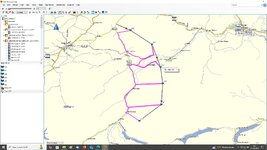
XT route and A/B direct route calculation issues

You don't get traffic info, or anything else

Good!

I purposely don’t link my phone to my XT, other than to send a route from MyRoute to the device. Similarly, I don’t have all the assorted weather, traffic, your mum called, the local time in Adelaide is, can I play you an awesome song….. nonsense apps and ‘must have’ services running.
 
Last edited:
Go into your route settings on the device and change the "Route Preference" (e.g., from "Faster Time" to "Shorter Distance" and back) to force the device to recalculate the route using the roads

Definitely will try! Thanks. I was trying to get it to recalculate the other day to no avail.
To be fair, I tried for a few minutes. As I said, it was a test, my plan was (as I did) to use the tracks directly.
 
Thanks for clarifying that the green line is indeed a track.

Turning back to the screenshot:

img_2219-jpeg.439708


Tracks do not hold shaping or way / via points, but these are shown in the screenshot as blue dots and the two orange flags. We can therefore deduce that the device did receive the route and (as the blue dots / flags are in the right place and its general shape looks OK) it was ‘correct’’ in its creation. That two of us can display and run the route independently, would seem to confirm this, too.

It looks like the device tries to go from the green ‘start’ flag to orange flag and then to the first few blue dots. But, it shows straight lines (ie. it cannot create a route along known roads) and then gives up. It deviates, creating a second route that is displayed simultaneously with the first ( the blue dots and orange flags) throwing out straight lines to the blue dots.

This second route, then apparently corrects itself near to Grosseto, where the magenta route line appears to loop back a bit to the orange flag and the next blue dot backwards. It then appears to turn around and route sort of correctly (it doesn’t follow tge green track precisely) to the next blue dot in the direction of Follinica.

The sixty four million dollar question therefore is why? Why didn’t the device run the first route normally?

Straight lines usually imply:

1. A failure to have detailed base maps. I guess this is not the case.

2. Two or more base maps running simultaneously. I guess this is not the case.

3. Insufficient information ‘breadcrumbs’ or shaping points in the route. This does not seem to be the case…. But….

4. An inability to snap the route onto the detailed map. This might be the case. In other words, the blue dots and flags are correct but the ‘breadcrumbs’ are not there. This is doubtful as both Lee and I can use the route on our own devices and in other apps. Or perhaps, on ‘import’ within the device and calculation the breadcrumbs were somehow lost. This seems possible.

How did you ‘import’ the route? I ask as some people seem to have some very bizarre methods, involving importing, saving and renaming routes, then running what I think is a copy. But hey, if it works for them….

Did the route ever display and / or run properly? Or was it corrupted from the very start?

Can you display and run other routes correctly, or do they all have the same problem?

 
Yes, the dots ans flags are from the route of course.

Both route and track have been uploaded at the same time, via usb, from BC with “upload to device”.

Now I do remember the odd behaviour from BC to denominate random shaping points as waypoints.
I juste recalled that when I planned my picos route last year, each time I had to double check each route *points manually from the info list before uploading.
That might have something to do as well.
 
Did the route ever display and / or run properly? Or was it corrupted from the very start?

Can you display and run other routes correctly, or do they all have the same problem?

So the first route from the opening of this post (near calais to near chalos) loaded 100% correctly.
It started fucking up after a few miles. The each time I reloaded it it had different levels of fucked up.

I take into account that I might have not noticed calculation errors on the first load (it’s a long route).

The following were fucked up from first load. And this is usually the case.

I think when I went on a ride with EV last month he provided a gpx route and I was surprised it worked fine now that I think of it.

In general you always get these straight lines.
In this case the shaping points are actually in the correct position.

In the case of the first route, they were completely random and offset for miles from the actual intended route.

There is some sort of “shift”.
 
having had a closer look at the above abomination i think i can see what gone wrong with it, in the pic below you can see that when i put waypoints where there is no possible way of routing to it the same thing hapens this was all done within base camp, now if i were to send the track thats there to one of my navs the same thing would happen if i were to ask it to convert track to route, so what i need to know , is the green trace a track or a route and same for the magenta trace, also was the either of them plotted using different maps and are they the same on computer and device. Richard is right regarding the track not containing waypoints or via points but that does not mean you cant run a track to and from one as you can see in my exaggerated route below. the same would happen if you used a different map that was slightly out compared to the other your waypoints would not be on the road. the black line is a track and magenta is a routeUntitled.jpg
 
This make sense.

Just a note: I sent the zumo both track and route, and what you see is the result of the zumo importing and (wrongly) plotting the route.

I never did anything with the track and I never (out of habit) convert automatically track to routes, especially on the device directly.
When I do convert tracks to routes (on basecamp, or MRA) I actually do it manually with the segment tool, retracing by hand and placing shaping points strategically.

Ignore the track in the examples above. It’s there just as a backup.

So, from your experiment, it seems zumo is trying to plot those routes with missing cartography at import stage, when you press the “import new routes” button.

Interesting.
I guess how as those roads are available on the base cartography though...
 
Last edited:
whether it be missing cartography or missmatched cartography i cant say, or maybe a bug in your particular unit or software, again hard to say . I can create the problem on my software and units and have also come across the problem when i have downloaded routes and tracks from else where.
Looking at the above pic of yours the route is picking up your via/way points the only way it can in a straight line because there is no info there (roads on the map) for the route to follow, so it takes the route where it can and when it cant (no roads) it does as in my picture takes a straight line.
Or i could be talking bollocks and be way off the mark:ROFLMAO::ROFLMAO:
 
One thing I have to check is WHERE I uploaded the routes.

I explain: I've had this straight lines issue on several Zumos. The marvellous 660 (pinnacle of GPS tech), my 596 (or whatever number) and the XT that replaced it swiftly.
If I remember correctly on the older unit the issue happened if you send the routes to the Memory Card instead of the internal memory where the maps are... out of habit in the last few years I always used internal storage, never the SD card (even if it's present) but I haven't checked the other day. I'll recover the laptop from the pile of unsorted bike luggage still piled in the middle of my bedroom later and check... :D

Or i could be talking bollocks and be way off the mark:ROFLMAO::ROFLMAO:

It't the Garmin guess game. Akin to divination :D :D


Back
Top Bottom