XT woes

Wapping

Well-known member
Moderator
Joined
Oct 21, 2005
Messages
90,841
Reaction score
15,616
Location
Wapping, London
I have copied these first two posts from a thread in the Trip Report section.

Hopefully, we can find a cure.

Richard

=================

At least your crap XT seems to be working:

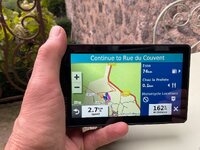
img_0622-jpeg.447135


Speed set to kilometres per hour.

Road currently on is the D63.

Next turn is left onto the D12.

Arrival time estimated at 5:23 PM.

:beerjug:
 
Last edited:
Not really Richard and whilst it might be user error, the XT’s were only used for secondary back up and our main nav was the Beeline Moto II which performed flawlessly. The most frustrating time with the Garmins was the day’s route showing up perfectly on the unit and then when you press go, being reduced to about 7kM’s. As I said though, the frustration with them might well be down to lack of expertise. The Beeline? You get probably 8% of the information on the screen, but enough to keep you going where you planned to, and more importantly, 92% less frustration as it just seems to work. Downsides? The planning is not as easy as MyRoute App.
 
Can you share the GPX file for one of the troublesome routes with us, please. That way, we an load the route onto our XT’s and see what happens.

If possible, can you please, share some screen shots of what you see on the XT’s screen from the moment you first load the route, describe the button presses you make and screen shots thro’ to the final disaster result. This way we can hopefully spot if user error is causing the problem.

I am guessing but the problem might lie in the moment you select GO or rather what you’ve asked the XT to “Go me to….”

PS No rush, enjoy your holiday first!

:beerjug:
 
Last edited:
As well as the GPX, it would be handy to know how the route was created i.e. on the device itself, using Basecamp or a 3rd party app like MRA. If created on a different device, what method was used to transfer the route to the satnav?
I know from sharing my routes created for a Zumo 390 (where they work perfectly) that the XT owner spends most of the day being nagged he is going the wrong way when I lead. On one day recently in France we both set our satnavs to go to the same hotel avoiding motorways with no other criteria. The XT owner led and for the first half of the day my 390 was telling me I was still 220 miles from the hotel. Then miraculously at one junction I teleported over 100 miles according to the "miles left" display and for the last couple of hours the two devices agreed over the last 100 miles or so. There is something very strange about the XT's algorithms. It seemed my 390 wanted to go towards Châteauroux through the Brenne Nat Park and the XT took us towards Châtellerault to get from Le Mont Dore to Saumur. This suggests to me that the XT is very much set to favour less rural roads. I have no idea if my travelling companion has messed with the routing priorities on his XT but this is maybe something to look at. My 390 is on default settings.
 
As well as the GPX, it would be handy to know how the route was created i.e. on the device itself, using Basecamp or a 3rd party app like MRA. If created on a different device, what method was used to transfer the route to the satnav?

Indeed.

An XT (as with any reasonable GPS device) is more than capable of running decently created routes.
 
As well as the GPX, it would be handy to know how the route was created i.e. on the device itself, using Basecamp or a 3rd party app like MRA. If created on a different device, what method was used to transfer the route to the satnav?
I know from sharing my routes created for a Zumo 390 (where they work perfectly) that the XT owner spends most of the day being nagged he is going the wrong way when I lead. On one day recently in France we both set our satnavs to go to the same hotel avoiding motorways with no other criteria. The XT owner led and for the first half of the day my 390 was telling me I was still 220 miles from the hotel. Then miraculously at one junction I teleported over 100 miles according to the "miles left" display and for the last couple of hours the two devices agreed over the last 100 miles or so. There is something very strange about the XT's algorithms. It seemed my 390 wanted to go towards Châteauroux through the Brenne Nat Park and the XT took us towards Châtellerault to get from Le Mont Dore to Saumur. This suggests to me that the XT is very much set to favour less rural roads. I have no idea if my travelling companion has messed with the routing priorities on his XT but this is maybe something to look at. My 390 is on default settings.
I have both a 390lm and an XT, the routing algorithm of the XT is very different than the 390 and from basecamp set up to route "faster Time".

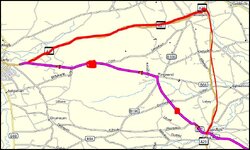
For this section of a route in Basecamp the 390lm will follow the magenta line if the route is loaded from basecamp. As you can see there are no shaping points between Garvagh and the end of the route. The XT algorithm reads "Faster Time" as more main roads and the same route loaded in the XT will follow the drawn on red line because there are no shaping points forcing it to go down the more minor roads even though the route is both shorter and "Faster" To make it follow the same route as the 390 the XT would require at least two additional shaping points placed roughly where the red blobs are.

1759068064828.jpg

It drove me nuts until I got additional explanation from Wapping and jfheath from the Garmin zumo forums.

In addition, the XT unit can suffer from repeated U turn behaviour if you don't go through a Via point even if you subsequently skip it i.e. it will keep trying to take you back even if the Via point is skipped. It does this if the Via point is included in an "imported route" i.e. imported from basecamp or another unit. It's an easy behaviour to provoke (on purpose if you know what causes it. It does not do it if the route is "Saved" i.e created on the unit and saved. You can make the XT think the current route is saved by starting it then saving the "Current route" (Thank you J Armstrong) or by editing the hex file of the route to turn off the "Imported" switch. That said if you don't miss your via points even "imported" routes will behave and the behaviour can be stopped by stopping the route and restarting it. The XT will navigate well with well designed routes. I also run a track under the route so that I can compensate for any unintended deviations.

All that said my principle navigation device is now my phone playing via Android Auto on my Africa twin screen. Either using MRA or OSMand+. My XT is used for POI's and as a backup. My 390 and 340 are used on my old R1150GS ........which is in dry dock at the moment.
 
We’ve just got back and I thought I’d take some pictures of the route that wouldn’t work yesterday on both of our XT’s. Sods law would dictate that I went through exactly the same process and hey presto it calculated correctly this time!

The route was transferred from Beeline, via a GPX file sent by email and opened in Garmin Drive. The Beeline routes are quite complex and for example MRA won’t open them as they have too many data points. On Garmin it always asks you if you want to convert the route or split it to overcome the number of points and generally speaking, I’ve had more success with Beeline transferred routes on the XT, than I have with MRA (which I transfer in exactly same way). So yesterday’s failure was an odd one and was perhaps caused by starting it off route and it recalculating and in doing so, ditching most of the original.

Whilst frustrating yesterday, in general the XT’s have behaved themselves using the same system as above, though I’ve kept them on as a back up just in case.

Great days riding today and simply fabulous scenery, roads and people, who have invariably been friendly.
 

Attachments

  • IMG_2806.jpeg
    IMG_2806.jpeg
    417.1 KB · Views: 22
  • IMG_2807.jpeg
    IMG_2807.jpeg
    433.3 KB · Views: 20
  • IMG_2808.jpeg
    IMG_2808.jpeg
    458.9 KB · Views: 22
Did you convert the track to a route in img2086? I always do and don't have any probs afterwards.
 
Are you now saying that your XT and that of JB, are both working properly, when running complicated routes?

One possibly useful trick:

When making a GPX route, you don’t need to start its creation from the point you are standing at. The GPS device will know exactly where you are, without being told by its owner. Instead, create the route to start say, a mile or so down the road. This gives the device somewhere to aim for.

Then, when you fire up the route on your XT, you’ll be given the option of starting the route from that point. Chose that option and press GO. The device will route you to that point (using your personal preferences as regards routing) and then, from there, the device will run your bespoke route, with no more intervention required by you.

Oh…. turn recalculation off or at least set it to prompted, please.

PS I know nothing about Beeline. I find MyRoute a very good bespoke route creation tool. I send the bespoke route that I have created in MyRoute, directly to my XT, via Garmin Connect, using version 1.1. It works; simple as that.

:beerjug:
 
The beeline probably exports its GPX as a breadcrumb track. The Zumo XT can have 31 (including start and finish) alerting via points and 125 shaping points between via points so its possible that an imported GPX may not be able to be calculated as a route as it may not satisfy these parameters. As siddo says take the GPX in from the Beeline as a track and convert the track in the XT as the XT won't exceed its own parameters. But as you've seen from Pic 2086 all you get is a start and finish. Navigating this way turn off auto recalculation (as suggested by Wapping) or if you go off route the XT will recalculate and take you straight to the end via "Fastest route" which in the case of the XT means it will seek main roads not necessarily the ones you want to be on..
 
Thanks guys and as background, I’m lifetime subscriber to MyRoute App and I’ve been using Garmin’s since they first appeared. The route was sent as a route and not a track, though I’ve generally found that tracks work well with Garmin and you then miss the endless foibles of Garmin’s route calculations.

As I mentioned, routes transferred from Beeline usually work well in Garmin as they’re complex and force the unit to stick to where you want to go.

The issue yesterday was odd as it was the same in both JB’s and my unit. Yet today, the same route saved to trip planner, loaded just fine.

I too like MyRouteApp for creating routes and as I said, I’ve used it since they did crowdfunding. When Beeline modify their software to allow off route recalculation on imported routes I’ll be happy.

User error? Quite possibly I’m missing some setting or other but quite frankly, after years of being frustrated by the bloody things, I’m hardly incentivised to dig deeper.

Beeline Moto II is a breath of fresh air and clearly for me, less is more. Not without issues but they pale in comparison. What I want is a system that faithfully follows what I’ve planned and is reliable …….
 
What I want is a system that faithfully follows what I’ve planned and is reliable …….

If you are prepared to use a phone (and as you like MyRoute for bespoke route creation) maybe give MyRoute’s Navigstion app a go? That said, your XT should work near enough perfectly, running the MyRoute route.

:beerjug:
 
I’ve tried that and a, not keen on their app and b, I prefer to keep my phone in the little tank bag. But that does bring up one of the issues with Beeline and that is that it relies on your phone. No signal and auto recalc doesn’t work, but it still gives upon a dotted line showing you in which direction your intended route is.
 
I was in the same camp as you, until I bought a sacrificial phone, with no SIM card. A bit of learning how the app worked, and running it alongside my XT, was enough to convert me. So much so, that I didn’t take my XT (nor a map) on two trips around some very small roads (which aren’t shown on many maps) in France, without a problem.

:beerjug:
 
I was in the same camp as you, until I bought a sacrificial phone, with no SIM card. A bit of learning how the app worked, and running it alongside my XT, was enough to convert me. So much so, that I didn’t take my XT (nor a map) on two trips around some very small roads (which aren’t shown on many maps) in France, without a problem.

:beerjug:
Yup, sold my XT about three years back as it was a waste of time having it as the phone did a better job with MRA.
 
Are you now saying that your XT and that of JB, are both working properly, when running complicated routes?

One possibly useful trick:

When making a GPX route, you don’t need to start its creation from the point you are standing at. The GPS device will know exactly where you are, without being told by its owner. Instead, create the route to start say, a mile or so down the road. This gives the device somewhere to aim for.

Then, when you fire up the route on your XT, you’ll be given the option of starting the route from that point. Chose that option and press GO. The device will route you to that point (using your personal preferences as regards routing) and then, from there, the device will run your bespoke route, with no more intervention required by you.

Oh…. turn recalculation off or at least set it to prompted, please.

PS I know nothing about Beeline. I find MyRoute a very good bespoke route creation tool. I send the bespoke route that I have created in MyRoute, directly to my XT, via Garmin Connect, using version 1.1. It works; simple as that.

:beerjug:
What Wapping said. Plus, if you create a circular route without additional way points or shaping points, the XT will just route from where you start to where you finish, which is a problem if that’s the same place.

As has oft been mentioned on these pages, a few extra waypoints or via points make all the difference and is easily done with the MRA expand waypoints function

Having just completed a longish trip with both the XT and a Garmin Montana 700, with surfaaced and unsurfaced routes, an with the same gpx files created in Basecamp and loaded into both, our experience was the XT worked very well.

Just remember the key things:
Turn of auto recalculate
Turn off u turns
Don’t mess with the route, en route, by adding in other stops like petrol stations
Show track on the device so you can see if you are going off route
 
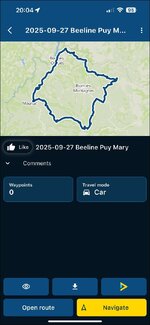
I have received the troublesome route from old JB, thank you my friend.

Sitting in the pub, just using my iPhone, I can:

A. Open it straight off the bat in MyRoute’s Navigation app:

IMG_5525.jpg

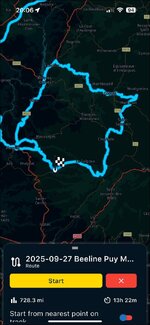
I can ‘navigate’ to it from London E1, arriving at the start (which is also the end) and I’m pretty sure it would work:

IMG_5526.jpg

IMG_5527.jpg

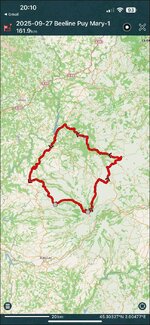
B. I can get it straight into Pocket Earth Pro, where it looks OK:

IMG_5528.jpg

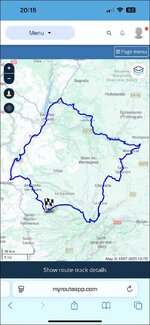
C. I can’t open it as a route in MyRoute Routeplanner, but that is simply because (as Mzokk expected) it contains over 200 shaping points. I can though import it into Routeplanner as as a track. Again this looks fine:

IMG_5529.jpg

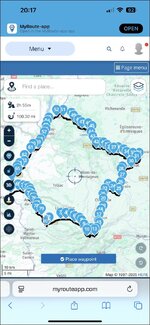
I can then ask MyRoute (again on my phone) to convert the track into a route. This it did very quickly:

IMG_5530.jpg

D. I can then share it:


Conclusions:

1. I am in the pub, so do not have my XT. I am unable therefore to see how the route and / or track might perform. That said, I’m pretty sure, bar one (potential) small glitch, it should work OK.

2. The glitch? Whilst decent GPS devices (like the XT and / or a phone) can and will run truly circular routes (where the start point is identical to the end) it can lead to, let’s be polite, user error.

3. It’ll be interesting to see what my XT makes of it. But before then, Timothy Taylor’s ‘Boltmaker’ is calling…..

IMG_5531.jpeg

:beerjug:
 
But before then, Timothy Taylor’s ‘Boltmaker’ is calling…..
A particular favourite. Named after a very good pub where I spent many happy hours a long time ago. Still a decent pub but not the same since the landlord and landlady retired along time ago.
 
1. I am in the pub, so do not have my XT. I am unable therefore to see how the route and / or track might perform. That said, I’m pretty sure, bar one (potential) small glitch, it should work OK.

I have now exported the route and the track from MyRoute on my phone to my XT, via Garmin Connect, using version 1.1. This is what I found:

A. The transfer from the phone and automatic installation of the route (the XT does everything) into Trip Planner was very quick.

B. When I look at the route in Trip Planner:

a. It is the right shape, looking to all intents and purposes the same on my XT as it does in MyRoute on my phone.

b. It is near enough the correct distance. The route in MyRoute is 100.30 miles. The route displayed on my XT is 104 miles. The discrepancy doesn’t bother me.

c. The time estimated to complete the route, all but matches. MyRoute says 2h 53m, versus the XT which says 2h 46. Again, the discrepancy is nothing to worry about.

What next?

When MyRoute converted the Beeline route’s track into a route, it created 80 waypoints (what Garmin calls, shaping points). Transferring in version 1.1 means that the XT displays each as little blue dots. MyRoute recommends a shaping point every three miles, so the route it has created has plenty to meet that ‘best practice’ requirement.

Before I touch Go! the XT offers up the green start point flag, the 78 intermediate points and the chequered flag at the end. The end point has very slightly diffent coordinates, but it’s ostensibly the same place.

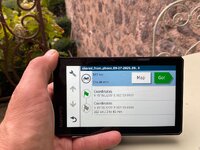
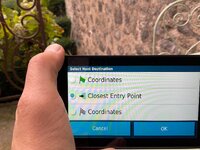
When I touch Go!, the XT offers up three choices:

i. The green flag start point 1.

ii. Closest entry point.

iii. The chequered flag end point 80.

It can’t offer up anything else, as it has no other points to aim for. That is fixable if I tap the first blue shaping point and turn it into an orange flag. Doing that now offers four points to aim for, as it adds the orange flag of point 2. Had I been standing at the start point, that is what I would have done. I’d then have selected the orange flag and then hit Go! I do not doubt that the XT would have taken me from where I was standing, to the flag at point 2 and then on, around the route with no problems.

I now have a route that is useable….. let’s see if it works…..

Bingo!

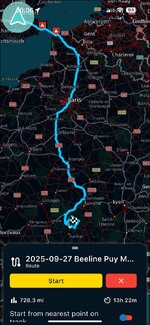
I asked my XT to take me from my home in London E1 (the device knows where I am sitting, I didn’t need to tell it, as it had locked onto satellites) to the green start flag and then around the circular route. The device did a quick calculation and offered me up a route of 725 miles in total length, from home way down to the green flag start point 1 in south west France.

Of the 725 miles, 621 miles (the XT tells me) are between my house and the green flag start point. That means that the difference is 104 miles, which is the distance of the Beeline route itself. Everything matches up.

Obviously I can’t test it but I am as sure as I can be that it would work perfectly. I am also as sure as I can be, that the same would be true using MyRoute Navigation on my phone.

Conclusion:

1. There is nothing wrong with the Beeline created route.. That alone is very encouraging.

2. Using a combination of MyRoute and Garmin Connect to get the Beeline route from my phone onto my XT was quick, painless and, above all, entirely successful.

3. Yes, it might be ‘better’ if the start and end points were spaced a bit apart, but that in itself doesn’t stop it all working properly. The XT can and does deal with circular and figure-of-eight routes very well.

4. I’m afraid some user error crept in, when our friends stood at the start in France, possibly cursing their XT’s very loudly, That cursing is pointless, as the dumb (but really very clever devices) couldn’t hear them. If Garmin ever install Siri, then the device will be able to ‘hear’. Let’s hope it doesn’t get too offended.

:beerjug:

PS My suggestion would now be for you to try doing it yourself. The results should be the same, it making no difference that you are sat in Yorkshire.

 
Last edited:


Back
Top Bottom