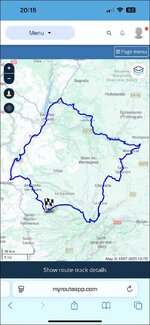
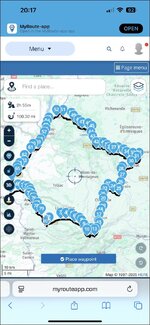
1. I am in the pub, so do not have my XT. I am unable therefore to see how the route and / or track might perform. That said, I’m pretty sure, bar one (potential) small glitch, it should work OK.
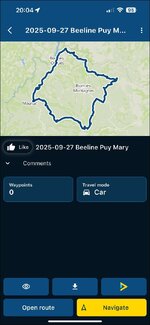
I have now exported the route and the track from MyRoute on my phone to my XT, via Garmin Connect, using version 1.1. This is what I found:
A. The transfer from the phone and automatic installation of the route (the XT does everything) into Trip Planner was very quick.
B. When I look at the route in Trip Planner:
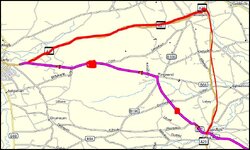
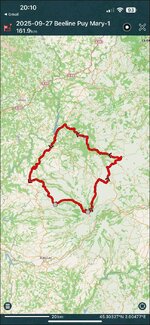
a. It is the right shape, looking to all intents and purposes the same on my XT as it does in MyRoute on my phone.
b. It is near enough the correct distance. The route in MyRoute is 100.30 miles. The route displayed on my XT is 104 miles. The discrepancy doesn’t bother me.
c. The time estimated to complete the route, all but matches. MyRoute says 2h 53m, versus the XT which says 2h 46. Again, the discrepancy is nothing to worry about.
What next?
When MyRoute converted the Beeline route’s track into a route, it created 80 waypoints (what Garmin calls, shaping points). Transferring in version 1.1 means that the XT displays each as little blue dots. MyRoute recommends a shaping point every three miles, so the route it has created has plenty to meet that ‘best practice’ requirement.
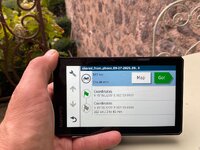
Before I touch Go! the XT offers up the green start point flag, the 78 intermediate points and the chequered flag at the end. The end point has very slightly diffent coordinates, but it’s ostensibly the same place.
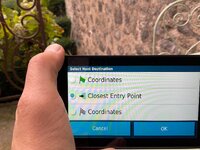
When I touch Go!, the XT offers up three choices:
i. The green flag start point 1.
ii. Closest entry point.
iii. The chequered flag end point 80.
It can’t offer up anything else, as it has no other points to aim for. That is fixable if I tap the first blue shaping point and turn it into an orange flag. Doing that now offers four points to aim for, as it adds the orange flag of point 2. Had I been standing at the start point, that is what I would have done. I’d then have selected the orange flag and then hit Go! I do not doubt that the XT would have taken me from where I was standing, to the flag at point 2 and then on, around the route with no problems.
I now have a route that is useable….. let’s see if it works…..
Bingo!
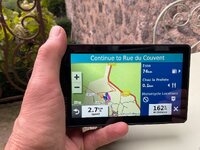
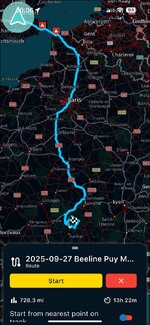
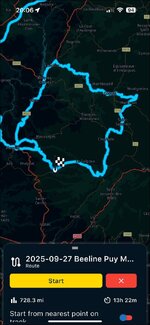
I asked my XT to take me from my home in London E1 (the device knows where I am sitting, I didn’t need to tell it, as it had locked onto satellites) to the green start flag and then around the circular route. The device did a quick calculation and offered me up a route of 725 miles in total length, from home way down to the green flag start point 1 in south west France.
Of the 725 miles, 621 miles (the XT tells me) are between my house and the green flag start point. That means that the difference is 104 miles, which is the distance of the Beeline route itself. Everything matches up.
Obviously I can’t test it but I am as sure as I can be that it would work perfectly. I am also as sure as I can be, that the same would be true using MyRoute Navigation on my phone.
Conclusion:
1. There is nothing wrong with the Beeline created route.. That alone is very encouraging.
2. Using a combination of MyRoute and Garmin Connect to get the Beeline route from my phone onto my XT was quick, painless and, above all, entirely successful.
3. Yes, it might be ‘better’ if the start and end points were spaced a bit apart, but that in itself doesn’t stop it all working properly. The XT can and does deal with circular and figure-of-eight routes very well.
4. I’m afraid some user error crept in, when our friends stood at the start in France, possibly cursing their XT’s very loudly, That cursing is pointless, as the dumb (but really very clever devices) couldn’t hear them. If Garmin ever install Siri, then the device will be able to ‘hear’. Let’s hope it doesn’t get too offended.

PS My suggestion would now be for you to try doing it yourself. The results should be the same, it making no difference that you are sat in Yorkshire.