2017.10 Map Update - not finding SD card ?

Flipper man, if i have got this right, you have now managed to send the new map to the nav, but now you are still only able to see the old map on the unit even though the newer map is there on the sd card, is this correct.

 
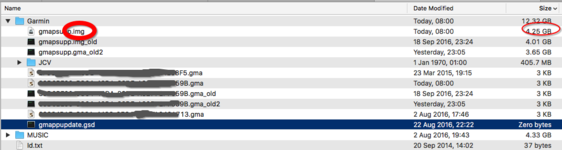
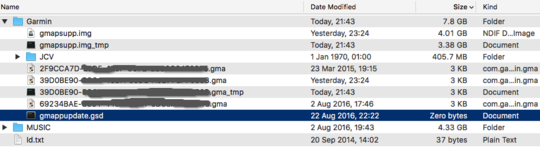
Using MapInstall its now copying the Map over to the SD card but is giving the new map image file (.img) a temporary name (.img_tmp) as per screen shot below but I now understand why it does that...
I hadn't removed the 'current' 2017.1 version of the .img file (as I was concerned that removing or renaming it would 'lose' it from the Nav and I've had NO detailed map ! )

Note - it uses the same gmapsupp.img filename when you add another file....so you cannot determine which version of the maps you have on there from filename alone.

What I did next..
Delete the _tmp files
Rename the Img and gma files, timestamped from last night (23:24) - effectively wiping them off the SD card as far as Nav is concerned.
Use MapInstall to reinstall maps - this time selecting ALL of Europe. MapInstall appears happy with my selection - 4.23GB by its reckoning.
MapInstall starts its processing.....

....and hey presto - the screen shot with red circles shows the new .img files (along with my renamed 'old' files).

So....I have a working solution....just a bit of messing around rather than using Garmin Express to find the SD card..
 

Attachments

  • Snip20160920_5.png
    Snip20160920_5.png
    88.2 KB · Views: 88
  • Snip20160919_4.png
    Snip20160919_4.png
    83 KB · Views: 123
My next suggestion would have been to rename the origional map file to gmapsuppold. that would then have stopped the unit from seeing it and would have been easy to revert it back should it have not worked,(there would have been no need to delete it), or you could have renamed the new gmapsupp file to gmappsupp1 and that should also have worked. It now looks like you have a working solution, so all good.
 
Just updated and in the map view by bike is about 5mm from the road i'm riding on, guess I will have to reload the maps?
 
After all my hard work i still cant get GE to see the SD card. So I've opened a case with Garmin UK. I think they are as puzzled as me. :D
 
After all my hard work i still cant get GE to see the SD card. So I've opened a case with Garmin UK. I think they are as puzzled as me. :D

Please list what you are using and what you have tried doing and someone maybe able to help
 
Please list what you are using and what you have tried doing and someone maybe able to help

The sat nav is a Nav 5 with a 32gb card in, its the second card I've tried. Its formatted to fat32. The computer is a Macbook pro, Im using garmin express and all items have the latest software.
 
The sat nav is a Nav 5 with a 32gb card in, its the second card I've tried. Its formatted to fat32. The computer is a Macbook pro, Im using garmin express and all items have the latest software.

Does the mac see the Nav 5, does express see the Nav 5, does the mac see the card, can you write to the card from the mac while it is onboard the Nav 5, can you write to the card using a card reader. has the map update downloaded to the mac ok, and is it working as it should (you can use basecamp). has this update been put on the unit before via a different card, and as above are you sure the usb cable is correct and working. so many questions, sorry .
 
Just used my daughters pc, loaded garmin express and hay presto, "we see you have sd card use that bla bla bla so me thinks it's a Mac/garmin express issue.
 
Just used my daughters pc, loaded garmin express and hay presto, "we see you have sd card use that bla bla bla so me thinks it's a Mac/garmin express issue.

So many folk having this problem.
Get your finger out Garmin & sort it out.
 
What a load of Garmin tripe !!! I have the same problem GE not recognising the SD card....Wouldn't mind if this was the only glitch in their software BUT we have to learn Basecrap and now have to work round a sort of fix for their poor programs.....Spread the word on all social media and see if Garmin like that !!!!

FECKIN GARMIN SHITE.
 
I am now down the pit of garmin...
My mac can see the sd card 32mb
BaseCamp can see the sd card
Nav 5 Cant see the flipping thing.
Grrrrrrrrr

Give the SD card a name when you format it as that sometimes helps
 
I fear a lot of it is actually User Error...
Did I miss spell or maybe your right......After trying everything that has been suggested, it doesn't work, it won't recognise the card....So we go from a working unit and computer that recognises the card to an update and the Garmin Shite GE that won't !!! BUT we can always rely on a friendly suggestion ...... "user error"

Cheers mate, I rely needed that :blast
 
Cheers mate, I rely needed that :blast

:D

Thing is it works for others so it is either something you are doing or your hardware (SD card or device)

Have you tried another card?

Do you have the map .img file? If so, just copy it to the \Garmin directory of the SD from the PC/Mac


Back
Top Bottom