
2017.10 Map Update - not finding SD card ?

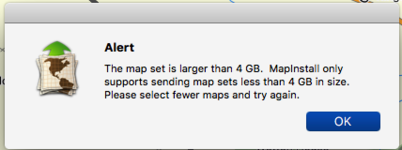
So....successfully download the map to my computer (only). Go to use MapInstall....select all of Europe and it recognises my SD card (26GB Free).....now it tells me that I can't have all of Europe (what I fool I am) - can't transfer anything over 4GB !

This is a Fat32 size limitation - not the software....so do we have to accept that we cannot have ALL of Europe on our devices ?
 

Attachments

  • Snip20160918_1.png
    Snip20160918_1.png
    25.1 KB · Views: 120
I have just uploaded new mapping via Garmin express to my Nav book pro. In the first instance i got the same message you got , file too large for the Nav ! I didn't really want the full map as i dont venture out of Europe and use the SD card (32gb) for storing Music. So i opted for the western europe maps ,which cover countries I will travel too, This loaded freely onto the hard drive of the nav .

it works fine and keeps my card free for tunes.

If you didn't need the whole mapping coverage ,trim down to the countries you might visit in the near future. A friend of mine as just UK loaded and he has space on the nav for more if required. does not use an SD card at all

Good luck
 
could someone who has loaded all of the map onto one of the latest navs please list how big the file is, and what i mean by all of the map is the whole of the City Navigator® Europe ntu 2017.20 mapping download, the latest if possible, i am a little confused with this as my complete version is only 3.47 GB, i do know its only the nt version and is only 2017.10 but is the ntu version that much bigger.
 
So....successfully download the map to my computer (only). Go to use MapInstall....select all of Europe and it recognises my SD card (26GB Free).....now it tells me that I can't have all of Europe (what I fool I am) - can't transfer anything over 4GB !

This is a Fat32 size limitation - not the software....so do we have to accept that we cannot have ALL of Europe on our devices ?

well we are over one hurdle, at least the maps are now on your Mac.
 
well we are over one hurdle, at least the maps are now on your Mac.

Indeed !
Another hurdle now as well - just realised that you have to manually remove the previous maps via MapInstall as well. On a Mac, holding down the option key and paint the area removes them, then drop the map option down to the latest version, drag the cursor over the areas you want - which is pretty much all of Europe now, and, as long as its below 4GB, it seems to be working......
 
Nav V USB lead

So....successfully download the map to my computer (only). Go to use MapInstall....select all of Europe and it recognises my SD card (26GB Free).....now it tells me that I can't have all of Europe (what I fool I am) - can't transfer anything over 4GB !

This is a Fat32 size limitation - not the software....so do we have to accept that we cannot have ALL of Europe on our devices ?

Hi Flipper_Man,

I managed to install the whole of Europe onto the SD card using my Mac without resorting to MapInstall - I did it with Garmin Express alone. However, I did find that it was only possible once I used the supplied USB lead. I wonder of North Oxford might lend you another 'official' lead just to see if that makes any difference. I know that it shouldn't, but I wouldn't put it past BMW to do something a little quirky with the lead.

Just a thought.
 
Indeed !
Another hurdle now as well - just realised that you have to manually remove the previous maps via MapInstall as well. On a Mac, holding down the option key and paint the area removes them, then drop the map option down to the latest version, drag the cursor over the areas you want - which is pretty much all of Europe now, and, as long as its below 4GB, it seems to be working......

could you not just have deleted the gmapsupp img from the card, and started again, after emtying your trash to restore space on the mac.
 
Hi Flipper_Man,

I managed to install the whole of Europe onto the SD card using my Mac without resorting to MapInstall - I did it with Garmin Express alone. However, I did find that it was only possible once I used the supplied USB lead. I wonder of North Oxford might lend you another 'official' lead just to see if that makes any difference. I know that it shouldn't, but I wouldn't put it past BMW to do something a little quirky with the lead.

Just a thought.

And how big is the file on the card please.
 
And how big is the file on the card please.

Just checked the files on the SD card. The file named gmapprom.img is 4.28 GB.

One other variable that I should mention for the sake of completeness. As well as using the supplied USB lead, I also bought a brand new SD card (identical to the previous one). The only difference being that I used it as supplied, without formatting it on the Mac using Disk Utility.
 
Just checked the files on the SD card. The file named gmapprom.img is 4.28 GB.

One other variable that I should mention for the sake of completeness. As well as using the supplied USB lead, I also bought a brand new SD card (identical to the previous one). The only difference being that I used it as supplied, without formatting it on the Mac using Disk Utility.

Many thanks for that.
 
Fat32 limitation is 4gb file size as you say but how do others manage?

If you format the SD card as exFAT, you can write files larger than 4gig from your Windows machine.
Using exFAT also allows you to read/write from a MAC
If you format the card as NTFS, you can R/W from Windows but NOT from a MAC.
 
could you not just have deleted the gmapsupp img from the card, and started again, after emtying your trash to restore space on the mac.

I was concerned that if I did that, I'd bugger up the only working map I had on the Nav V.

As it is - I came to the device this morning to see that MapInstall had finished copying the file over to the SD card (file timestamp of 2300hrs etc)....turned on Nav....still thinks its using the 2017.1 maps rather than the newer 2017.2 ?! I'll have another go this evening....just incase I was going mad and put 2017.1 back on there. Working from home tomorrow so I'll have opportunity for a further play.
 
I was concerned that if I did that, I'd bugger up the only working map I had on the Nav V...... still thinks its using the 2017.1 maps rather than the newer 2017.2 ?!

Can you not give it a more meaningful name?
On my Montana I can call it what I like, eg CNEU201710, and then select that as the active map.
 
If you format the SD card as exFAT, you can write files larger than 4gig from your Windows machine.
Using exFAT also allows you to read/write from a MAC
If you format the card as NTFS, you can R/W from Windows but NOT from a MAC.

Device requires Fat32 or MS-DOS (Fat) (Mac) file format
 
Ah... yes. Device limitation.
See here

Per Garmin Customer Service (4/2/2014): The largest size microSD card we recommend using with the BMW Navigator V is 8 gigabytes. Using a microSD card size larger than 8GB is not supported for these devices. However, using one will not harm the device but it may or may not work. Also, Garmin supports all speed ratings (including unmarked cards).

If the above quote is what you are refering to it appears that that is wrong,

http://www.bmw-motorrad.co.uk/com/e...avigation2014/faq/faq_overview.html&notrack=1

What is the maximum size of memory card that can be used with the BMW Motorrad Navigator V?

The unit is fitted with a microSD slot for cards of up to 64GB (SDXC card). This memory can be used both for additional cards and for storing MP3s. Please ensure that SD cards are FAT32 formatted. The exFAT format is not supported.

This is from BMWs own text on the subject


Back
Top Bottom
