Same here....Seems to be all fixed now as mine is working fully and seeing the SD card which it was not doing 2 weeks ago


You are using an out of date browser. It may not display this or other websites correctly.
You should upgrade or use an alternative browser.
You should upgrade or use an alternative browser.
2017.10 Map Update - not finding SD card ?
- Thread starter Flipper_Man
- Start date
Updated mine last night. It didn't ask about where it should put the maps.....which was suspicious.....just went straight to downloading the file. Let it do its thing overnight, got the 'You're up to date!' message on Garmin this morning. Turned on Nav V.....it comes up with 'Loading Maps' and then screen goes dark. Tried powering off and on - dont get further than 'Loading maps' and then screen goes off.
Brilliant.
I had a workaround to put the maps on.....and now I have a bricked device.
Fuck-tards.
I can't even connect to my Mac.....it cycles round the startup screen (BMW Motorrad) and the computer connected screen and blank.....
Trying a reset now....
Brilliant.
I had a workaround to put the maps on.....and now I have a bricked device.
Fuck-tards.
I can't even connect to my Mac.....it cycles round the startup screen (BMW Motorrad) and the computer connected screen and blank.....
Trying a reset now....
Updated mine last night. It didn't ask about where it should put the maps.....which was suspicious.....just went straight to downloading the file. Let it do its thing overnight, got the 'You're up to date!' message on Garmin this morning. Turned on Nav V.....it comes up with 'Loading Maps' and then screen goes dark. Tried powering off and on - dont get further than 'Loading maps' and then screen goes off.
Brilliant.
I had a workaround to put the maps on.....and now I have a bricked device.
Fuck-tards.
I can't even connect to my Mac.....it cycles round the startup screen (BMW Motorrad) and the computer connected screen and blank.....
Trying a reset now....
Hard reset did it.....just got to add my stuff back on there and change my settings......which I'm an expert at now.....as I've had to do it so many f*cking times !!!
Garmin have truly pissed me off with this debacle.

Updated mine last night. It didn't ask about where it should put the maps.....which was suspicious.....just went straight to downloading the file. Let it do its thing overnight, got the 'You're up to date!' message on Garmin this morning. Turned on Nav V.....it comes up with 'Loading Maps' and then screen goes dark. Tried powering off and on - dont get further than 'Loading maps' and then screen goes off.
Brilliant.
I had a workaround to put the maps on.....and now I have a bricked device.
Fuck-tards.
I can't even connect to my Mac.....it cycles round the startup screen (BMW Motorrad) and the computer connected screen and blank.....
Trying a reset now....
Once you have done a hard re set and got it conected to the mac check which maps it is installing ( never mind where ) then try the change map options and re install all europe and it should say that it has found SD card before you hit go then takes about 2 hours depending on download speed
Once you have done a hard re set and got it conected to the mac check which maps it is installing ( never mind where ) then try the change map options and re install all europe and it should say that it has found SD card before you hit go then takes about 2 hours depending on download speed
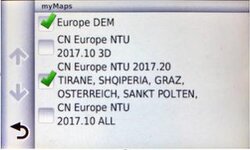
TBH....I'll leave that till the next update. I've spent far, far too much time playing around with this little fecker. I have now installed the map on the Mac also for use in Basecamp. I've had a look on the Garmin unit itself and the newest map file is dated 20 September (on the SD - can't find any map files on the units memory). So god knows what it was downloading all last night.....going to the unit and checking what maps are installed tell me that its the new .20 and the other shit has been tidied up (image is pre install last night).
So I've had enough for the moment and will look forward to the disaster of the next map update....
Attachments
godwyn1962
Registered user
An on going problem
I got a new 64GB card for my Navigator V, formatted it to FAT32 and transferred data from the original 8GB SD card that came with the unit and all was well, satnav and Basecamp worked well with the new card.
Then the fun started. Garmin Express wanted to install City Navigator Europe NT 2017.3 to my satnav but everytime I tried I got an "Incompatible Card" message.
I think the problem maybe with the card type. The original 8GB SD card that came with the unit is an HCI (2-32 GB capacity), my new 64GB card is XCI (32-2000 GB capacity). Garmin Express says SD cards up to 64GB are supported so it ought to work but I just keep getting "Incompatible Card" message.
Before I get a new 32GB HCI card I'll try Garmin support and a few other things like a hard reset of the unit. I'll post an update.
I got a new 64GB card for my Navigator V, formatted it to FAT32 and transferred data from the original 8GB SD card that came with the unit and all was well, satnav and Basecamp worked well with the new card.
Then the fun started. Garmin Express wanted to install City Navigator Europe NT 2017.3 to my satnav but everytime I tried I got an "Incompatible Card" message.
I think the problem maybe with the card type. The original 8GB SD card that came with the unit is an HCI (2-32 GB capacity), my new 64GB card is XCI (32-2000 GB capacity). Garmin Express says SD cards up to 64GB are supported so it ought to work but I just keep getting "Incompatible Card" message.
Before I get a new 32GB HCI card I'll try Garmin support and a few other things like a hard reset of the unit. I'll post an update.

I got a new 64GB card for my Navigator V, formatted it to FAT32 and transferred data from the original 8GB SD card that came with the unit and all was well, satnav and Basecamp worked well with the new card.
Then the fun started. Garmin Express wanted to install City Navigator Europe NT 2017.3 to my satnav but everytime I tried I got an "Incompatible Card" message.
I think the problem maybe with the card type. The original 8GB SD card that came with the unit is an HCI (2-32 GB capacity), my new 64GB card is XCI (32-2000 GB capacity). Garmin Express says SD cards up to 64GB are supported so it ought to work but I just keep getting "Incompatible Card" message.
Before I get a new 32GB HCI card I'll try Garmin support and a few other things like a hard reset of the unit. I'll post an update.
I did the same. bought a 32GB card, copied all the data from the supplied 8GB card to the laptop then copied that back to the 32GB card. Loaded it up and no issues (yet) im keeping my fingers crossed.

I may be wrong but isn't 32gb the biggest card you can use ?

I may be wrong but isn't 32gb the biggest card you can use ?
There is contrary advice on the internet.
BMW's own website seems to indicate 64gb, whilst Garmin's own site recommends 8gb. Meanwhile, there are reports on other websites (including UKGSer) of people using cards up to 32gb.
The best overall advice seems to be:
1. If you just want to run the maps and nothing else, 8gb is sufficient. I do this; it works, giving me enough space for the latest mapsets for the whole of Garmin's Europe maps and large chunks of Germany / France in Open Street Maps. More than sufficient for my needs as I do not use any music.
2. If you want more space, 32gb is the largest card to use.
In both instances, make sure the card is correctly formatted before use.
========================================================
As regards the rest of large chunks of this thread, I've just installed the latest maps to:
(A) My Mac and a Nav V simultaneously without a glitch, using the install to computer and device simultaneously option within Garmin Express. It apparently took six hours, so I just left it running overnight. However long it took, it was all done when I woke up.
(B) To a second Nav V only, again using Garmin Express. I didn't need to install them to my Mac, as they are already there. The process was estimated at taking 30 minutes. I didn't bother to watch but the maps are safely installed.
I shall be installing the same maps to a third Nav V and to a MacBook Air this evening, again using Garmin Express. Assuming that goes well, that will be three Navigator V's and two Mac computers updated with the latest maps, all without a glitch.
There are now so many secondhand Nav V devices floating around, many of which have at sometime in their lives been attached to PC's or Mac's and / or been used with different SD cards and / or been 'improved' by careful owners, it is all but impossible to tell why bods might be having problems. Add in that it is often impossible to tell quite how some people have their PC's and Mac's configured and what Garmin software (Garmin Express / Garmin Mapinstaller / Garmin Mapmanager) they might have installed or be using, it's getting very difficult to help them.
All I can say is that I have rarely if ever had a problem using my Garmin GPS devices, whether in the past on PC's or more recently using Mac's. I am far from an IT whiz, having no idea how to do anything more than just limiting myself to using Garmin software, attaching the devices and patiently following the instructions on how to proceed. If it takes two minutes or ten hours, I don't care. I just leave it to do its stuff. I use the most basic SD cards, no larger in size than is absolutely necessary.
If for some odd reason a card does not work just as it should or if Garmin's software for some unknown reason prompts me to change a card, I just do it. Cards are cheap; querying why a card that should work but suddenly doesn't is not worth the effort. Swap in a fresh card and normal service is resumed, though this happens so rarely I can't recall when I last had to do it.
Keeping things simple seems to work for me.

I've found that Macs version of FAT32 is different enough that it causes all of the issues you talk of, in the past I've taken customers units home, formatted their cards on my Windows 7 Pro laptop and they've been fine since then.
Yes the Nav 5 accepts 64gb cards but the updating software will not see them and needs max 32gb.
I tend to not be too much of a slave to map updates, hell my old Nav III is still on its 2009 map and is mostly ok with a bit of common sense
I've not had any experience with Macs, being an ex Windows Server engineer/admin. It does seem that Garmin have made life difficult for Mac users.
Yes the Nav 5 accepts 64gb cards but the updating software will not see them and needs max 32gb.
I tend to not be too much of a slave to map updates, hell my old Nav III is still on its 2009 map and is mostly ok with a bit of common sense
I've not had any experience with Macs, being an ex Windows Server engineer/admin. It does seem that Garmin have made life difficult for Mac users.

iand46
Registered user
I've used a Mac with my Garmin & SD card since 2011 without any issues
iand46
Registered user
64gb cards need extra software to convert them to the FAT32 format as they use the ExFAT format as standard. 32gb recommended to avoid any issues.
64gb cards need extra software to convert them to the FAT32 format as they use the ExFAT format as standard. 32gb recommended to avoid any issues.
I had to use ExFAT when formatting a 1TB extrernal drive, or whatever the thing is called, as some large files were to be transferred. Bods may well be struggling if they are trying to send very large music files across.
I don't know one end of a computer from another but these articles were easy enough to understand, even for a numpty like me.
http://www.howtogeek.com/73178/what-file-system-should-i-use-for-my-usb-drive/
http://www.howtogeek.com/235596/whats-the-difference-between-fat32-exfat-and-ntfs/
http://www.pcworld.com/article/3109...le-format-matters-fat32-vs-exfat-vs-ntfs.html
I've not had any experience with Macs, being an ex Windows Server engineer/admin. It does seem that Garmin have made life difficult for Mac users.
On the contrary, I think Garmin have made their products really good for Mac users, BaseCamp being a prime example. There again, there seems to be plenty of PC users who find BaseCamp OK, too... and plenty that do not.
I shall be installing the same maps to a third Nav V and to a MacBook Air this evening, again using Garmin Express. Assuming that goes well, that will be three Navigator V's and two Mac computers updated with the latest maps, all without a glitch.
All done, without any problems.
The only delay in the entire process is the slow finding of the GPS devices by the Mac's. Garmin made a software update available that was designed to fix the issue but I can't see that it ever made much difference. It's not so long a delay that I take out a rope to hang myself though.

Similar threads


