
App vs website

rjwojcik

Registered user
Joined
May 24, 2022
Messages
71
Reaction score
17
Location
Essex, England
Team

Any idea if there's a way to synch the info on the bike app to the motorrad website? I use the same email address to sign into both.

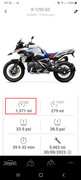
So on the app is shows a total of 1,371 miles:


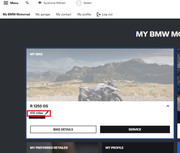
On the website it shows 414 miles:


:confused:

And those miles were because I updated it manually.

Many thanks in advance.
 
I have a feeling it only gets updated when its serviced by BMW and they add it to the system.....

Everyone goes on about being connected but most companies haven't got a clue what they are doing. I mean look at Amazon who hound you about buying something AFTER you have bought it.....
 
I have a feeling it only gets updated when its serviced by BMW and they add it to the system.....

Everyone goes on about being connected but most companies haven't got a clue what they are doing. I mean look at Amazon who hound you about buying something AFTER you have bought it.....

Thanks, so it looks like the dealer didn't update the mileage after it's running in service, maybe?

Since posting the above, I went on to the Motorrad website and fired off an email to them, the contents together with the screen shots being:


Good morning

Any ideas what I should do / check to enable details to be transferred from the app, onto to your servers and make this information available on the website?

On the attachment Motorad_001.jpg, it shows that I'm currently on 1,371 miles.

On the attachment Motorad_002.jpg, it shows the mileage as 414 miles. Surely this should show 1,371 miles?

I am signing into to both the app and website using the same BMW ID.

On the website ( https://support.bmw-motorrad.com/s/...age=en_GB&searchKey=motorrad website&hashtags ) it states:

What are the advantages of logging in with the BMW ID in the BMW Motorrad Connected App?
The BMW ID is your central login for all offers relating to the BMW, BMW Motorrad and MINI brands.
You can log in to the BMW Motorrad Connected app with your BMW ID. Your data is then securely synchronised with the BMW Motorrad servers. This includes your recorded rides, planned tours and favourites.
If you change your smartphone, all you need to do is log in to the BMW Motorrad Connected app with your BMW ID. Your data will be automatically restored - provided you have synchronised it beforehand.

Kind regards


I'll report back once I get a response.
 
I'll be interested in the answer also, as it looks like on the website, you have to enter the mileage regularly. Having said that, for some reason on the website it had my mileage down at 14K+ when I've "only" done 11.5K (so I've just corrected it). God knows where they got that 14k number from as I didn't enter it.
 
When you connect to bike, The data is transferred to the app.
When you open the app, it syncs to the web database.
If the rider isnt connecting to the bike, the data will be different.
 
When you connect to bike, The data is transferred to the app.
When you open the app, it syncs to the web database.
If the rider isnt connecting to the bike, the data will be different.

Well the app is connecting to the bike, as the mileage is correct and up to date on the app.

I do open the app to check the above. How can I check the synch to the web database is working and up to date?
 
Well the app is connecting to the bike, as the mileage is correct and up to date on the app.

I do open the app to check the above. How can I check the synch to the web database is working and up to date?

Open the app app on your phone, At the bottom you'll notice "Synchronising" It pops up for a couple of seconds whilst its checking data.
Ive just checked my app and it is correct. What I did notice though was in "My Garage" there were two vehicles. Somehow I'd registered two bikes, The same bike, But only one was connected with the bike, and the data on that bike was correct. The "other" , 2nd bike was not correct. So check in the website that you only have that bike connected to the app.
 
Open the app app on your phone, At the bottom you'll notice "Synchronising" It pops up for a couple of seconds whilst its checking data.
Ive just checked my app and it is correct. What I did notice though was in "My Garage" there were two vehicles. Somehow I'd registered two bikes, The same bike, But only one was connected with the bike, and the data on that bike was correct. The "other" , 2nd bike was not correct. So check in the website that you only have that bike connected to the app.

OK, get the synchronising message when I first open the app. I've also re-registerred my bike on the website using the chassis number on my paperwork, and that has now automatically replaced my bike and the mileage has now gone back to zero.

So, does your mileage synch across to the website?
 
OK, get the synchronising message when I first open the app. I've also re-registerred my bike on the website using the chassis number on my paperwork, and that has now automatically replaced my bike and the mileage has now gone back to zero.

So, does your mileage synch across to the website?

Yes. Milage is exactly what is on the app, from the bike.
 
Yes. Milage is exactly what is on the app, from the bike.

Thanks for confirming. I'll check the VIN number on the actual bike in the next couple of days, in case that's different to that written on the paper work that I have.
 
Thanks for confirming. I'll check the VIN number on the actual bike in the next couple of days, in case that's different to that written on the paper work that I have.

Let us know how you get on. You only have one bike in the app ? The second, or any other vehicles you have to add mileage manually.
 
Let us know how you get on. You only have one bike in the app ? The second, or any other vehicles you have to add mileage manually.

Yeap, only the one motorbike setup in the app, which pairs and retrieves the info from the bike every time I start the bike up.


Back
Top Bottom
